I also created a custom Access Control plugin with the same results.
Why are the doors / events not showing up in the Client?
I also created a custom Access Control plugin with the same results.
Why are the doors / events not showing up in the Client?
Can you please check if your user has enough role to do it? Or please use admin role user. One more thing, please use Live update filter or click an update button located next to search textbox in the Access Control tab in the Smart Client.
I was not setting up ACEvents / ACStates correctly
What I’m doing now:
When our Access Control System informs the plugin that a Valid Access (for example) has occured, I am creating a ACEvent
with the Event Type ID indicating the Valid Access ACEventType I added
in the ACConfigurationManager FetchConfigurationAsync
For a Door Opened, I am creating an ACEvent similar to Valid Access above AND im calling FireStatesChanged in the ACStateManager
I’m still not seeing any Events (or doors for that matter), in the Smart Client.
i only have one user (my local windows user)
my one user is part of the administrators group
i can search credential holders successfully
The search expression I enter into the search box, what is it matching against? For credential holders, since i overrode the Get… Search… methods, i know what it’s matching against. But ACEventManager does not have Get… Search… overrides, so it’s not apparent. And there is no ACDoorManager to even have Get… Search… methods to override.
Let us focus on one by one. Can you please test if you can see AC events using unmodified Access Control from our sample?
https://doc.developer.milestonesys.com/html/index.html?base=samples/acplugin.html&tree=tree_1.html
I recorded the tasks / results below
BUT FIRST
I have included the Event Server log files.
The last line says “Unable to handle EventOccurred event from access control system plugin. Event source not licensed. Demo Server: Demo System on localhost ([GUID HERE])”
What is the Event Source and how do I license it?
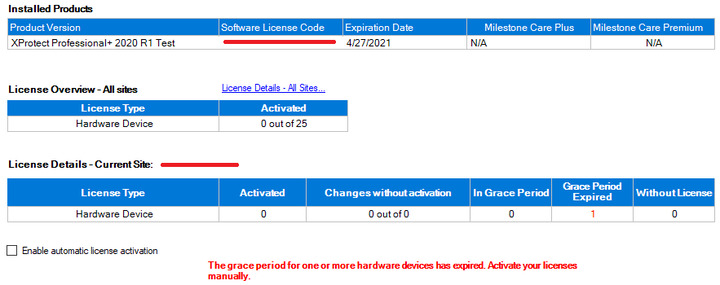
FYI, I am using a Test license (see License.png)
PER YOUR REQUEST
I followed the documentation you sent.
The only difference is that I am deploying the plugin to:
[C:\Program](file:C:/Program) Files\VideoOS\MIPPlugins\DemoAccessControlPlugin\
Instead of
… Milestone\XProtect Event Server\MIPPlugins\DemoAccessControlPlugin
TASKS / RESULTS
* Launched DemoACServerApplication
* Launch installed Management Server, Recording Server, Event Server
* Deploy plugin by copying acplugin.def and DemoAccessControlPlugin.dll to deploy directory (see above)
* Launch Management Client
* Create New Access Control (see Management Client.Demo Deployed.General Settings.png)
* Can see “Cardholders” and Set Picture in Management Client
* Launch Smart Client > Access Control (tab)
* Can see Cardholders (see Smart Client.Access Control.Card Holders.png)
* But no Doors (Smart Client.Access Control.Doors.png)
* Dragged Credential Holder 1 over Door 1 (see Demo Access Control System.Access Granted.png)
* But no Events in Smart Client
NOTE:
Apparently i can only add one file to this correspondence.
I included the License.png as it shows the type of license I’m using and the “… has expired” message I believe is causing the issue.
I’ll include the log files in a separate reply
Event Server Log Files attached
Access Control must be licensed, otherwise it should not work. Please ask for an extended license that you can use AC.
I am still not seeing doors and events in Smart Client.
I have gotten and applied the extended license.
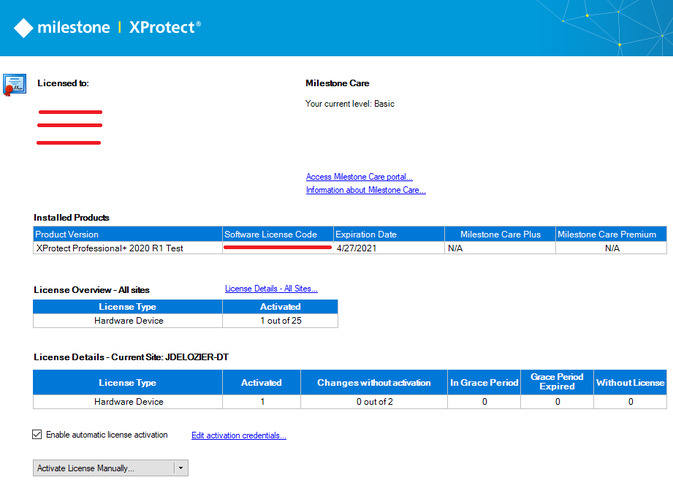
The license Information page now shows 1 out of 25 Hardware Devices licensed. The license details shows my PC name as the Current Site
In the C2020-06-11.log file, I’m still seeing the following message:
Unable to handle EventOccurred event from access control system plugin. Event source not licensed. Demo Server: Demo System on [PC NAME] ([GUID])
(Yes, i have restarted the services the requisite 3 times)
When adding Demo Access Control to the system via Management Client, it wants to use localhost as the Address property. I changed it to use [My PC Name] to match the Licensing page.
I’ll attach the log files to this correspondence. Although I have looked through them and don’t see anything that jumps out at me.
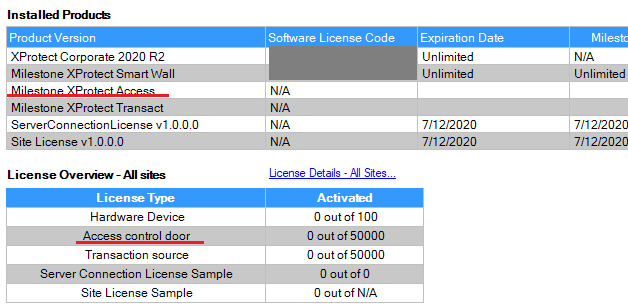
I am a bit suspecting that you are using the extended license, because when we looked at your license image that you sent, it did not say anything about AccessControl in the image. If your AC is available, you can see AC in your license such as -
For the clarification, can you please send an image of your license again?
No, my license does not mention Access Control.
The extended license they gave me last time, I believe, added a Hardware Device license, but no Access Control license.
I’ll contact sales again with a more specific description of my needs.
The Access Control is not licensed and in this case it will never work.
Please contact the Milestone Partner Team directly or create a Support Case on this. We cannot debug licensing on the Developer Forum directly because we will need the sensitive information to debug..
Another option that might work quicker is to use the License Chat, you find it on this page: https://www.milestonesys.com/support/
I was told I needed an extended license.
I got an extended license.
Then i was told I needed an Access Control license.
So, I got an Access Control license.
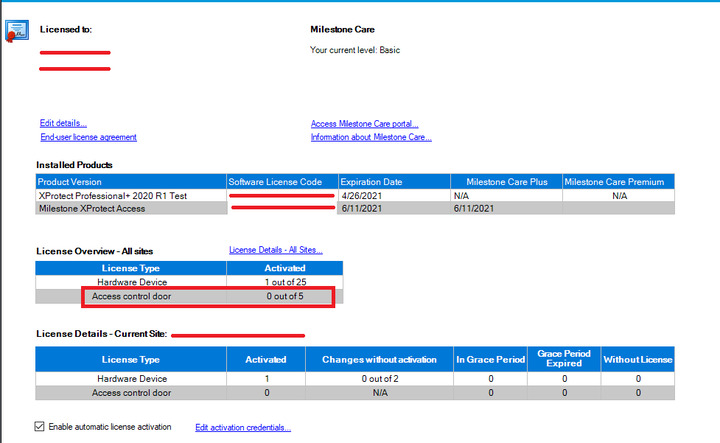
My license page is now showing under Installed Products, XProtect Access as being licensed.
But it also shows under License Details as having Access control door - Activated - 0
Is that lack of licensed doors causing me to still not see doors and events in Smart Client? Or do I have all the licensing I need, and the issue is now something else?
If I need more licensing, can you please tell me ALL the licensing I will need in-order to see doors and events in Smart Client?
I will contact the Milestone Partner Team, or Create a support case, or use License Chat … but I need to know the above so I know what to ask for.
You do not need more licensing, in the previous post you did, you will notice the difference in the two screen captures you have provided.
Can you confirm that license has been activated in the latter screen capture? Have you restarted the Event Server after activating the license?
OK, I am now seeing Doors and Events … thank you all for you help.
I had restarted the Event Server (and all the other services for that matter) before posting the previous post (I understand the law of reboot 3 times).
What i had to do was:
* Delete the Demo Access Control in Management Client and re-add it.
* And/Or delete my custom plugin (even though it was disabled).
If it was the latter, then something in my custom plugin is conflicting with the Demo plugin (I’ll double check the Id’s between the two, make sure their unique)
Either way, it’s working now, and i can proceed.
Thank you.