Hello.
I enabled realized with manual event and online schedule to method it connect or disconnect to camera .
But , I want to realize by the .net application it.
I know that i can do with smart client and Sample source “TriggerGenericEvent” “TriggerGenericEventStream” work by xprotect corporate.
I use “Xprotect Professional 2016 R2” , but can it be realized?
The TriggerGenericEvent should work while TriggerGenericEventStream will only work in XProtect Corporate. XProtect Professional will not start parsing the string until the TCP connection is closed, it is a requirement that the connection gets closed.
Note. A manual event is not a generic event. What is called User-defined events in Corporate is in Professional called manual event and can be triggered by the TriggerCommand.
>What is called User-defined events in Corporate is in Professional called manual event and can be triggered by the TriggerCommand.
Thank you, that’s useful information.
I will use TriggerCommand, but I don’t know fqid of User-defined event.
Please tell me to how to get fqid of User-defined event.
https://developer.milestonesys.com/s/question/0D50O00003EIrkVSAT/mip-sdk-2016-r2?t=1491349263933
Looking at it, it seems that Xprotect Professional 2016 R2 can not acquire the information of the event you defined.
Is it possible to issue an event by TriggerCommand even if event information can not be acquired?
Alarms are not manual or generic events, like manual events are not generic events. So take care not to confuse this.
The manual events can be easily triggered, and my guess is that this is what you need. Please run the ConfigAccessViaSDK sample, find the event and use the Trigger button. If it fits you can explore the code and you will know how to develop using the events.
Thank you very much.
I was able to execute the created manual event using ConfigAccessViaSDK which told me.
However, the event is not reflected in the camera.
When executing a manual event from SmartClient, the contents are described in the log of the recording server.
However, when executing the same manual event from ConfigAccessViaSDK, there was no description in the log of the recording server.
I use the same account on ConfigAccessViaSDK and SmartClient.
Is there something special about the creation or execution of the event?
Based on your observation and an experiment I did, the sample does not work correctly for this. TriggerCommand can often be used with an associated camera but here it should not be included. Please change the code in the sample like this -
private void buttonTrigger_Click(object sender, EventArgs e)
{
    Item item = dumpConfigurationUserControl1.GetSelectedItem();
    if (item == null)
    {
        MessageBox.Show("Select an item");
    } else
    {
        //var form = new VideoOS.Platform.UI.ItemPickerForm();
        //form.KindFilter = Kind.Camera;
        //form.Init();
        //if (form.ShowDialog() == DialogResult.OK)
        {
            EnvironmentManager.Instance.SendMessage(
                new VideoOS.Platform.Messaging.Message(
                    VideoOS.Platform.Messaging.MessageId.Control.TriggerCommand),  //, form.SelectedItem.FQID),
                item.FQID);
        }
    }
}
I have left the code as remarks so that you can see what to remove.
Please let me know if this works for you!
Trying the way you taught, the event worked correctly!
Thank you very much.
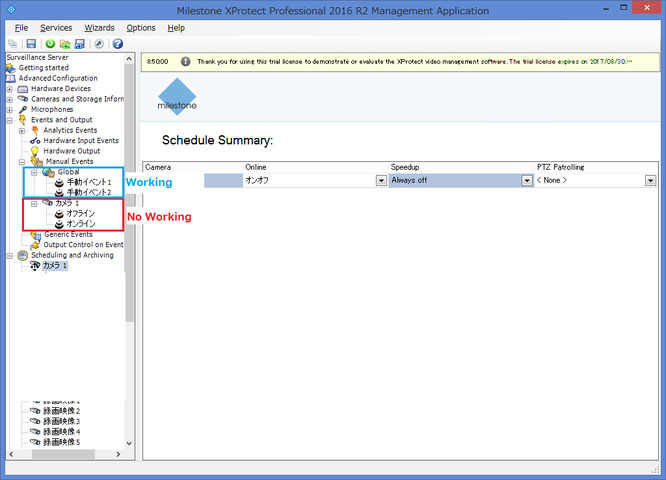
Although it is not important, there were events that did not work depending on the setting.
- Events created under Global will work correctly.
- Events created under the camera will not work.
Is this assumed behavior?