I have two cameras on a test server which just play a pre-recorded video on loop. The video does have lots of motion (cars going back and forth on a street).
Motion Detection is active for both.
Is there something else I need to look at like rules, alarm definitions etc?
Also, will SnapshotList be populated for such events or is there some other way I’ll need to use to get the images/video?
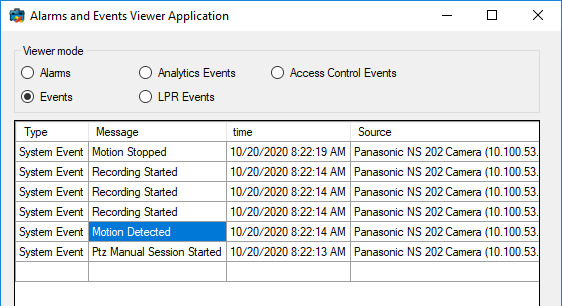
Setting up motion detection is not really a development question and it is important that you know that motion detection is correctly configured and working when you try to use it from MIP SDK code. You can verify that the event happens by using Alarm List in the Smart Client and configure it to show events instead of alarms.
Alternatively, you can use the AlarmEventViewer sample and see when the events occur.
Thanks very much for the reply @Rie Kiuchi (Milestone Systems) .
The problem as it seems to me now is that video extraction is not even supported in Event Server plugins and as Bo pointed out in his answer it doesn’t seem right to do it in the Smart or Management client either.
Can I call the recording server over HTTP from within the Event Server plugin and get the video from there? (async task)
I need to send the video/images to an external server along with the camera and site info. I suppose I can send all the needed info, credentials etc to the external server which can then pull the video from the recording server directly (showcased in the VideoViewer Component sample I think)…but I want to avoid that round trip for the sake of speed. What would you suggest?
Also, if one does go with the “external server pulls video from recording server” approach, how can I get the complete credentials needed to connect to the recording server from within the plugin? (The plugin can then send these credentials to the external server along with event timestamps etc, whereat the external server will pull the video)
Hi Usama. We have not implemented streaming support in the Event Server as this would consume extra resources (for decoding the video) and we don’t want to put this kind of load on the Event Server. So even though you might be able to access the Recording Server interfaces from the Event Server by writing your own code we strongly recommend not doing so.
Instead I would suggest moving your code to a separate service (could then be installed on same machine as Event Server or any other machine). In here you can listen to the same messages (including motion detection) and you can then use the different video source classes (which are available in the standalone environment) for retrieving the video. Credentials for logging in to the VMS would of course have to be provided to the service (e.g. during installation) and stored safely.
@Peter Posselt Vergmann (Milestone Systems) thanks very much for your explanation. It probably prevented me from making a bad architectural decision.
In regards to my follow up question, after having received an event on the Event Server is there a way I can send some auth credentials (host, port, username, password etc…maybe an auth token?) to the external service which it can then use to pull the video from the relevant recording server?
I’d also really appreciate it if you could please specify the HTTP endpoint(s) that the external service can use to hit the recording server and pull the video, where they are documented etc.