Using XPCorp SDK 2017 R3, Win7 x64, VisualStudio 2017 pro.
When I have an ImageViewerControl on a panel in a form, resizing the form ( which resizes the ImageViewerControl ) causes the ImageViewerControl to lock up the application (EDIT:- or the ImageViewerControl stops displaying the video footage - it freezes the image eventually, after more resizing of the form, the image viewer area is completely trashed ) . I’m currently trying to implement a workaround by stopping the playback, completely destroying the ImageViewerControl, resizing the panel, then creating/reconnecting the ImageViewerControl. I’m now starting to get a little lower level, into the WndProc as opposed to using the c# event handlers, as it seems that the c# sizing events are fired later than what the ImageViewerControl likes - ie clean up the control before ANY resizing even begins to occur.
Specifically the app will lock up when it gets to the ImageViewerControl.Close() method - what makes it worse is that it’s intermittent but will always lock at the same place when it does.
Is there a preferred ‘code path’ required for resizable ImageViewerControl(s)?
I would like to refer to the samples.
I tried if I could reproduce the issue with either PlaybackUser or PlaybackWpfUser samples (last one uses ImageViewerWpfControl might that work better for you?). In both cases I did a lot of resizing without any issue.
The crash on close does sound familiar, we have a hotfix I would like you to try..
Maybe issues you see on resize is fixed with that. Please give feedback on this.
https://developer.milestonesys.com/s/question/0D50O00003nehOaSAI/milestone-r3-imageviewercontrol-throws-nullreferenceexception-after-being-disposed
I think I’ve isolated the area of a potential bug, if you could confirm?
The nearest that I can get to reproduce the problem in your examples is using the VideoViewer2Playback example while playing back previous video. If you remove the Anchor settings for the panels - so that the viewers don’t actually resize when you maximize, minimize or resize the form - the video image gets corrupted, and will occasionally lock up.
In my app I’m controlling the resizing and positioning of the panels/viewers manually ( to keep all components lined up - the auto positioning using Anchors just isn’t working out ) which is causing a potentially bigger issue? stemming from this one.
The issue also shows up in the same example while viewing live too.
I cannot reproduce.
When the viewers do not resize I would expect less “trouble” than if they were resizing, at any rate it seems to work fine.
Do you see difference in behavior in the two viewers? Does the right hand control fail and the other work fine?
Its a shame that you can’t reproduce the issue there.
When the issue occurs both viewers have the issue at the same time.
The ‘on close’ issue only occurs after the viewers have ‘locked up’, during normal operation everything works perfect without error.
In my app I use the PlaybackUserControl and after/if the viewers have locked up then the control continues to move and the audio is still playing.
From that fact it would maybe be a closer to reproduce the issue with the “PlaybackUser” sample. I cannot reproduce it. Can you reproduce it with that sample?
Can you show me a screen capture what it looks like when “trashed”?
Can you show me a screen capture with dagnostic overlay?
Yes certainly.
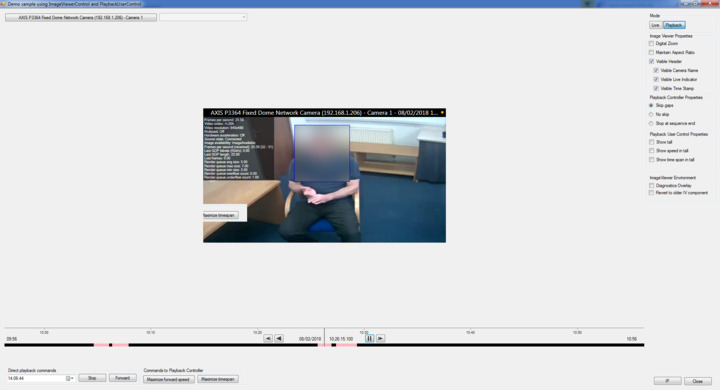
This pic is of another test we were conducting this morning. I’ve blurred out the person face for privacy. While the app was running I hit the maximise button and the video playback froze. Initially in the pic it’s difficult to tell that this has happened but if you look to the lower left of the image you can see remnants of the ‘Maximize timespan’ button is still in the image.
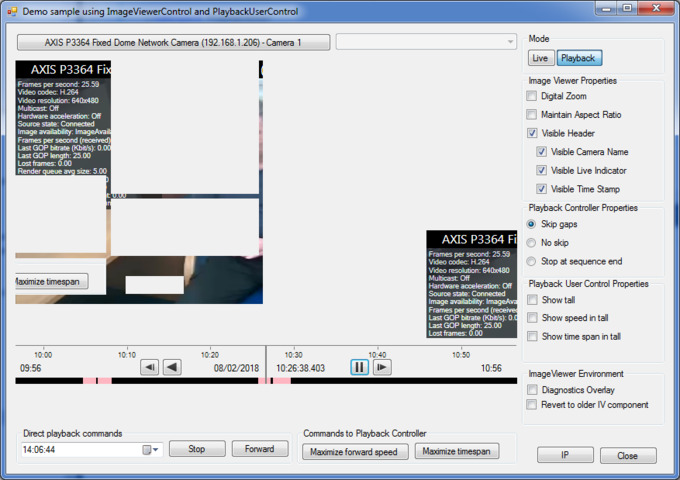
This pic is the exact same pic taken after the first pic first. I hit the minimise button and the result in the video player panel is seen in the pic. Sometimes this result can happen on the first time that you resize. Sometimes there is no error at all and the video will play correctly.
After the errors begin in the player, the UI thread seems to lock up. If it doesn’t lock up immediately then using any user controls eventually causes the app to lock forcing use the Task Manager to close the app, or ( in the dev env ) to stop the app via Visual Studio debug control.
Hi Bo,
I’ll be out of office until 26/02/18.
Still unable to reproduce. Try to run the sample you build in another PC, preferably very different, it would give an indication whether the issue is in what you build or is in where you try to run it.
(Hope you are enjoying a nice vacation. If and when you update this forum thread I trust I will pick it up.)
Hiya Bo,
The vacation was great thank you. Returned to some snow here in the UK and -5c… a far difference from the average 32c in Bali !!
On topic…
I managed to isolate the problem to an issue with our deployment process, so this issue can be considered resolved.
Thank you for your help and input.