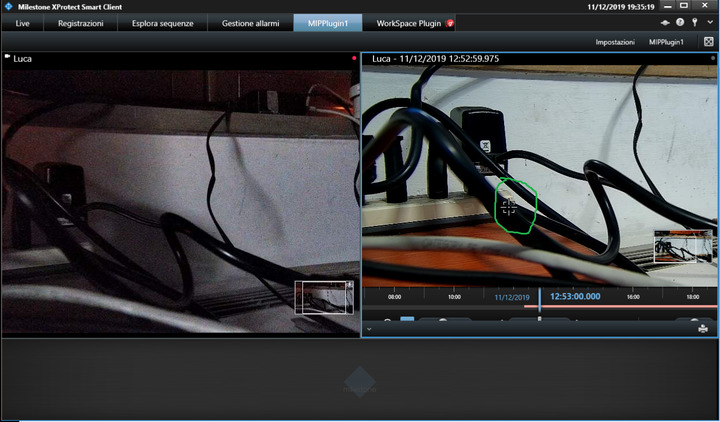
I’m using ImageViewerWpfControl as indipendent playback in a worspacePlugin.
And i’ve
imageViewerControl.EnableDigitalZoom = true;
_imageViewerControl.EnableMouseControlledPtz = true;
_imageViewerControl.EnableMousePtzEmbeddedHandler = true;
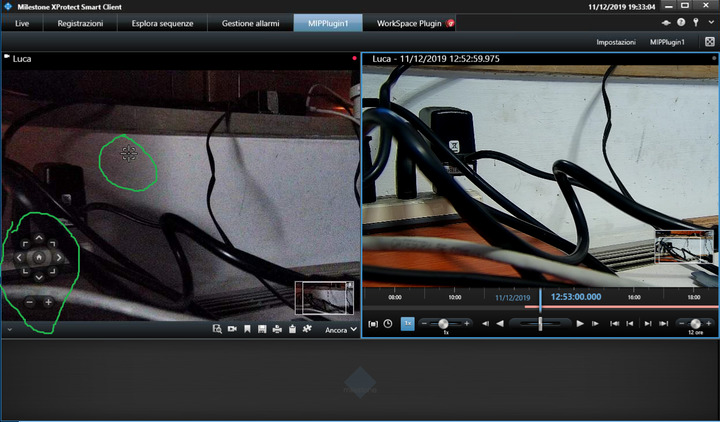
I can use the mouse to zoom and other ptz functions using the mouse (mouse wheel, drag and drop rectangle), but i cant see the ptz buttons that normally i see in the client playback panels(for example the plus/minus buttons for zooming) when the mouse is over the camera.
Moreover:
i put in my workspace plugin an imageViewer with an indipendent playback and a ViewAndLayoutItem.CameraBuiltinId with the same camera in live mode.
The camera is not PTZ then, for example, the ptz zoom command is a simple digital zoom.
In the builtin live if i use the digital zoom button then i can see that the playback panel is zoomed the same as the live . But if in the builtin live camera i use the mouse wheel to zoom only the live camera is zoomed and not the playback.
Best Regards.