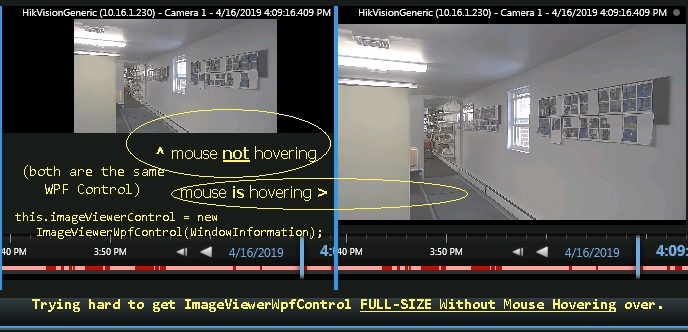
myViewItemWpfUserControl has ONE
this.imgViewerCtrl = new ImageViewerWpfControl(WindowInformation);
The problem is: my imgViewerCtrl is TOO-SMALL until I hover over it with the mouse. When hovering over it, it then grows to the size I want it to be. I would like it to be large without having to hover over it with the mouse.
(I did spend several hours on this.) How is this done?
Hi. We found a sample “Smart Client Independent Playback” (Home > Plug-in Integration > Samples Index > Smart Client IndependentPlayback) and tested with this sample, and we couldn’t reproduce this behavior.
Could you please try with this sample.
Also our guess is that the following code should be there. It is from the sample:
        \_imageViewerControl = new ImageViewerWpfControl(WindowInformation);

        \_imageViewerControl.VerticalAlignment = System.Windows.VerticalAlignment.Stretch;

        \_imageViewerControl.HorizontalAlignment = System.Windows.HorizontalAlignment.Stretch;