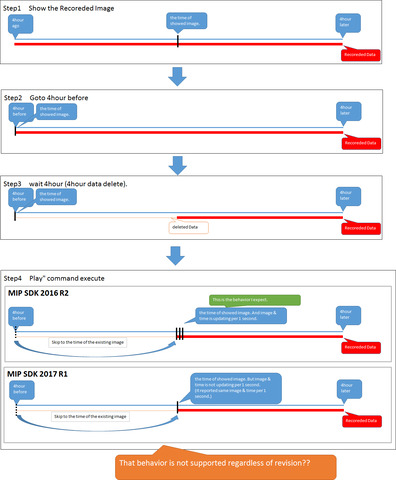
I use ImageViewerControl to develop applications with playback functions.
However, the playback command does not operate normally under the following conditions.
1. Use the Goto command to display the oldest video
2. Delete 4 hour’s worth of data including 1 video on the server side
3. Execute the following Play command
In 3, we were able to acquire 4 hours later video and time from the video displayed in 1 as expected. However, I was expecting that the next video and time will be notified after 1 second, but only the same time will be notified.
It did not occur in MIP SDK 2016 R2.
I have not tried MIP SDK 2016 R3.
· Goto command
           EnvironmentManager.Instance.SendMessage (new VideoOS.Platform.Messaging.Message (

                                                        MessageId.SmartClient.PlaybackCommand,

                                                        New PlaybackCommandData () {Command = PlaybackData.Goto, DateTime = date}), (FQID) fqid);
Play command
            EnvironmentManager.Instance.SendMessage (new VideoOS.Platform.Messaging.Message (

                                            MessageId.SmartClient.PlaybackCommand,

                                            New PlaybackCommandData () {Command = PlaybackData.Play}), (FQID) fqid);
· Video time acquisition event
RecordedImageReceivedEvent
A Milestone VMS does not support that you “delete 4 hours of data”. Unless you mean you reconfigure the retention of the video.
I am thinking that I possibly have misunderstood. Can you explain what you do (in which version and using which Milestone application).
Sorry, I delayed response.
Is it means that it does not support behavior when Xprotect deletes that data while I play data?
XProtect does not support playing back deleted data.
So if I understand the situation: You use goto to take you to the first footage, waits four hours where the four hours of footage then gets deleted, when you then playforward the playback will skip 4 hours ahead (might depend on VideoOS.Platform.Client.PlaybackController.SkipGaps).
This is expected behaviour.
Note; the deletion of data is done by the recording server based on retention setting, you cannot “influence” when the actual deletion, which is performed by the recording server, is performed.
I showed what I want to hear in the diagram.
Do you understand?
Is it right?
I would expect the same behaviour in 2016r2 and 2017r1 versions.
Before going deeper; does it make a difference if you set SkipMode? The PlaybackUser sample has a set of radio buttons that you can test this. (Can you reproduce it with that sample and does skip mode make a difference?)
This is part of Source Code of my application .It was already setting to SkipMode.
So, It make a difference when it was SkipMode.
-------------------------------------------------------------------------------------------------
    \_fqid = ClientControl.Instance.GeneratePlaybackController();

    this.\_imageViewerControl.PlaybackControllerFQID = \_fqid;

    EnvironmentManager.Instance.SendMessage(new VideoOS.Platform.Messaging.Message(

                    MessageId.SmartClient.PlaybackSkipModeCommand, PlaybackSkipModeData.Skip),

                    \_fqid);
I confirmed to reproduce with the following three sample programs.
1. MIP SDK 2016 R2 - Video Viewer 2 Playback
2. MIP SDK 2017 R1 - VideoViewer2Playback
3. MIP SDK 2017 R1 - PlaybackUser
As a result, only Sample 1 skipped the part without data when in SKIP mode.
The operation of sample 2 and sample 3 did not change in Noskip mode and SKP mode.
Thank you for reporting this, after you used the ilustration I finally understood so thank you for your patience.
We will make a deeper investigation in a Milestone test lab.
Quick question -
You mention the MIP SDK version. Please tell me the XProtect product and version of your test server.
Xprotect product and version is Xprotect Professional 2016 R2.
test server also same.
We have difficulty in reprodcuing the issue. Can you share the recording settings you are using? Is the cameras recording on motion?
Yes,
It is set to record always, motion detection is not set.
Following the last post on this thread Milestone Technical Support had a chance to do deeper debugging and this revealed a bug. The bug will formally by fixed in MIP SDK 2017R3 later this year.