Hi,
When I am sending camera through SDK to milestone client, it shows well, but when I send camera by milestone software, it’s clear my SDK send camera. How I can keep my camera until I will not clear it.
Hi,
When I am sending camera through SDK to milestone client, it shows well, but when I send camera by milestone software, it’s clear my SDK send camera. How I can keep my camera until I will not clear it.
I am sorry I cannot follow, please elaborate. What are you doing and what are you observing? Perhaps you can add a few pictures showing what you are doign in the two scenarios. Perhaps in the scenario where you use the SDK you can supply a snippet of code to show the methods used.
I developed custom application where I am using milestone SDK to send camera on Smart Wall for example Tile Number 1 and camera is display fine.
But other user using Smart Client application and he select the camera and send on same Smart Wall but he send on other Tile for example Tile Number 2, But after that automatically Tile Number 1 camera has gone.
I wonder if it makes a difference what your Preset behavior is; Empty preset- Clear or Preserve. Element insertion- Linked or Independent.
I have tried if I could reproduce, I was unsuccessful. I am doing a lot of guessing while trying to reproduce. Maybe if you document every step I can try to reproduce.
Dear Andersen,
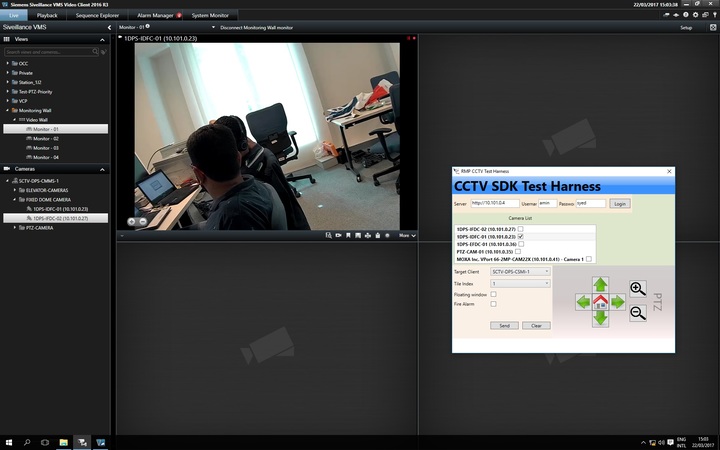
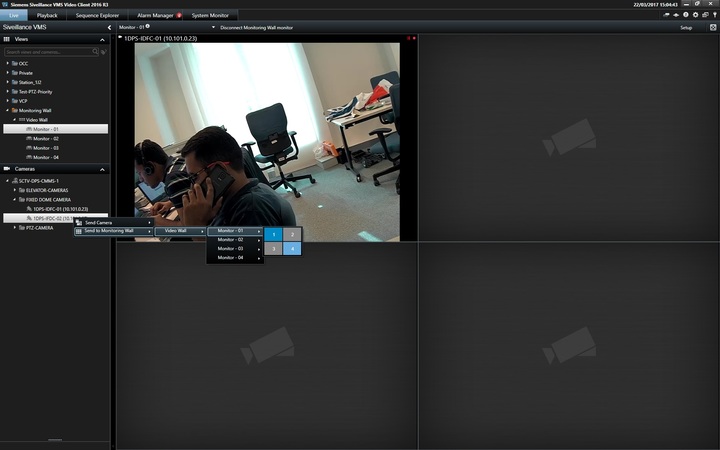
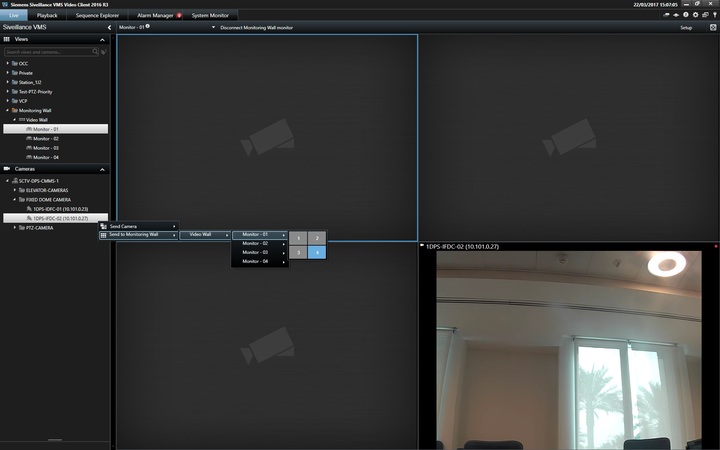
Kindly find attached screen snap.
- Send Camera By SDK on Pane 1 [01 - (1st Scenario) Send By SDK on Pane 1.jpg]
- Before send Camera [02 - (1st Scenario) Before Send Camera on Pane 4 By Video Client.jpg]
- Select Camera through Video client and send to Monitor - 01 on Pane 4 [03 - (1st Scenario) Send Camera on Pane 4 By Video Client.jpg]
- Send Camera on Pane 4 By Video Client then Pane 1 video has gone
Thanks
Please tell me, preferably using a snippet of your source code, what does your application do?
Might it be something like -
EnvironmentManager.Instance.SendMessage(new Message(MessageId.SmartClient.SetCameraInViewCommand, new SetCameraInViewCommandData()
Hi,
Here is my code.
    **private void Show\_Cameras(ViewCameraRequestMessage requestMessageData, int CameraIndex)**

    **{**

        **//FQID cameraFQID = requestMessageData.CameraFQID; // If not List of Cameras**

        **FQID mCameraFQID = requestMessageData.CameraList\[0\];**

        **ClientControl.Instance.CallOnUiThread(**

        **() =>**

                **EnvironmentManager.Instance.SendMessage(new Message(MessageId.SmartClient.SetCameraInViewCommand, new SetCameraInViewCommandData()**

                **{**

                    **Index = CameraIndex,**

                    **CameraFQID = mCameraFQID,**

                    **StreamId = requestMessageData.StreamId**

                **}))**

        **);**

    **}**
This is by design and working as it is supposed to. If you change a view like you do with SetCameraInViewCommand, the view is changed and is then updated everywhere also on the Smart Wall using the view.
The Smart Client uses another method when updating Smart Wall rather than doing an overall view change.
For now the Smart Client method for updating Smart Wall is not available to the MIP plugins.
Interestingly this functionality is in the pipeline, in next versions of XProtect Corporate and MIP SDK there will be new MIP methods to control the Smart Wall. XProtect Corporate 2017R2 and MIP SDK 2017R2 is planned to be released this summer.
Hi Andersen,
So is there any other way for my scenario ? means any other command can we use to solove our problem.
Unless you can configure user defined events and rules and use this as a workaround (which is not flexible and might come up short).
I believe the new enhanced functionality in 2017R2 is the answer but there is a wait before it is released and your systems would need to be upgraded.