Invalid URI, Unauthorized

Hi,

using SDK 2023 R2

The code below is called in the component integration project.

  1. code snippet one

HardwareDriverSettings hws1 = hw.HardwareDriverSettingsFolder.HardwareDriverSettings.FirstOrDefault();

if (hws1 != null)

{

HardwareDriverSettingsChildItem hsci1 = hws1.HardwareDriverSettingsChildItems.FirstOrDefault();

if (hsci1 != null)

{

String propKey1 = null;

propKey1 = hsci1.GetPropertyKeys().FirstOrDefault(x => x.ToUpper().Contains("MACADDRESS"));

if (propKey1 != null)

{

}

}

Randomly, we get the below exception.

GET Unexpected statuscode Unauthorized in ‘http://v2.demo.va25.com/API/rest/v1/hardware/992d0cea-f8eb-4e8f-b3d0-0c6f84549be7?definitions&tasks&resources

  1. code snippet two

Camera primcam = new Camera(primcamfqid);

Hardware PrimHw = new Hardware(primcam.ServerId, primcam.ParentItemPath);

AXIS P3807-PVE Network Camera (192.168.0.128) Invalid URI: The format of the URI could not be determined.

Is there any known issue with SDK?

Any hotfix available?

Thanks,

Vikas

Please only ask one question in each thread, it will enhance the usability and searchability of the forum if we all do.

I cannot reproduce. Are you able to reproduce this in a second test server?

if (sites.Count != 0) //if federeted

ManagementServer ChildManagementServer = new ManagementServer(sites[0].FQID);//read first child

//print serverID

11-12-2023 21:06:28.754 - Id: efad63e5-b62d-46c9-9bd0-755ade0c3539 Uri: http://v22.demo.vega25.com.80

11-12-2023 21:06:28.788 - exception - Invalid URI: The format of the URI could not be determined.

Sorry, too cryptic for me. Please elaborate and explain the setup. Please also include more code, if I do not know what object ‘sites’ is I will probably get it wrong if I try to guess.

Randomly @ line no 5 gives an exception - Invalid URI: The format of the URI could not be determined.

SelectedSiteItem - current site Item 
 Item MasterSite = EnvironmentManager.Instance.GetSiteItem(SelectedSiteItem.FQID);
 List<Item> sites = MasterSite.GetChildren();
 if (sites.Count > 0)
	ManagementServer siteManagementServer = new ManagementServer(sites[0].FQID);

I notice in your older post..

//print serverID

11-12-2023 21:06:28.754 - Id: efad63e5-b62d-46c9-9bd0-755ade0c3539 Uri: http://v22.demo.vega25.com.80

This is of course a problem. Can you please start by checking whether you in the setup have mistakenly replaced ‘:’ with ‘.’?

http://v22.demo.vega25.com.80 instead of http://v22.demo.vega25.com:80 ?

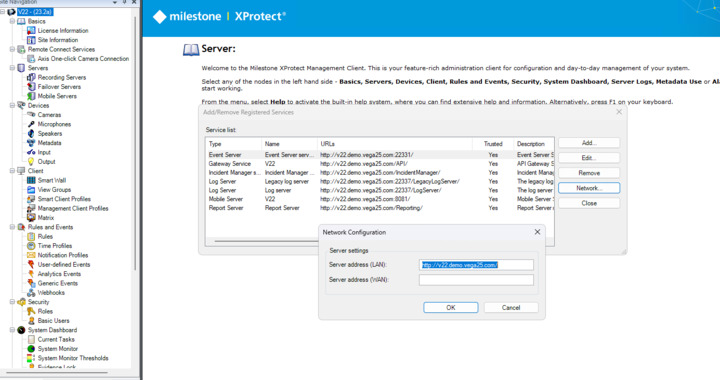
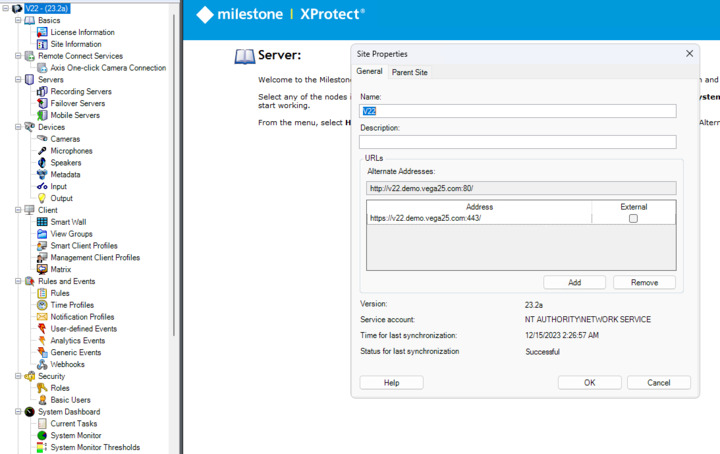
My guess is there could be a mistake in Site properties. (In Management Client left hand pane you have in the top the ‘site’, right click and pick Properties. In the Site Properties dialog, inspect all URLs.

Or there could be a mistake in Registered services. (In Management Client top bar, Tools → Registered Services.., inspect the addresses. Also click the Network button and inspect the settings.)

We check, and looks like all URLs are proper.

In the previous post, you said “Randomly @ line no 5 gives an exception” - this means that you get the error but not always, and the code works fine sometimes.

Can you please check if all the Milestone services work fine and stable when you run the code?

Also, can you please check if there are any exceptions or errors in Milestone logs ([C:\ProgramData\Milestone\XProtect](file:C:/ProgramData/Milestone/XProtect) Management Server)?

Hi,

1.Set the following property in the start of your code: Configuration.Instance.ConfigurationApiManager.UseRestApiWhenAvailable = false;

This will change the functionality of the SDK to use the configAPI for communication, which doesn’t have this issue. We have no plans of deprecating the config API, but some new features may only work through the REST API. So once the bug has been fixed, I suggest that you remove this line.

After setting the above line, we do not face any issues.
Thanks,

Vega