I saw that I can add a camera to a smart wall via the api, but it seems that smart walls are a “global” thing and i want it to show only for a specific user.
Thanks!!!
I saw that I can add a camera to a smart wall via the api, but it seems that smart walls are a “global” thing and i want it to show only for a specific user.
Thanks!!!
I don’t agree that Smart Walls are a global thing. Allow me to explain. You can configure Roles in the Management Client and specify whether members of the Role have access to see a Smart Wall.
While you manage access for the Roles to Smart Walls and ViewGroups, if you want a different setup for each User you will have to create a Role for each User.
The Private ViewGroup that each user have (if the setup allows) and can see and configure in the Smart Client is only accessible for that user, and it is with the current functionality not possible for an Admin user to see or manage the private group for another user. This is so no matter if you are using the regular clients, the Configuration API, or the Rest API.
This might not answer what is the best way to do it.
This would be the sample to look at if using Smart Walls..
This would be a sample to look at if making temporary views..
Thanks!
I see now that i can setup a smartwall for a specific user, if i define a role for each user in the management app.
Now the question is can I do it via the api?
That is, if i have a role id and a smartwall id, how can define permissions for that smartwall for that role?
My user base is very dynamic and i cannot setup this ahead of time.
Yes, you can.
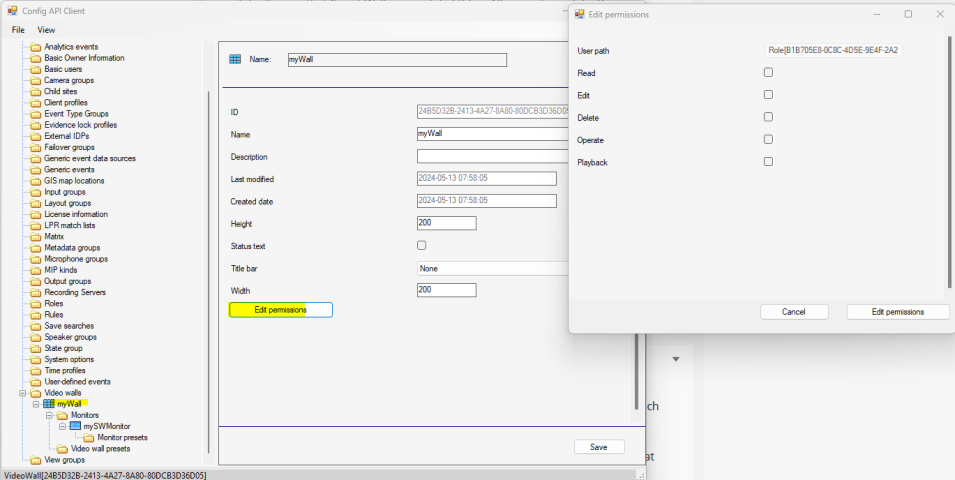
Let me first illustrate this using the Config API Client sample.
If you pick the video wall, you can then do “Edit permissions”, and pick the role, and edit..
You can do the same in the strongly typed classes (ConfigurationItems), there is a VideoOS.Platform.ConfigurationItems.VideoWall.ChangeSecurityPermissions ..I generally recommend using the ConfigAPIClient sample to figure out if it can be done and the elements involved but then use ConfigurationItems.
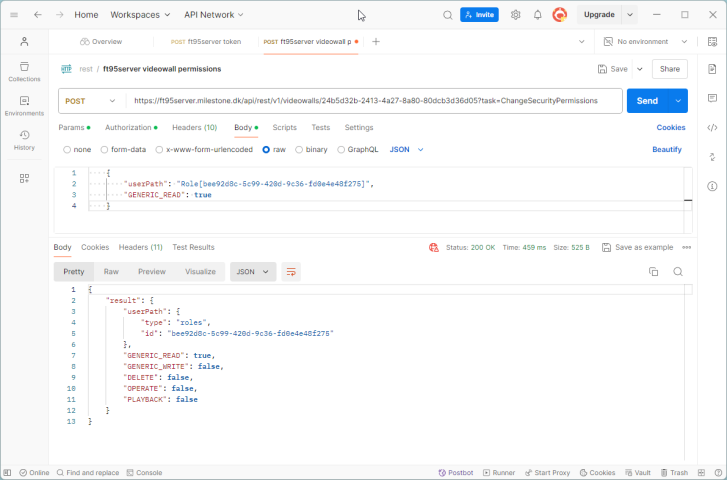
You can do the same in the Rest API.
Thanks! That is very helpful.
Though it’s still unclear how to use some methods, such as ChangeSecurityPermissions. In the .net sample I see that properties such as “GENERIC_READ” are being sent to the method invocation.
How can i send these properties via the rest api?
I need to edit permission of a videowall for a specific role.
Answering to myself,
apparently it’s as simple as adding the property to the body of the request:
{
“userPath” “…”,
“GENERIC_READ”: true
}