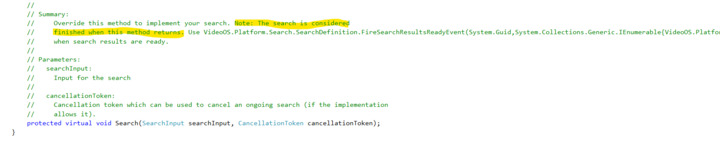
I am developing Search Agent pluing which loads 50,000 + events as search result on a single search request.
These 50,000+ search results will be loaded on custom SearchResultUserControl which has my own image thumbnails.
Currently, I am fetching all the 60,000+ records including image thumbnails inside the Search Method and invoking “FireSearchResultsReadyEvent”.
My question is: Is there any possible way to lazy load the Search Result, when user scroll down on a search result, I can get any notification or event to query for the next chunk of event data and pass on result to “FireSearchResultsReadyEvent”?
OR
If lazy loading is not possible,
I am using TransmitMessage to pass event data (60,000+) from Server Plugin to Smart Client, which is causing delay in transfer of data from server plugin to smart client ( 4-5 minutes).
Can you suggest some efficient way to transfer bulk data from server plugin to smart client?
From documentation of the SearchDefinition class → Search Method, it says that "Note: The search is considered finished when this method returns."
Hi @Parth Modh
I am not entirely sure if I understand the problem correctly, but let me try to answer anyway.
SearchResultData is the data object representing a search result. These are the results that are placed into the ItemCollection of the list showing the search results. This list is using UI virtualization, which means it only loads UI elements (i.e. SearchResultUserControl) for the visible elements. For performance reasons, it also attempts to reuse these UI elements by replacing the underlying DataContext.
The FireSearchResultsReadyEvent simply tells the Smart Client that new data objects are available and they should be merged into the current list of data objects. This may or may not affect the UI (SearchResultUserControl instances) depending on whether the new items are within the visible region or not.
You can override the Init(SearchResultData) on your custom SearchResultUserControl, and utilize that to perform whatever you need to “query for the next chunk of data”. This method will be invoked when the result is “scrolled into view” and I think that is what you’re asking for? You can use this to load the thumbnails on demand instead of up front.
Regarding "Can you suggest some efficient way to transfer bulk data from server plugin to smart client?"
I am not sure completely follow what and where this is used. You mention that you pull 60,000+ records from your database. My assumption is that these are then converted into SearchResultData objects representing search results. This question then relates to “event data”, is that the same records we’re talking about? If so, and if this is what is taking a long time, I suggest you split that into multiple “paged” calls to your server-side, and then call FireSearchResultsReadyEvent with each chunk/page. You can invoke this method as many times as you want (for as long as the Search() method is running). Basically you should block the Search() method while spinning up a number of background tasks to fetch the data. Having multiple tasks/threads fetching smaller chunks in parallel should get you quicker response times (depending on your server-side implementation of course). Once all tasks/threads finish you unblock the Search() method and let it run to completion. I hope that makes sense.
/Nicolai
Thank you Nicolai
Your understanding is correct.
You can override the Init(SearchResultData) on your custom SearchResultUserControl, and utilize that to perform whatever you need to “query for the next chunk of data”.
-—>
Init(SearchResultData) is called for each record that is “scrolled into view”.
If query next chunk of data, how can I pass that to "FireSearchResultsReadyEvent " as Search method is already ended at this point of time?
-----------
I suggest you split that into multiple “paged” calls to your server-side, and then call FireSearchResultsReadyEvent with each chunk/page.
-—>
I am already passing data (including thumbnail) in “pages” (using TransmitMessage method multiple times) and calling FireSearchResultsReadyEvent for each page.
Can you guide what should be the recommended page/data size for each TransmitMessage OR any other way to transmit data such large amount of data efficiently from Server Plugin to Smart Client Search Agent?
Hi Parth
> If query next chunk of data, how can I pass that to "FireSearchResultsReadyEvent " as Search method is already ended at this point of time?
Well, I don’t think you should. Why should a search result being “scrolled into view” cause new search results to be fetched? The idea is that the SearchDefinition.Search() method busy-waits until it has called FireSearchResultsReadyEvent for ALL records, so there isn’t any more data (i.e. search results) to load. I was assuming you want to load some additional data related to a given search result (e.g. thumbnail, metadata, etc.). That part you could avoid taking the cost up-front if you wanted to, and just do it in the Init(SearchResult) method. I am not sure I understand your intention here…
> Can you guide what should be the recommended page/data size for each TransmitMessage
I don’t think I can give any “general recommendations” here. It very much depends on what your desired result is. If you want to avoid a UI that “looks like it is hanging”, then you probably want a relatively small chunks, but you also incur the “combining search results” cost when doing this, so there is definitely a trade off.
It also very much depends on your server-side implementation. Does that return a big chunk of (paged) data? Can it stream the results? Things like that. I think your best bet is to expose some settings for your plugin such that this is somewhat configurable and you can play around with it to find some values that seem appropriate. I’m sorry I cannot give you better advice.