Hi there,
I have a plugin that opens a Floating Window, using MultiWindowCommand and there I set up the X and Y where this Window opens.
What I want to do is, if and when the user moves that Window, I’d like to retrieve that new position and set it as the new opening position.
Essentially I want the Floating Window to always open on last position, but I can’t seem to find anyway of retrieving Windows positions.
Any help?
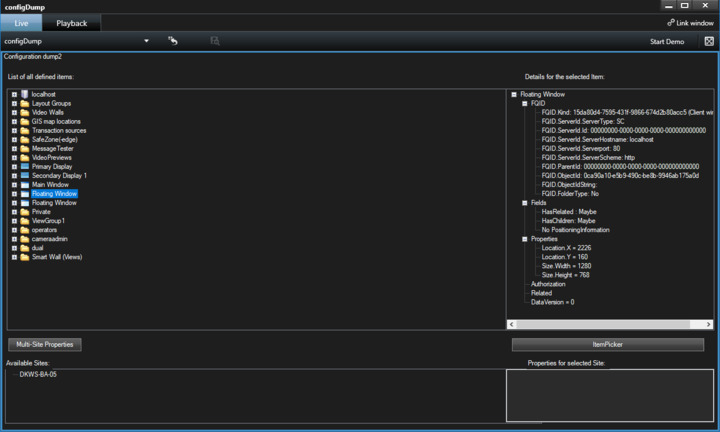
You can get the position of all by reading the properties for the floating window item. If you use the ConfigDump tool plugin sample it look like this:
https://doc.developer.milestonesys.com/html/index.html?base=samples/configurationdump_sample.html&tree=tree_1.html
For getting the floating window you might utilize:
List<Item> windows = Configuration.Instance.GetItemsByKind(Kind.Window);
or if you know the Id of the floating window:
Item window = Configuration.Instance.GetItem(floatingWindowObjectId, Kind.Window);
Hello,
When I close the floating window is some message sent inside the system? I tried
EnvironmentManager.Instance.RegisterReceiver(SetWindowLocation, new MessageIdFilter(MessageId.SmartClient.MultiWindowCommand));
But this only responds when the message to pop-up the window is sent and not when I close it (using the X button on the window)
I was trying to obtain the window coordinates right before the floating window was closed, so I can save them for the next pop-up.
I experimented with this listening to the event with the Message Tester tools plugin sample and I found that this works:
MessageTester- changed the MessageTesterUserControl like this -
private delegate object MessageReceiverDelegate(VideoOS.Platform.Messaging.Message message, FQID dest, FQID sender);

private object messageReceiver(VideoOS.Platform.Messaging.Message message, FQID dest, FQID sender)
{
	if (InvokeRequired)
	{
		return Invoke( new MessageReceiverDelegate( messageReceiver ), new object[] {message, dest, sender} );
	}
	else
	{
		String extra = "";
		if (message.Data != null)
		{
			extra = message.Data.ToString();
		}
		if (sender != null)
		{
			extra += ", sender=" + sender.ObjectId;
			if (message.MessageId == "SmartClient.SelectedViewChangedIndication")
			{
				var ws = Configuration.Instance.GetItemsByKind(Kind.Window);
				Item w = ws.Find(x => x.FQID.ObjectId == sender.ObjectId);
				string strx;
				if (w.Properties.TryGetValue("Location.X", out strx)) extra += " X= " + strx;
			}
		}
		int ix = listBoxTrace.Items.Add(message.MessageId + "  " + extra);
		listBoxTrace.SetSelected(ix, true);
		listBoxTrace.SetSelected(ix, false);
		return null;
	}
}
Hi Bo,
Thank you for your help and sorry for the late reply, got caught up in other things.
I tried what you suggested and it works fine when the floating window pops up but not when it is closed or moved.
When the Floating Window pops up I can retrieve it’s location with no struggle. But that doesn’t fit what I need to have, which is the last known position ( so I can save that and tell the Floating Window to open on that position next time).
What happens when I close the Floating Window is this piece of code explodes since there are no windows opened.
var ws =  Configuration.Instance.GetItemsByKind(Kind.Window);
Item w = ws.Find(x => x.FQID.ObjectId == sender.ObjectId); <--- explodes here
Any ideas on this? Isn’t there any event raised when floating windows are closed?
I believe there is an event when the window is closed, but this points to a closed windows object which explains the “exploding”.
I am unsure if you can get closer but my suggestion is to set a breakpoint and explore in depth the event you see.
https://developer.milestonesys.com/s/article/debugging-techniques-for-Smart-Client-plugins