I’m tempted to used the search functionality with our own filters. However, while trying to see how the sample works I’ve been unable to get it working. I only get these two. If I’m not wrong, I should see the PersonWithAccessory and the Animal filters which are not appearing. I’ve just downloaded it from the repo and placed it into the corresponding folder.
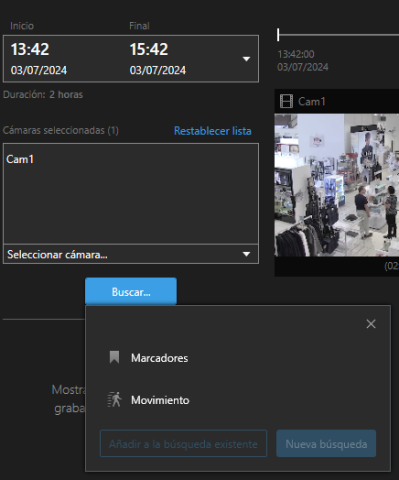
Have you restarted the Smart Client after deploying the sample? I just tested on my machine and it shows up without any problems.
Please check the Smart Client About box and see whether the sample is listed there. If not please check the MIP log files for the Smart Client (in ProgramData) and see if the plugin is mentioned there.
Yes, I’ve restarted multiple times. The sample is indeed listed in the about box but there’s nothing related to it in the smart client. I don’t really know how to access those logs, so if you can tell me where the files are I’ll check them.
To make sure everything is stated, I’m working with Milestone 2022 R3 which maybe is the cause of this?
Oh. There has been made some changes to the APIs, so it is likely that the reason it is not shown is due to some added API functionality being used by the plugin. Could you please try download 2024 R1 Smart Client and try with that one? Should be possible to still use same VMS version.
I’m aware that some third party products have been able to use this feature and have been able to insert plugins of this kind in the version I’m working in. I guess then that there’s indeed a way to make it work. Could you check this?
Yes, if you only use the methods, properties and classes available in that version it will surely work, but if you take the latest version of the sample it will be using some of the APIs that has changed and will thus not work. You can either check the release notes on https://doc.developer.milestonesys.com/html/ for what has changed or you can try replace the VideoOS.Platform.dll you are linking with to the one from Smart Client 2022 R3 and you can see what compile errors you get.
I see no changes reffered to the SCSearchAgent plugin, so I’m guessing it’s the same. But it’s not working for me. I should be able to see them just by compiling it and droping the files in the plugin folder. But nothing is shown although the code is being accessed as I’ve checked with VS.
I just tested and as expected the sample has been updated to use new functionality that has been added in later releases. If you enable logging (in Settings->Advanced) you will see in the MIPLog.txt (under ProgramData) that it lists some unrecognized methods. In particular various constructors taking a VideoOS.Platform.UI.Controls.VideoOSIconSourceBase as parameter. To make it work on older versions you will need to change those to use the constructors taking an Icon instead.
Cool! Gonna try it.