Issues in sending meta data

Hi,

So my ai bridge is connected
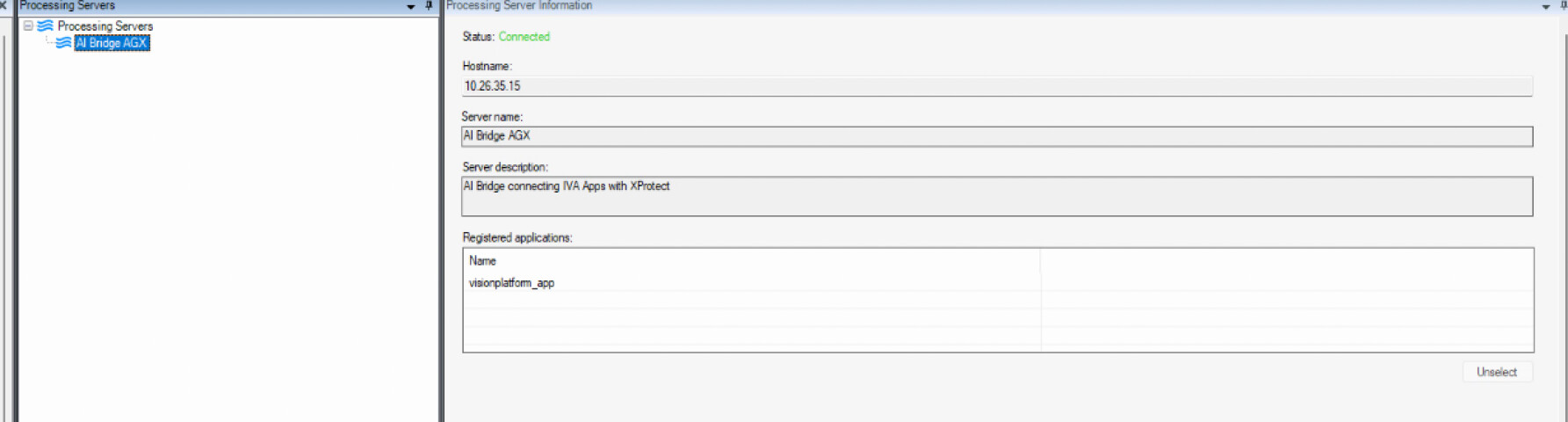
I am making an app that automatically registers itself and then makes the topics

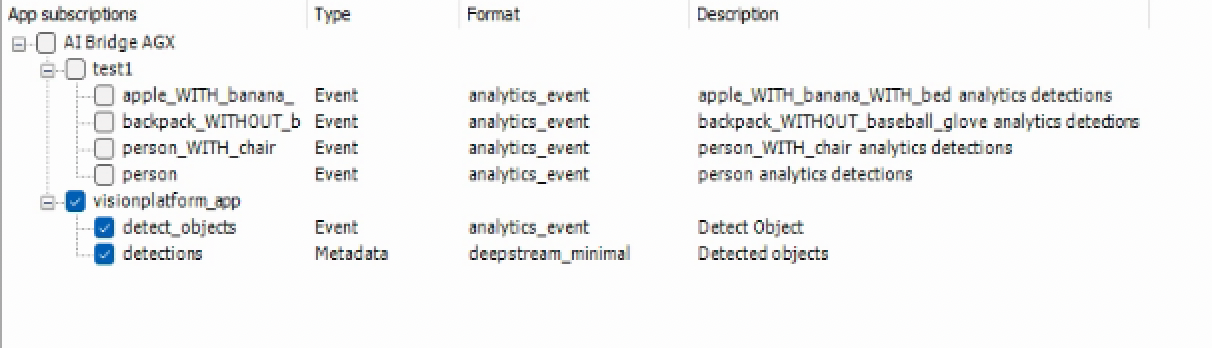
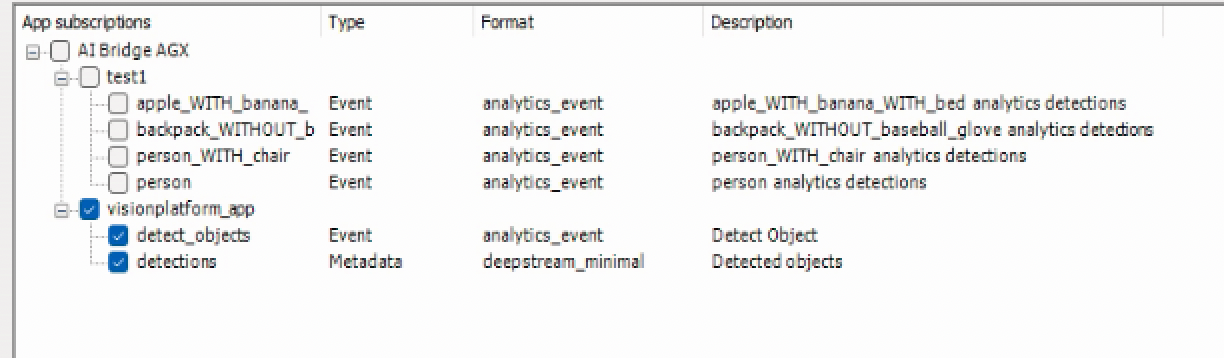
as you can see below the noew app and its topics are made
Question 1)

Now when the app detects a person I look in the ai bridge proxy container and I see

the file I send is in the comment below this one

I get the response

'_content': b'', '_content_consumed': True, '_next': None, 'status_code': 200, 'headers': {'Date': 'Wed, 06 Aug 2025 12:52:40 GMT', 'Content-Length': '0'}, 'raw': <urllib3.response.HTTPResponse object at 0xffff2803b910>, 'url': 'http://10.26.35.15:8382/event/86e3aed3-1553-5d23-8d61-2286215e65f1/person/analytics_event', 'encoding': None, 'history': [], 'reason': 'OK', 'cookies': <RequestsCookieJar[]>, 'elapsed': datetime.timedelta(microseconds=21602), 'request': <PreparedRequest [POST]>, 'connection': <requests.adapters.HTTPAdapter object at 0xffff2803b160>}

But for the person in chair class I see in the ai bridge proxy

image

with the JSON

{
    "@context": "http://www.insights.data/2021/06/analytics-event.jsonld",
    "type": "AnalyticsEvent",
    "name": "detect_objects event",
    "description": "VisionPlatform detect_objects event",
    "uuid": "84a8942b-5772-4d0d-9ae3-33f71df495e5",
    "triggeredByRule": [
        {
            "type": "Rule",
            "name": "Deepstream TRIGGER",
            "description": "Visionplatform trigger",
            "class": "person",
            "hasTriggerZone": [
                {
                    "type": "Polygon",
                    "closed": true,
                    "hasVertices": [
                        {
                            "x": 0.010416666666666666,
                            "y": 0.018518518518518517
                        },
                        {
                            "x": 0.010416666666666666,
                            "y": 0.9259259259259259
                        },
                        {
                            "x": 0.9375,
                            "y": 0.9259259259259259
                        },
                        {
                            "x": 0.9375,
                            "y": 0.018518518518518517
                        }
                    ],
                    "hasLineColor": {
                        "red": 255,
                        "green": 255,
                        "blue": 0,
                        "alpha": 255
                    },
                    "hasFillColor": {
                        "red": 255,
                        "green": 255,
                        "blue": 0,
                        "alpha": 30
                    }
                }
            ]
        }
    ],
    "fromSource": {
        "type": "Reference",
        "uuid": "9084b8f0-4b4c-4dda-8960-de68905e0588"
    },
    "involvedObject": [
        {
            "type": "Object",
            "name": "person",
            "description": "person",
            "class": "person",
            "confidence": 0.924281120300293,
            "trigger": true,
            "hasOutline": {
                "type": "Polygon",
                "closed": true,
                "hasVertices": [
                    {
                        "x": 1.2799382209777832,
                        "y": 0.44793994338424115
                    },
                    {
                        "x": 1.7135223150253296,
                        "y": 0.44793994338424115
                    },
                    {
                        "x": 1.7135223150253296,
                        "y": 2.3731648127237954
                    },
                    {
                        "x": 1.2799382209777832,
                        "y": 2.3731648127237954
                    }
                ],
                "hasLineColor": {
                    "red": 0,
                    "green": 255,
                    "blue": 0,
                    "alpha": 255
                }
            }
        }
    ],
    "fromVendor": {
        "type": "Vendor",
        "name": "visionplatform.ai"
    }
}

And the responce I get is

{'_content': b'', '_content_consumed': True, '_next': None, 'status_code': 200, 'headers': {'Date': 'Wed, 06 Aug 2025 12:55:09 GMT', 'Content-Length': '0'}, 'raw': <urllib3.response.HTTPResponse object at 0xfffea4109970>, 'url': 'http://10.26.35.15:8382/event/86e3aed3-1553-5d23-8d61-2286215e65f1/person_with_chair/analytics_event', 'encoding': None, 'history': [], 'reason': 'OK', 'cookies': <RequestsCookieJar[]>, 'elapsed': datetime.timedelta(microseconds=5331), 'request': <PreparedRequest [POST]>, 'connection': <requests.adapters.HTTPAdapter object at 0xfffea4109250>}
2025-08-06 14:55:09,667 - INFO - Milestone event 84a8942b-5772-4d0d-9ae3-33f71df495e5 uploaded successfully to http://10.26.35.15:8382/event/86e3aed3-1553-5d23-8d61-2286215e65f1/person_with_chair/analytics_event

Why is this happening ?

Question 2)

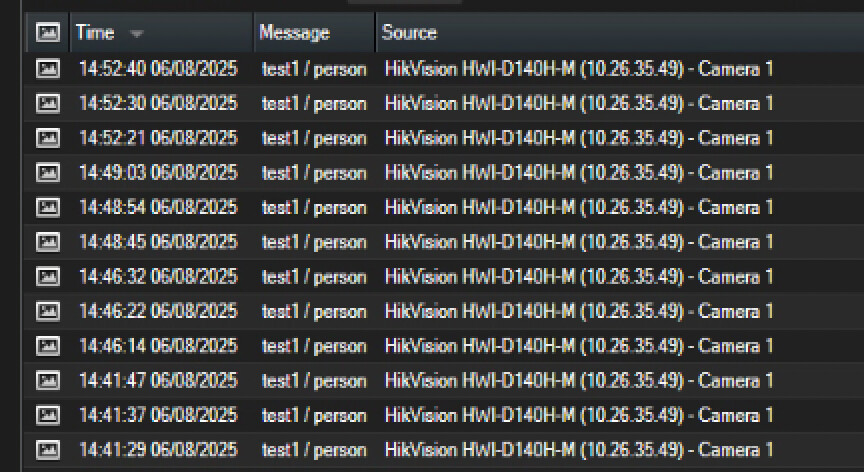
As you can see in the picture the camera is not registered to the app

but when I look at the smart client I see events for the camera

how is this connection even made?
Question 3)

When the person topic is removed and the app is updated. I see that the new app does not have. a person class but when the person class is added again the camera automatically is subscribed to the topic. Its almost as if there is a database where the camera stores all the topics it was connected to and remembers.

Can you explain this persistence ?

For the person JSON

{
    "@context": "http://www.insights.data/2021/06/analytics-event.jsonld",
    "type": "AnalyticsEvent",
    "name": "detect_objects event",
    "description": "VisionPlatform detect_objects event",
    "uuid": "243af49f-bc17-4973-be5d-1a1c56fd0406",
    "triggeredByRule": [
        {
            "type": "Rule",
            "name": "Deepstream TRIGGER",
            "description": "Visionplatform trigger",
            "class": "person",
            "hasTriggerZone": [
                {
                    "type": "Polygon",
                    "closed": true,
                    "hasVertices": [
                        {
                            "x": 0.010416666666666666,
                            "y": 0.018518518518518517
                        },
                        {
                            "x": 0.010416666666666666,
                            "y": 0.9259259259259259
                        },
                        {
                            "x": 0.9375,
                            "y": 0.9259259259259259
                        },
                        {
                            "x": 0.9375,
                            "y": 0.018518518518518517
                        }
                    ],
                    "hasLineColor": {
                        "red": 255,
                        "green": 255,
                        "blue": 0,
                        "alpha": 255
                    },
                    "hasFillColor": {
                        "red": 255,
                        "green": 255,
                        "blue": 0,
                        "alpha": 30
                    }
                }
            ]
        }
    ],
    "fromSource": {
        "type": "Reference",
        "uuid": "9084b8f0-4b4c-4dda-8960-de68905e0588"
    },
    "involvedObject": [
        {
            "type": "Object",
            "name": "person",
            "description": "person",
            "class": "person",
            "confidence": 0.9183209538459778,
            "trigger": true,
            "hasOutline": {
                "type": "Polygon",
                "closed": true,
                "hasVertices": [
                    {
                        "x": 0.006043883040547371,
                        "y": 0.3367929811830874
                    },
                    {
                        "x": 0.27456622508664924,
                        "y": 0.3367929811830874
                    },
                    {
                        "x": 0.27456622508664924,
                        "y": 2.396893960458261
                    },
                    {
                        "x": 0.006043883040547371,
                        "y": 2.396893960458261
                    }
                ],
                "hasLineColor": {
                    "red": 0,
                    "green": 255,
                    "blue": 0,
                    "alpha": 255
                }
            }
        }
    ],
    "fromVendor": {
        "type": "Vendor",
        "name": "visionplatform.ai"
    }
}

Hello @Sharath Rajampeta​ ,

Firstly I’d like to know some details about your setup:

  1. What version of AI Bridge are you using?
  2. What version of XProtect are you connecting?
  3. Are you connecting to more than one XProtect from the same AI Bridge?
  4. How are you registering your VMS(s), apps and topics? Using the GraphQL mutation directly or though the init container and the register.graphql file(s)?
  5. Could you provide your docker-compose files?

:red_question_mark:About question 1:

  • Since AI Bridge uses kafka to communicate internally, the 200 message you are getting is an OK response for the message to be sent to kafka and inside AI Bridge.
  • Could it be the topic (person_with_chair) is registered more than once? We are having a problem when the same app and topics are registered on different VMSs, and this is the behaviour we are facing on that scenario.
  • Ensure the uuid provided for the fromSource.uuid belongs to a registered and valid camera.
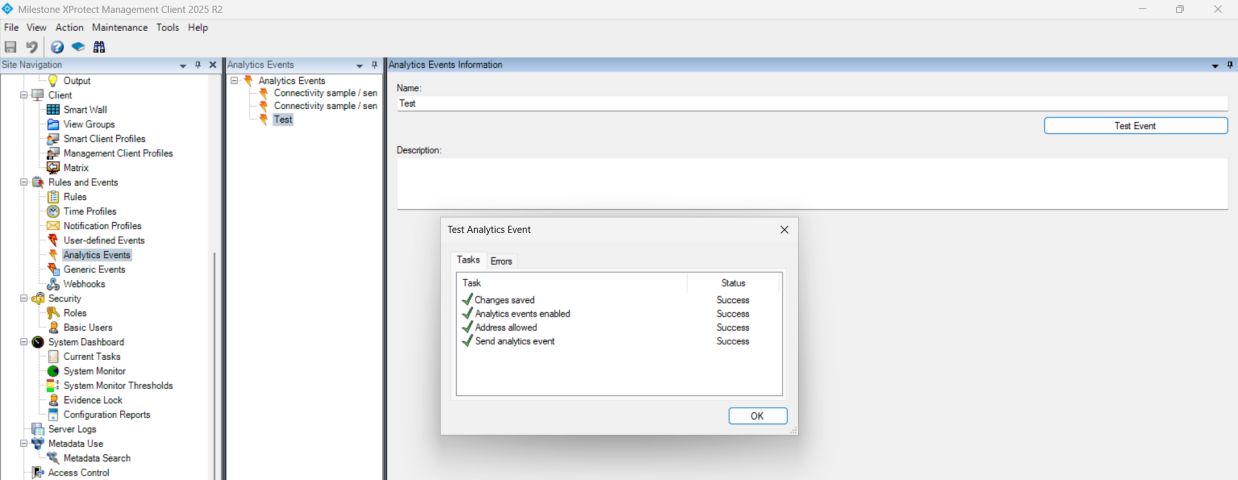
  • Ensure the analytic event is being sent using the test button in Management client at Rules and Events/Analytics Events, [The event name you want to test], then click “Test Event” and select a camera. This should be the result:Afterwards, the event sould listed on the events list in Smar Client.

:red_question_mark:About question 2:

  • Since XProtect allows sending events from any device (you may see it on the previous point validation where you can select any camera) AI Bridge cannot prevent sending the event as long as the json is well formed and the identifiers are correct.

:red_question_mark:About question 3:

  • Unfortunatelly we have a bug on the persistance of data on the topics checkboxes, even it you unregister the VMS, applications or even remove and add topics when registering the app differently, the checkboxes values are always remembered. Even, the numbers of subscribers for at topic may be misleading because of this same reason. Modifying the application ID that is being registered on the AI Bridge could be a workadound. Sadly, there is not other workaround for this behaviour except modifying the Surveillance database but this could lead to unstable states of the VMS or AI Bridge and it is not recommended.

:white_check_mark: If you are not using it yet, I’d strongly suggest upgrading to AI Bridge 2.0.1, you can pull it from AWS.

:white_check_mark: I’m not sure if you are aware of it, there are some samples (apps or scripts) published on GitHub, you can visit them here: https://github.com/milestonesys/MIP-AIBridge-samples/

I’ll be waiting for the details I’ve asked you, in case I could provide more guidelines with these details in hand.

Regards,

Fer

Answers tot he above questions

  1. Yes we are using the new AI bridge v 2.0.1.

  2. We are using the milestone version 2023 R3

  3. No we are not connecting more than one AI bridge

  4. We are registering through mutations

  5. This is my docker compose attached.

I also found something strange.

So friday I tried something different where instead of seperate apps I made topics per app. it was working as expected at 13 00 and then at 1700 some minor changes in the code were made but they had nothing to do with milestone and I suddenly get

image

Also I ran the code afain where the registering was turned off but it still gave the above error.

And when I changed from the person_with_chair to person class and register again then it works

image

I am thinking when the app registers each time it starts up there is a persistence of memory that is causing an issue. But why it does not effect the person class I dont know.

I also think the one thing I did was I checked the box between 12 and 1700 so checking the box took a sort of snapshot and is causing wierd issues

To test this I need to somehow refresh the database how can I do it ?

Hello @Sharath Rajampeta​,

Thanks for sharing your setup. I’ve been trying to replicate your scenario without success, unfortunatelly.

I can recomend you one more thing to test:

  1. AI Bridge is running (init container stopped succesfully and connector syncronized 100%)
  2. Navigate to Management Client/Processing Server
  3. Right click on the AI Bridge connected instance
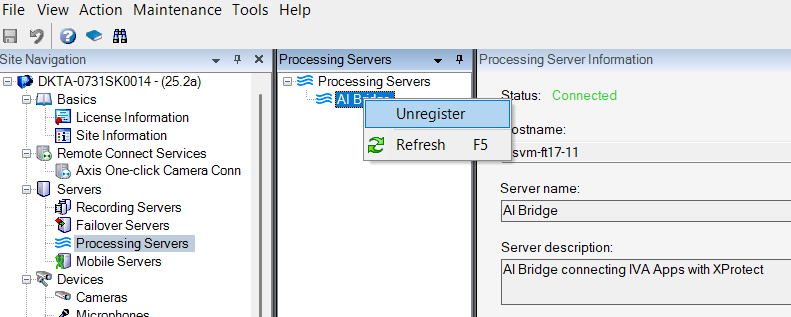
  4. Click on the “Unregister” option:
  5. Wait for the connector container to finish the unregistration, you’ll see log message such as:
Disconnecting from endpoint http://[VMS_HOST] succeeded
AI Bridge unregistration for endpointID:'[SOME_GUID]' succeeded
Observer with ID 'application-unregistered[SOME_GUID]' removed.

After this, restart AI Bridge and test again your scenario.

Note: if you do not find the “Unregister” option on the context menu in Management Client, it’s because you are using an old version of the Processing Server Admin plugin, please grab latest from here (Milestone AI Bridge resources) and upgrade it.

Please, let me know how it goes.

Regards,

Fer

HI thanks for the reply. I am looking into a away where you can replicate this. I will post the test setup tomorrow. Thanks for the support