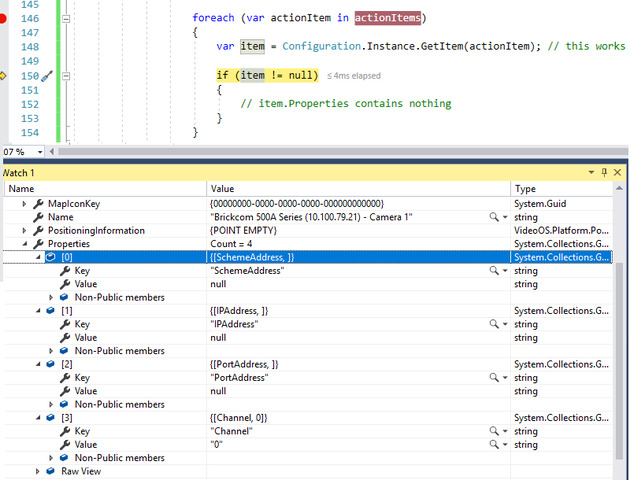
I’ve a ActionManager plugin. When I edit the items in the management client, the properties dictionary is loaded properly, but when I get the item via the ExecuteAction function:
        public override void ExecuteAction(Guid actionId, Collection<FQID> actionItems, BaseEvent sourceEvent)
        {
            foreach (var actionItem in actionItems)
            {
                var item = Configuration.Instance.GetItem(actionItem); // this works

                if (item != null)
                {
                    // item.Properties contains nothing
                }
            }
         }
There’s also no ‘MIP kinds’ folder when I’m exploring the server via the ConfigurationAPI.
foreach (var actionItem in actionItems)
{
        var item = Configuration.Instance.GetItem(actionItem); // this works
         if (item != null)
         {
              // item.Properties contains nothing
          }
}
My plugin works flawlessly on my dev machine, so this is no “default issue”. It’s the live production server that I’m having problems with. It’s a Corporate 2018 R1.
Could you please tell us what “actionitem” is in your code? Is it referring MIP item which you design in your plugin or Builtin item which source camera have?
If you use MIP item, please send us “GetItem” method (code) in BatActionItemManager.cs, or entire BatActionItemManager would be also fine.
The “actionitem” is a MIP item, created in the Management Client. The GetItem method is untouched. I suspect there’s something wrong with the Milestone server, since it works just fine in the Management Client but not in the Event server, although the Event server can get the item and see the name.
A bunch of stuff. As I mentioned, it works perfectly fine on my dev PC that runs Corporate 2019 R2. It’s probably a major issue with the live-server that runs Corporate 2018 R1, so we’re planning on upgrading it when 2019 R3 arrives.
I uploaded the question if you guys had some experience with something similar before.
There has in previous versions been issues regarding serialization of items, but these should now be fixed. So we are glad that you have already planned to update the system then it should solve the issue.