JavaScript SDK Playback issue

Hi, i was trying to get playback in web app for specific time (start, end), so i went into the samples and the docs, i use XPMobileSDK.playbackGoTo

but the problem is i only get the last frame from the last record exists and it’s ignore the time that i give it.

here is my code:

(async function () {
  const sleep = (ms) => new Promise((r) => setTimeout(r, ms));
 
  function parseLocalDateTime(value) {
    const local = new Date(value);
    return local.getTime() - local.getTimezoneOffset() * 60000;
  }
 
  window.LoadMobileSdk(async () => {
    const urlInput = document.getElementById("serverUrl");
    const userInput = document.getElementById("username");
    const passInput = document.getElementById("password");
    const camSelect = document.getElementById("cameraSelect");
    const fromInput = document.getElementById("fromTime");
    const toInput = document.getElementById("toTime");
    const startBtn = document.getElementById("startBtn");
    const canvas = document.getElementById("playbackCanvas");
    const ctx = canvas.getContext("2d");
 
    XPMobileSDK.connect(urlInput.value);
    await sleep(1000);
    XPMobileSDK.login(userInput.value, passInput.value, "Basic", {
      SupportsAudioIn: "Yes",
      SupportsAudioOut: "No",
    });
    await sleep(1000);
 
    XPMobileSDK.getAllViews((items) => {
      const cams = items[0].Items[0].Items[0].Items;
      cams.forEach((cam) => {
        const opt = document.createElement("option");
        opt.value = cam.Id;
        opt.textContent = cam.Name || cam.Id;
        camSelect.appendChild(opt);
      });
      startBtn.disabled = false;
    });
 
    startBtn.addEventListener("click", () => {
      const camId = camSelect.value;
      const fromMs = parseLocalDateTime(fromInput.value);
      const toMs = parseLocalDateTime(toInput.value);
 
      if (!camId || isNaN(fromMs) || isNaN(toMs) || fromMs >= toMs) {
        return alert("Select a camera and valid From/To times");
      }
      startPlayback(camId, fromMs, toMs, ctx);
    });
  });
 
  function startPlayback(cameraId, fromMs, toMs, ctx) {
    ctx.clearRect(0, 0, ctx.canvas.width, ctx.canvas.height);
 
    const params = {
      CameraId: cameraId,
      DestWidth: ctx.canvas.width,
      DestHeight: ctx.canvas.height,
      SignalType: "Playback",
      MethodType: "Push",
      Fps: 25,
      ComprLevel: 71,
      KeyFramesOnly: "No",
      RequestSize: "Yes",
      StreamType: "Transcoded",
    };
 
    const token = XPMobileSDK.RequestStream(params, onStreamReady, (err) =>
      console.error("Stream error", err)
    );
 
    let vc;
 
    const obs = {
      connectionOpened() {
        XPMobileSDK.playbackSeek(vc, "DbStart");
 
        setTimeout(() => {
          XPMobileSDK.playbackGoTo(
            vc,
            fromMs,
            "TimeOrAfter",
            () => {
              console.log("Seeked to ≥", new Date(fromMs).toISOString());
              XPMobileSDK.playbackSpeed(vc, 1.0);
            },
            (err) => console.error("Seek error", err)
          );
        }, 200);
      },
 
      videoConnectionReceivedFrame(frame) {
        if (frame.dataSize <= 0) return;
 
        const url = URL.createObjectURL(frame.blob);
        const img = new Image();
        img.onload = () => {
          ctx.drawImage(img, 0, 0, ctx.canvas.width, ctx.canvas.height);
          URL.revokeObjectURL(url);
 
          if (frame.timestamp.getTime() >= toMs) {
            vc.removeObserver(obs);
            vc.close();
            XPMobileSDK.cancelRequest(token);
            console.log("Playback complete");
          }
        };
        img.src = url;
      },
    };
 
    function onStreamReady(videoConnection) {
      vc = videoConnection;
      vc.addObserver(obs);
      vc.open();
    }
  }
})();

Thanks for any help

Hi Abaas,

Thanks for your question and sorry for the delayed reply. From what I can see, the problem is that connectionOpened is never executed because it is not a function that is defined in the observer. So you need to call playbackGoTo after stream is ready.

Below is a revised version of your code. I added a check for the first frame, because it is received with the wrong timestamp. That’s probably because it is returned when we start stream before changing it to the time we want. But all the frames received afterwards seem to have the correct timestamp.

Here is the modified code:

(async function () {
  const sleep = (ms) => new Promise((r) => setTimeout(r, ms));
  let vc = null;
  let firstFrameReceived = false;
  let fromMs = 0;
  let toMs = 0;
 
  function parseLocalDateTime(value) {
    const local = new Date(value);
    return local.getTime() - local.getTimezoneOffset() * 60000;
  }
 
  window.LoadMobileSdk(async () => {
    const urlInput = document.getElementById("serverUrl");
    const userInput = document.getElementById("username");
    const passInput = document.getElementById("password");
    const camSelect = document.getElementById("cameraSelect");
    const fromInput = document.getElementById("fromTime");
    const toInput = document.getElementById("toTime");
    const startBtn = document.getElementById("startBtn");
    const canvas = document.getElementById("playbackCanvas");
    const ctx = canvas.getContext("2d");
    XPMobileSDKSettings.MobileServerURL = urlInput;
 
    XPMobileSDK.connect(urlInput.value);
    await sleep(1000);
    XPMobileSDK.login(userInput.value, passInput.value, "Basic", {
      SupportsAudioIn: "Yes",
      SupportsAudioOut: "No",
    });
    await sleep(1000);
 
    XPMobileSDK.getAllViews((items) => {
      const cams = items[0].Items[0].Items[0].Items;
      cams.forEach((cam) => {
        const opt = document.createElement("option");
        opt.value = cam.Id;
        opt.textContent = cam.Name || cam.Id;
        camSelect.appendChild(opt);
      });
      startBtn.disabled = false;
    });
 
    startBtn.addEventListener("click", () => {
      const camId = camSelect.value;
      fromMs = parseLocalDateTime(fromInput.value);
      toMs = parseLocalDateTime(toInput.value);
 
      if (!camId || isNaN(fromMs) || isNaN(toMs) || fromMs >= toMs) {
        return alert("Select a camera and valid From/To times");
      }
      startStream(camId, ctx);
    });
  });
 
  function startStream(cameraId, ctx) {
    ctx.clearRect(0, 0, ctx.canvas.width, ctx.canvas.height);
 
    const params = {
      CameraId: cameraId,
      DestWidth: ctx.canvas.width,
      DestHeight: ctx.canvas.height,
      SignalType: "Playback",
      MethodType: "Push",
      Fps: 25,
      ComprLevel: 71,
      KeyFramesOnly: "No",
      RequestSize: "Yes",
      StreamType: "Transcoded",
    };
 
    const token = XPMobileSDK.RequestStream(params, onStreamReady, (err) =>
      console.error("Stream error", err),
    );
 
    const obs = {
      videoConnectionReceivedFrame(frame) {
        if (frame.dataSize <= 0) return;
 
        // First frame is received with wrong timestamp, so skip it
        if (!firstFrameReceived) {
          firstFrameReceived = true;
 
          if(frame.timestamp.getTime() >= toMs) {
            return;
          }          
        }
 
        const url = URL.createObjectURL(frame.blob);
        const img = new Image();
        img.onload = () => {
          ctx.drawImage(img, 0, 0, ctx.canvas.width, ctx.canvas.height);
          URL.revokeObjectURL(url);
          //console.log("Frame timestamp:", frame.timestamp.toISOString());
 
          if (frame.timestamp.getTime() >= toMs) {
            vc.removeObserver(obs);
            vc.close();
            //XPMobileSDK.cancelRequest(token);
            console.log("Playback complete");
          }
        };
        img.src = url;
      },
    };
 
    function onStreamReady(videoConnection) {
      vc = videoConnection;
      XPMobileSDK.playbackGoTo(
        vc,
        fromMs,
        "TimeOrAfter",
        () => {
          console.log("Seeked to ≥", new Date(fromMs).toISOString());
          XPMobileSDK.playbackSpeed(vc, 1.0);
        },
        (err) => console.error("Seek error", err),
      );
      vc.addObserver(obs);
      vc.open();
    }
  }
})();

I hope it will be helpful :slightly_smiling_face:

Have a great day!

/Cagri

Hi @Cagri Kayalar

Thanks a lot for your response.

I have executed the code that you provided and i still get only the last frame in the last record, so when i log the timestamp i get the last frame time but this time this frame dataSize is 0. i don’t know why this is happening but anyway i still get only the last frame of the last record this camera have

Thanks a lot for your help, and have a great day

Hi again @Abaas Mahroos

I think it could be because of the way datetime is parsed in the code.

function parseLocalDateTime(value) {
    const local = new Date(value);
    return local.getTime() - local.getTimezoneOffset() * 60000;
  }

I think that you are trying to get the frames for the wrong time this way and that time probably doesn’t have any recordings.I would try to tweak the datetime parsing code.

It works for me if i parse it as below. Depending on how you are getting the date, it might also work for you:

function parseLocalDateTime(value) {
    return new Date(value).getTime();
  }

I hope it will be helpful for you. Have a great day!

/Cagri

Hi again @Cagri Kayalar

Thanks a lot for your help.

first thing i was trying to change the time into UTC, because most of the stream and playback i have worked with in Milestone service was the same thing.

No after i have checked your response, I’m getting the time correct but i have only one frame and when i log the timestamp of each frame i get the same time of the start, but with dataSize 0.

Thanks again for your help, Have a great day

Hi @Abaas Mahroos

Unfortunately I cannot reproduce the case you described, the code is supposed to work.

The only time when I got frames without data was when the camera was disconnected from the server, so maybe you could check that. It could also be that there is no recording at all for the camera you are trying or another configuration issue, it is difficult to tell.

If playback is paused, keep alive frames are sent without any data. That’s another case where frames would be received with dataSize 0. But there isn’t any part of the code that pauses the stream, so I don’t know if that’s what’s happening here.

I would try with a different camera, check if camera is connected, live/playback works, and whether there are any recordings from the camera. You can also try to restart services on the server or restart the server all together.

I’m sorry that I cannot provide more help on this.

Have a great day.

/Cagri

Hi @Cagri Kayalar

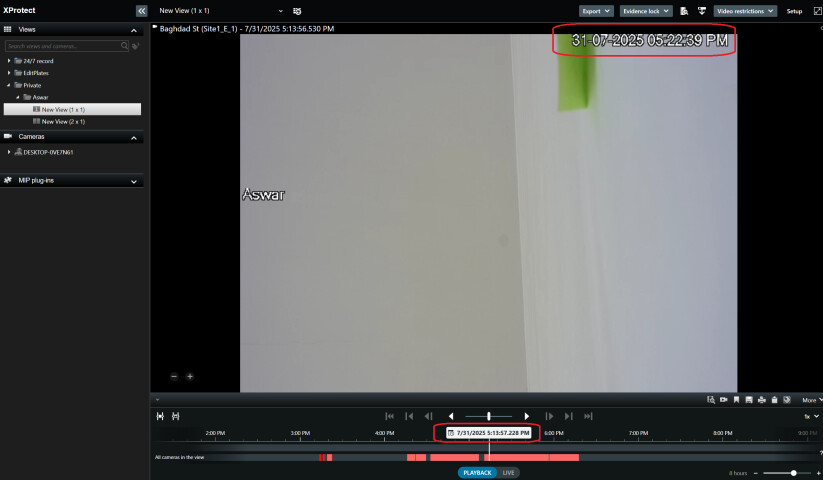
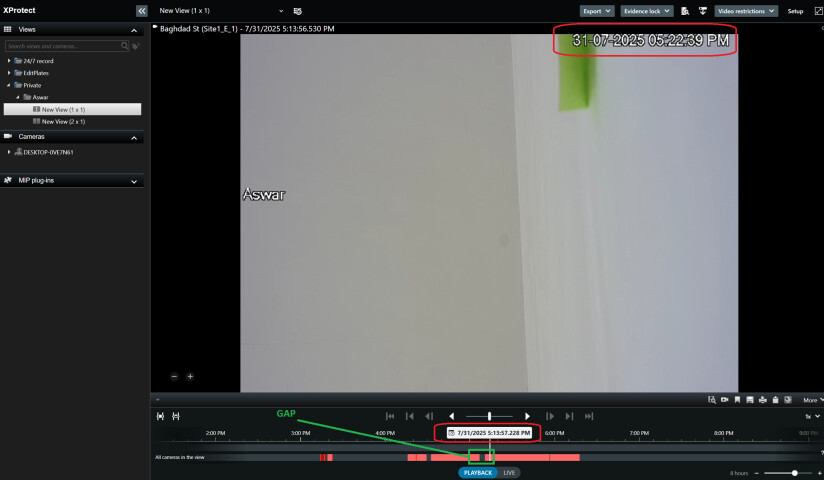
Thanks for help, but i don’t understand how it’s not working with us and works for you. I test the same code on two different machines, and i always check the video time before fetching. if you look here in playback:

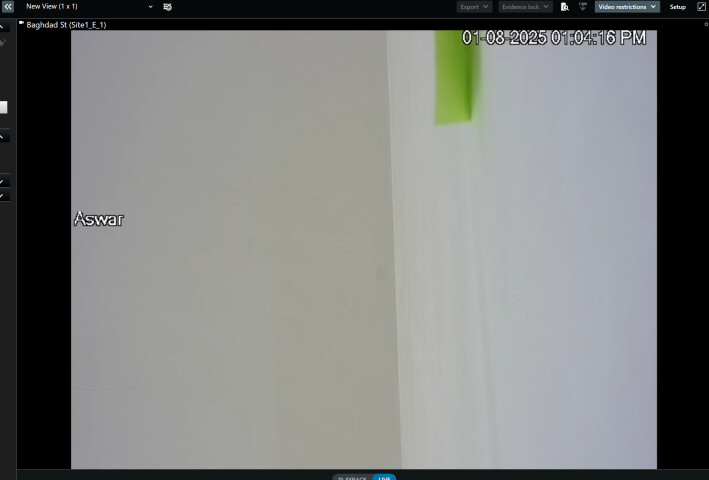
And the camera is connect right now :

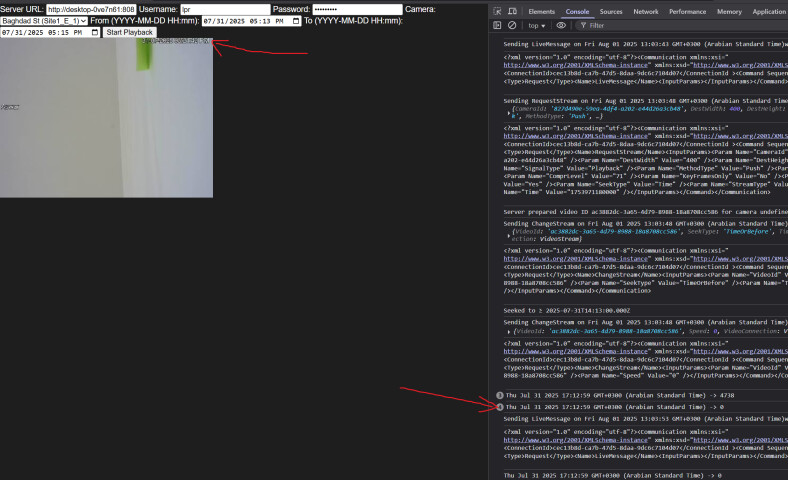
Now i will try to get the playback with the time (start, end) that exists in first image:

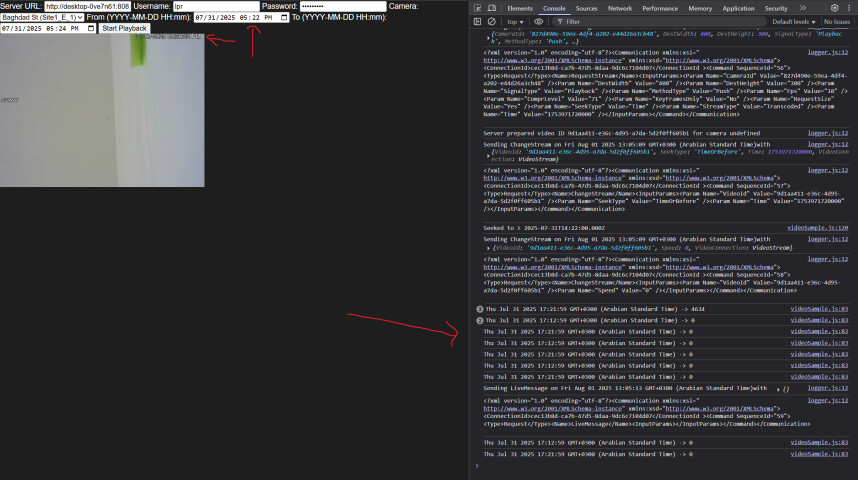
event when i try to fetch the time that on the frame :

so can you share how it works on your side with the same code?

and if it possible to setup meeting to solve this issue because it’s very urgent that will be super helpful

Thanks again for your help

Hi Abaas,

Sorry for the late reply, I have been on summer vacation.

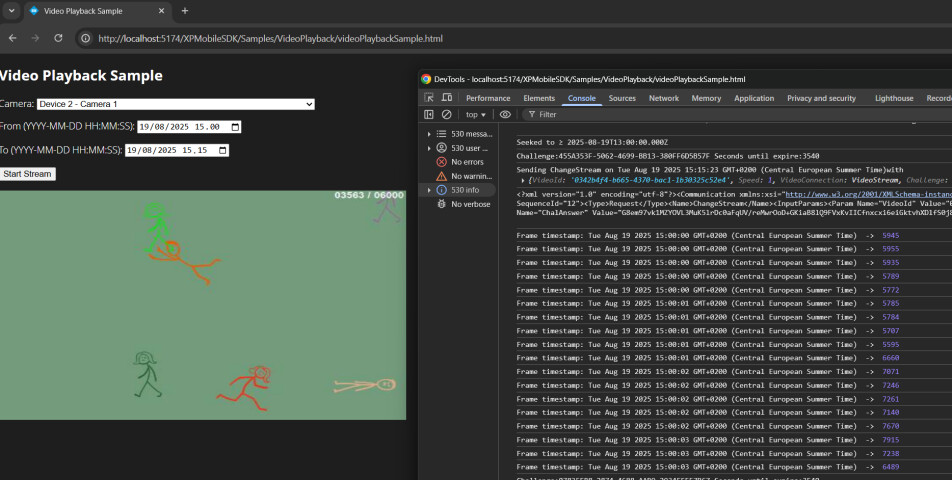
Here is how it looks when I run it:

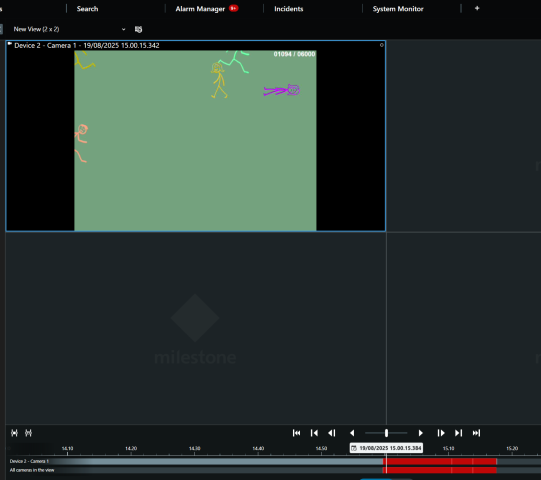
And this is from Smart Client:

And it works as it should when I try with different servers also.

One thing I noticed in your screenshot is that there is a gap between recordings. So maybe you are trying to get recording for a time interval that doesn’t have recordings. You could check it and try to get the recording for the time interval that has recording, to see if that works.

I’m also attaching the sample code that I was running. You can extract it and put in under “mipsdkmobile-web/Samples/” folder and run it the same way as running the other samples. Just make sure to add url, username and password fields in the code (i added TODO next to them). Let me know if it works for you when you try from the sample.

I hope it will be helpful. Have a great day.

/Cagri

Hi @Cagri Kayalar

Thanks for your response. We solved the issue from another third party source.

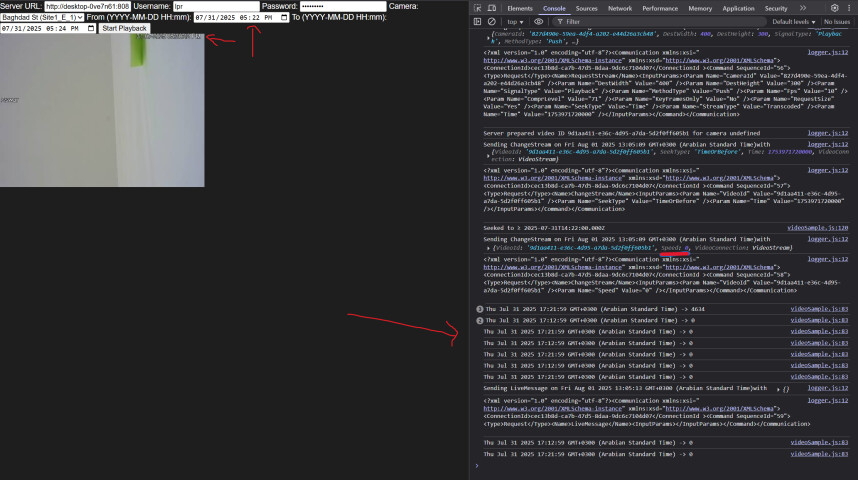
The issue is in the RequestStream Params. if you notice it’s don’t contains Speed property and it’s sending the default value which is 0 if you look at this image i sent before:

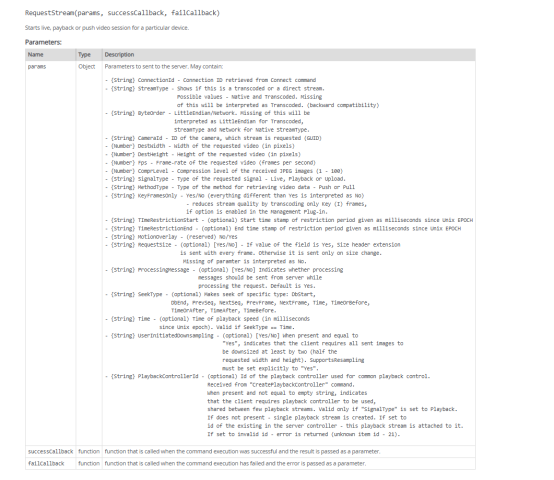
after just adding Speed 1 my code is working without any issues. We need to know where we suppose to find such this documentation because this issue toke from use 2 Months and this is hold us down. I Know you will say in this documentation of Mobile server or in this Samples but we didn’t find this in any of them. and in the documentation the RequestStream function you never mentioned about the Speed:

Also @Constantina Ioannou​ Said i should open new ticker and i did in this link.

Thanks a lot for help.

Have a great day.

Hi @Abaas Mahroos

I’m happy to hear that the code works now for you. And you are correct that Speed doesn’t seem to be among the properties of params, then that would obviously cause confusion. Thanks for pointing out to that parameter that seems to be “hidden” for some reason.

However, if you check the code I sent you initially, you can see that there is a line where I set the speed inside onStreamReady (it is line 9 in below snippet):

function onStreamReady(videoConnection) {
      vc = videoConnection;
      XPMobileSDK.playbackGoTo(
        vc,
        fromMs,
        "TimeOrAfter",
        () => {
          console.log("Seeked to ≥", new Date(fromMs).toISOString());
          XPMobileSDK.playbackSpeed(vc, 1.0);
        },
        (err) => console.error("Seek error", err),
      );
      vc.addObserver(obs);
      vc.open();
    }

If you haven’t had that line in your code, then I guess it makes sense that it wasn’t working for you but was working for me.

I’m glad all works fine now. Thanks again for sending the solution that worked out for you and letting us know about the parameter.

Have a great day!

/Cagri