Hello,
I have a question about the JPEGLiveSource class (MIP SDK 2019 R2 and R1). Calling the Init() method results in an exception complaining about missing files: ToolkitGenericPlugin_mtd.dll and CoreToolkits.dll.
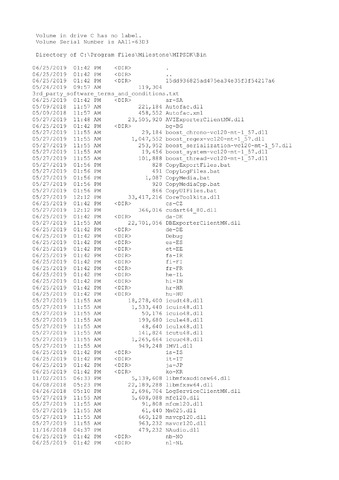
I can see that CoreToolkits.dll is available, while ToolkitGenericPlugin_mtd.dll isn’t. According to other threads it is a legacy component, which probably should not be there.
I’ve checked the CameraStreamResolution example from the SDK. It does work in my installation. But I can’t see what is can cause the exception in my application.
Thanks in advance!
Code:
var jpegLive = new JPEGLiveSource(cameraItem);
_timeoutEvent = new Timer(TimeOutCallBack, null, 30000, 30000);
jpegLive.LiveModeStart = true;
jpegLive.Width = 0;
jpegLive.Height = 0;
jpegLive.Init();
jpegLive.LiveContentEvent += jpegLiveContentEventHandler;
_resetEvent.WaitOne();
_timeoutEvent.Dispose();
jpegLive.LiveContentEvent -= jpegLiveContentEventHandler;
Stacktrace:
at VideoOS.Toolkit.ToolkitFactory.CreateInstance(String configurationXml)
at VideoOS.Platform.SDK.Media.SDKInternalMediaService.CheckAndCreateToolkitDictionary()
at VideoOS.Platform.SDK.Media.SDKInternalMediaService.CreateMediaForkWithIsSource(FQID deviceFqid, Guid streamId, MediaSessionInfo sessionInfo, Boolean enableMulticast)
at VideoOS.Platform.SDK.Media.SDKInternalMediaService.LiveConnect(FQID deviceFqid, Guid streamId, Func`3 useForkConfXml, Func`3 configXml, ISet`1 properties, Boolean enableMulticast)
at VideoOS.Platform.SDK.Media.SDKInternalMediaService.LiveVideoConnect(LiveVideoConnectParams parameters)
at VideoOS.Platform.Live.BaseLiveSource`2.PollThread()
Could not open file ‘ToolkitGenericPlugin_mtd.dll or CoreToolkits.dll’!