What are all possible reasons for a null value response. Code was correctly returning site items from parent site. Customer upgraded to 2022_R1 server. Now the LoadSiteItem returns null. What are all possible reasons for the call to stop working?
You might see changes on authentication even if you did not deliberate changed users.
This might be a little hint but it if it does not lead to a solution please answer: Is it the same site upgraded that now has this issue? Perhaps you can say something about how your app authenticates. Please also share a snippet of code how you use LoadSiteItem.
Hi Bo,
I have included a link to a copy of my source code for review. It is not a plugin. It is an external program that our C2P API client executes to retrieve camera information from the Milestone Server. Arguments are passed into the program MilestoneConsoleCameras.exe. They include the IP Address:port, authentication (windows), username, password and true (if federated otherwise false).
The specific issue is at the execution of:
Item parentSite = VideoOS.Platform.SDK.Environment.LoadSiteItem(secureOnly, uri, _credentialCache);
The result from that call is null.
This program worked on your prior server and I have no idea why null is returned.
I have no issues with this program at our development lab using Milestone Xprotect VMS 2022 R2.
https://www.dropbox.com/s/4r8z5q3hgp53bm2/MilestoneConsoleCamerasV8.0.16_2022R1_1.zip?dl=0
Example of running MilestoneConsoleCameras.exe on C2P Development pc
Allow me one step back, please first verify that the credentials can be used to log in on this PC. If you tested this please just confirm. I would like to rule out the simplest explanation first.
Do you see the issue in your own test servers or only at a customer. Multiple customers?
If you confirm this I will run the code in my test environment.
The credentials at the UAE site are used to login with a Milestone Client which is successful.
When the same credentials are used in the MilestoneConsoleCameras.exe at the UAE site they fail to return site information (LoadSiteItem the result returns null).
I only see this at the UAE Site. Here at our lab MilestoneConsoleCameras.exe works as expected.
The console attached is the results when I try to login either as Federated or as a specific login to that server: First time as “Federated using LoadSiteItem…. (returns null)
Second attempt logging in as non-federated using VideoOS.Platform.SDK.Environment.Login(uri); (returns Unauthorized)
Either way MilestoneConsoleCameras is unsuccessful.

Can you please verify to use the newest SDK? Please rebuild it with the newest one and let’s see what will happen.
MIPSDK_2022_R1 is the sdk I downloaded. I replaced the Milestone libraries in the MilestoneConsoleCameras application with the libraries from that SDK. I will send this most recent update to UAE and test next week to see if this makes a difference. In my development lab I am successful with older SDK libraries.
2022 R1 is not the newest, 2022 R2 is the current newest. Please see this link –
Nuget - https://www.nuget.org/packages?q=milestone+systems
If you want to use samples, please see this link - https://github.com/milestonesys
However, if you have rebuilt with 2022R1 and have results it would be interesting to know if the issue is solved with that one…
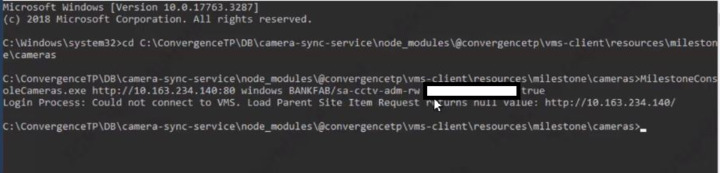
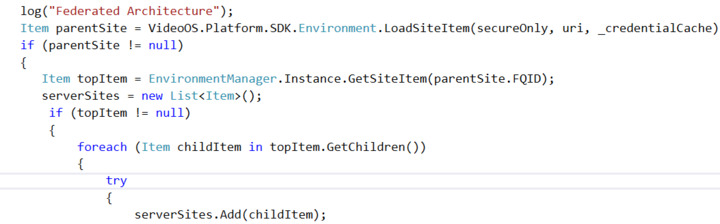
I rebuilt our MilestoneConsoleApplication with the nuget package 2022 R2 from the link above. I just tested on the customers site and I still get the same error (see below). Also I’m including a snippet of where the code is failing. The Item “parentSite” result is null.
There might be some more information on what is going on in MIP SDK logs. Have you looked into them?
I would also like clarification on the setting of the “secureOnly”. When should it be set to true. What would the results be if incorrectly set?
VideoOS.Platform.SDK.Environment.AddServer(secureOnly, uri, _credentialCache); VideoOS.Platform.SDK.Environment.AddServer(secureOnly, uri, _credentialCache);
When “secureOnly” is set to true, you can only connect to a server that is running HTTPS and OAuth2.0. If that is incorrectly set then login would fail.
I have not looked at the MIP SDK logs. Where are those located?
What are the results of a “fail” if secureOnly is set to false and the server is HTTPS and OAuth2.0? Would it return a NULL value as the result of the LoadSiteItem or fall to an error process (try/catch) ?
MIP SDK logs are by default located under [C:\ProgramData\Milestone\MIPSDK.](file:C:/ProgramData/Milestone/MIPSDK.)
If secureOnly is set to false and the server is HTTPS then the login would be successful. The only use case when the login would fail because of secureOnly is, as mentioned above, when having secureOnly set to true and trying to connect to the server running HTTP.
We never received the logs my colleague asked for. Can you please make them available? (Alternatively upload them on a support case (not to show them in public forum))
Yesterday we were able to get onto the customer’s system to capture the SDK logs as well as what we believe to be all of the Milestone logs. The bank is sanitizing the logs before they upload them.
Just uploaded the first batch of logs from the customer. The upload folder was created by Jeffery Dugue
Milestone Technical Support (MTS). I can send the case number if needed.
What were the conclusion of this issue? We seem to be having a very similar problem.
We have a command line utility that calls LoadSiteItem() to get the list of itesm. The utility has been working fine with the 2019 SDK and 2019 server.
We updated to the 2022 SDK (and 2022 server). One one dev machine, all is working correctly. On another dev machine and at the customer site, LoadSiteItem() always returns null.
The exact same dll are used on all 3 sites. Any clue as to what may cause the different behavior?
I don’t think we ever reached the conclusion for this issue.
The different behavior might be caused by that in the current version, LoadSiteItem() needs to login to get the site information from server (and that was not the case for 2019 SDK) . We have recently seen issues with logging in on some setups, where the login fails due to reaching the connection check timeout.
Have you looked into MIP SDK logs? What do they say when the LoadSiteItems() returns null?
Here is the content of the MIPSDK log file:
We know there is no certificate, this is a test server, but we have the exact same behavior with the production server and that last one has a proper valid certificate.
2023-01-18 09:20:01.241 Error: ConnectionCheck:IsOAuthServerOnline (): Error(s): No authorization server found at: https://192.168.222.116/idp/.well-known/openid-configuration: The remote certificate is invalid according to the validation procedure.
2023-01-18 09:20:01.794 Debug: FindBestAddress (): Address was found: http://192.168.222.116/. Is OAuth server: True
2023-01-18 09:20:02.104 Debug: ProxyClientBase (): Creating an HTTP client using uri: http://192.168.222.116/
2023-01-18 09:20:02.863 Debug: LoadSiteItem (): Login to OAuth server failed. Server URI: http://192.168.222.116/
2023-01-18 09:20:02.890 Error: LoadSiteItem (): Failed to retrieve loginSettings for URI: http://192.168.222.116/