It seems to me that the Preview is not showing the current state.
The state will be passed by calling the NewEvent Method on the Eventmanager instance.
I have logged this step and double checked the stateID and the Eventmanager instance.
Neither the MIP Protocol nor the Server Protocol of the Event Server contains any error messages. The device is marked as online.
_eventManager.NewEvent(stateID.ToString(), stateValue ? EventId.InputActivated : EventId.InputDeactivated);
Sometimes the problem can be fixed by restarting the Recording Server while Management Client remains open.
I did a quick test using the Demo Driver sample. When I activate input in the Demo Driver Device (simulator device) I see the preview in the Management Client update immediately. I cannot reproduce your observation.
If you test using the unmodified sample do you see the issue?
I have not tested the default Demo Driver sample yet. If I remember correctly, the Demo Driver uses some kind of an InputPoller and only has 1-2 Inputs. This will not be used in my case. The _eventManager.NewEvent Method will, depending on the configuration, be called very frequently (30+ to 10000+) in a short period of time (few milliseconds). Is there a Log, where I can check, if the Event Server handles the updates correctly?
The design was made for have inputs on devices, I worry if your are doing something that the VMS isn’t suited for. We are a bit curious as to the use case here.
If the system can keep up the preview in the Management Client should reflect the changes to the input.
One idea we discussed here at Milestone: If you activate and then deactivate an input with very little time in between we are not sure what will happen, we don’t think we ever tested. Is this the scenario you have?
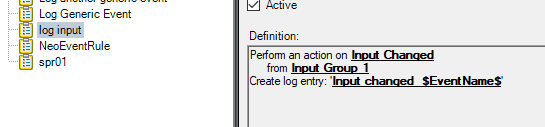
I have an idea that you can test in an alternative way. Create a rule that will write to log when an input is changed. See the log if there are the expected entries in the log.
On the other hand, I don’t know what will happen to the log if you log 10000+ in few milliseconds.
You can think of it as an IO device. This device has, depending on it’s configuration, 1 to approx. 10000 inputs and up to 500 Outputs.
The most configurations will be less than 50 Inputs and less then 20 Outputs. On device driver startup, the states of those Inputs and Outputs will be read and transferred to the system via the “NewEvent” Method. After that, state changes will not happen that often (In summary 1 - 60 per Minute).
Thank you for the input rule hint. I will check this, next time I have access to the system.
I wrote that I am worried you’re doing something the VMS isn’t suited for. I can now elaborate, and I found some additional information that is important.
The issue is that if you do very many events at start up they are all going into the system as being evaluated in the rule system and being picked in a number of other places. It will cause an overload situation.
There is actually instructions on doing the driver framework driver start up.
Looking at VideoOS.Platform.DriverFramework.Definitions.InputDeviceDefinition Class Reference. https://doc.developer.milestonesys.com/html/index.html?base=driverframeworkhelp/class_video_o_s_1_1_platform_1_1_driver_framework_1_1_definitions_1_1_input_device_definition.html&tree=tree_search.html?search=inputdevicedefinition
It includes this text:
--
Right after connection is established to the real hardware, this class should issue
one of these pre-defined events to initialize the current state of the input:
- InputCurrentlyActivated
- InputCurrentlyDeactivated
Thank you for the hint. I will implement this in my project and also implement a queue with configurable processing delay.