Hello,
I’d like to know what is the best way to map Camera items belonging to a Hardware item to actual view areas of my device.
My device has 5 view areas that are added as 5 cameras. For some reason view area 4 of the device is always added as first Camera item in the Cameras folder of the Hardware item.
I guess there should be some property that can be used to order the Camera items in the same way as they are shown in the API’s of the device?
Thanks in advance!
Hi. How do you add your hardware? Using management client or in a code? If it’s a code, could you please show the code example.
Hi,
The hardware is added via code. When the hardware is added the cameras are added one by one while iterating the CameraFolder of the Hardware.
ServerTask task = recordingServer.AddHardware(dutHost, driverPath, dutUser, dutPass);
if (waitForTask(task).State != StateEnum.Success) throw new Exception("Failed to add hardware to the server");

hardwarePath = task.Path;
Hardware hardware = new Hardware(EnvironmentManager.Instance.MasterSite.ServerId, hardwarePath);
hardware.Name = "myHardware";
hardware.Enabled = true;
hardware.Save();

string groupName = "myCameraGroup";
group = createCameraGroup(groupName);

int idx = 0;
foreach (Camera cam in hardware.CameraFolder.Cameras)
{
    cam.Name = "camera_" + idx;
    cam.Enabled = true;
    cam.Save();

    task = group.CameraFolder.AddDeviceGroupMember(cam.Path);
    if (waitForTask(task).State != StateEnum.Success) throw new Exception("Server task failed while adding camera " + cam.Name + " to the server");
    idx++;
}
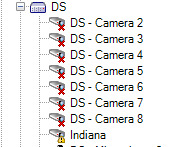
The Management Client actually order cameras on the same hardware alphabetically..
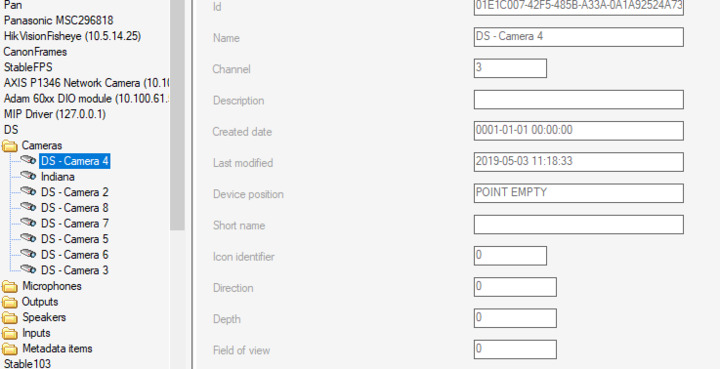
Whereas the order as seen in Config API Client sample is pseudo-random starting with number 4
You can implement your own ordering and base it on the “channel” property. (You also see that property in the picture above).