I’m developing an application using BoundingBoxMetadataProvider sample.
<https://github.com/milestonesys/mipsdk-samples-component/tree/main/BoundingBoxMetadataProvider >
*Our app calls the following QueueMetadata method at about 10 second intervals to overlay bounding boxes on the camera image.
public bool QueueMetadata(MetadataStream metadata, DateTime startTime, TimeSpan? timeSpan = null);
*Our app set startTime to DateTime.UtcNow and set null to timeSpan.
*QueueMetadata method always returns true.
*Problem
Sometimes bounding boxes are not shown on the camera live image.
We couldn’t see these bounding boxes on the corresponding playback image as well.
It seems that the metadata is missing for some reason.
Does anybody have any thoughts on this problem?
Thank you in advance.
Rik
April 19, 2023, 9:55am
2
Can you please verify that time is in-sync between the server and the client? We strongly suggest to use time server.
Also, this article might be helpful for you to start troubleshooting - https://developer.milestonesys.com/s/article/how-to-view-device-metadata
One more thing, I have tested the Bounding Box Metadata Provider sample (https://doc.developer.milestonesys.com/html/index.html?base=samples/componentsamples/boundingboxmetadataprovider/readme.html&tree=tree_2.html ), and it was working fine and I have not seen any issues while it is running. So please debug your application and see what happens.
We confirmed that there is no time difference between server and client.
> it was working fine and I have not seen any issues while it is running. So please debug your application and see what happens.
We were able to reproduce the issue with BoundingBoxMetadataProvider sample.
See attached video file.
We modified the value of _timeBetweenMetadata in MainForm.cs from 0.5 to 10 to make this problem more clearly understandable.
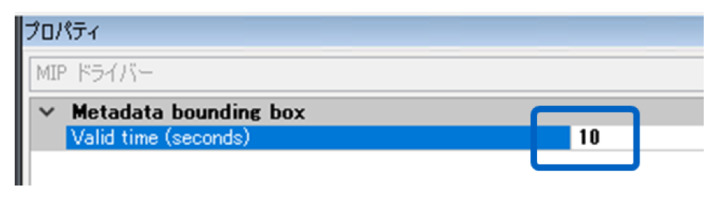
According to this change, we set Valid time of metadata to 10 sec. with Management Client.
Other than that, we are using your sample code as it is.
Rik
May 22, 2023, 11:05am
4
Can you please tell us which version of VMS are you using when you see the issue? Also, please verify that you are using the newest samples (https://github.com/milestonesys ) and Nuget (https://www.nuget.org/packages?q=milestone+systems )
Rik
May 22, 2023, 12:39pm
5
We cannot reproduce the issue using 2023 R1 VMS(Corporate) and the newest sample.
We are using XProtect Professional+ 2022 R1.
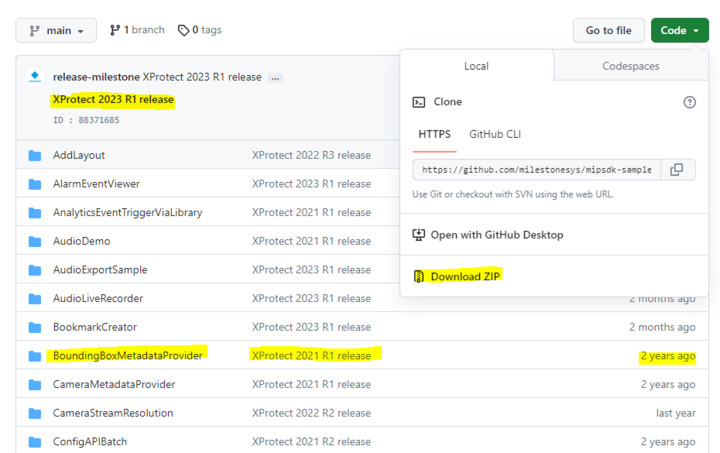
We got the Bounding Box Metadata Provider sample from github recently by clicking “Download ZIP” button.
We think this sample is the newest because the Bounding Box Metadata Provider has not been updated for 2 years.
Rik
May 26, 2023, 12:57pm
7
How about Nuget package? Please verify that you have used the newest Nuget. That is rather more important than the sample…
We have tried to reproduce the issue using Professional+ 2022 R1 but no success.
Aside from the Nuget package, we would like you to check if your machine’s CPU usage is close to 100%. If so, there might be some issues.
Also, it needs to be clarified where the issue occurs, is it on Smart Client or Server. So please see this link and troubleshoot it -
https://developer.milestonesys.com/s/article/how-to-view-device-metadata
(If you can see Metadata while playing playback, means that delivering metadata is fine. So, problem would be in Smart Client. If you cannot see Metadata while playing playback, means that delivering metadata is not fine, so problem would be in the server.)
We reproduced the issue with the latest stable version of Nuget sample.
We didn’t find any problem in the CPU usage.
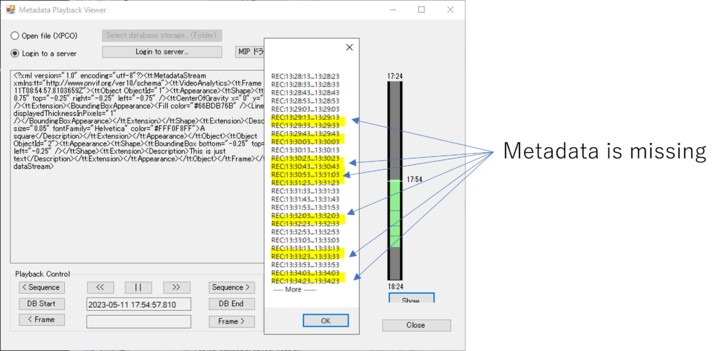
We tried MetadataPlaybackViewer and confirmed that metadata are missing in the playback data.
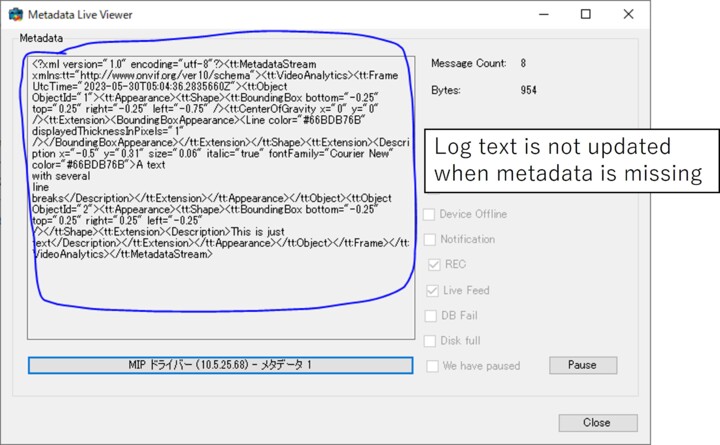
We tried MetadataLiveViewer as well.
The log text on the window was not updated when this issue occurred.
For you information.
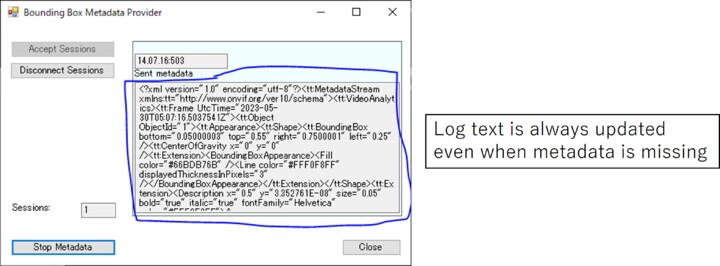
The log text on the BoundingBoxProvider is updated correctly even when this issue occurs.
We assume that there is no problem in queuing metadata of BoundingBoxProvider.
Rik
June 7, 2023, 9:56am
9
We have tried to reproduce the issue but no success.
BoundingBoxProvider worked fine and we saw that MetadataLiveViewer was updating as expected according to the provider, nothing was missing, it was working properly. Also, we tested MetadataPlaybackViewer and it was also working fine.
We made small notes from the provider and recorded the metadata and then the PlaybackViewer showed exactly the same as the notes. I am not sure if we are missing any settings compare to yours (we are using non-encrypted server and all in one) but so far, everything works fine.
Have you ever tried to test with any other servers or other machines or other network in order to see the issue? I am wondering if there might be a cause of the issue on your network or somewhere on hardware on your particular machine.
Also, we are wondering if there are any logs on the recording server that could show the problem, so please check the logs.
Due to our test results, it is hard to say that it is SDK issue. Please ask again in the support community, you should get better help from the partners using the support community. (Please make sure to test with other servers or another network which is not busy. Also, please check logs too. )
https://supportcommunity.milestonesys.com
We are not sure about the logs of the recording server.
Could you tell us the concrete filename and its location?
Please allow me to make sure your test environment just in case.
1)Did you modify the code of BoundingBoxMetadataProvider?
As we said, we modified the value of _timeBetweenMetadata in MainForm.cs from 0.5 to 10 to make this problem more clearly understandable.
2)We set Valid time of metadata to 10 sec. with Management Client. Please check it as well.
3)Did you run BoundingBoxMetadataProvider for enough time?
In our test environment, the problem occurs at least once per 10min, so I think 1hour is enough to reproduce the problem.
Regarding test environment, we are now considering building new environment from scratch with new PC to breakdown the cause of the problem.
Rik
June 9, 2023, 1:28pm
11
Log path is here - [C:\ProgramData\Milestone\XProtect](file:C:/ProgramData/Milestone/XProtect) Recording Server\Logs
DeviceHandling.log, DeviceFeedState.log, ImageServer.log might be good to check.
Please check logs there and find log entries that fit for the issue.
Suggestion - Each log entry has datetime, so it can be easier for you to do is -
1, To check the issue’s timestamps (around missing metadata’s timestamp)
2, And then check log entries around the metadata’s timestamp.
3, Find error log entries.
Regarding the questions from you, 1 and 2 yes. 3, we did it 15 mins or so.
But let us wait what you find in the logs and results of the new installation.
I confirmed the log files you mentioned.
-DeviceHandling.log
There are a a lot of warning and info messages in DeviceHandling.log.
The lines written in yellow are the messages at the timing of missing metadata.
Is this expected behavior?
-DeviceFeedState.log
There are no messages on this log file.
-ImageServer.log
We found the following warning message near the timing of the problem.
Is this relavant to the problem?
2023-06-12 11:08:47.219+09:00 [ 1257] WARNING - HandleConnect: Timeout getting a mediaFeedHandler from the device
Rik
June 27, 2023, 12:13pm
13
Are there any errors (not warning) in the logs?
These warnings are fine, because the log entries show us Established as info after the warnings. So to my knowledge, that is not the issue.
One more question, how about results of a new test environment? Have you tested it in the new environment? It would be great if you could tell us the results of the test when you finish it.
> Are there any errors (not warning) in the logs?
There are no errors in the log files.
>Have you tested it in the new environment?
We performed the same test with new environment.
Unfortunately the issue was reproduced.
During the test, we found the following strange behavior.
When we set _timeBetweenMetadata in MainForm.cs to 9.9, the issue does not occur.
When we set _timeBetweenMetadata in MainForm.cs to 10.0, the issue occurs.
When we set _timeBetweenMetadata in MainForm.cs to 10.1, the issue does not occur.
Do you have any ideas about the cause of this behavior?
Rik
July 13, 2023, 4:43pm
15
Thank you for the (1) - (3) notes above. Unfortunately, I have retried new tests with more than an hour, but still cannot see the issue. But regarding the notes, I will ask Milestone Development to check and see if there is no trick with the numbers. We will get back to you later.
Rik
September 4, 2023, 7:55am
16
I am sorry for keeping you wait for a while and here comes a good news for you, finally.
Milestone Development found out that the issue was in the driver.
They have fixed this issue and the fix will be included 2023 R3 (driver).
Thank you for your information.
We will try XProtect 2023 R3 as soon as Milestone releases it.
By the way, when we use XProtect 2023 R3,
do we need to update MIPSDK to the latest version as well?
Or updating XProtect is enough to fix this issue?
Rik
September 5, 2023, 11:34am
18
What you will need to do is to install driver(coming release Device pack, it has not released yet but it will be upcoming here - https://www.milestonesys.com/support/software/device-packs/ )
so you don’t need to install entire XProtect.
Regarding the SDK, We always suggest to use the newest MIP SDK