Hello Team,
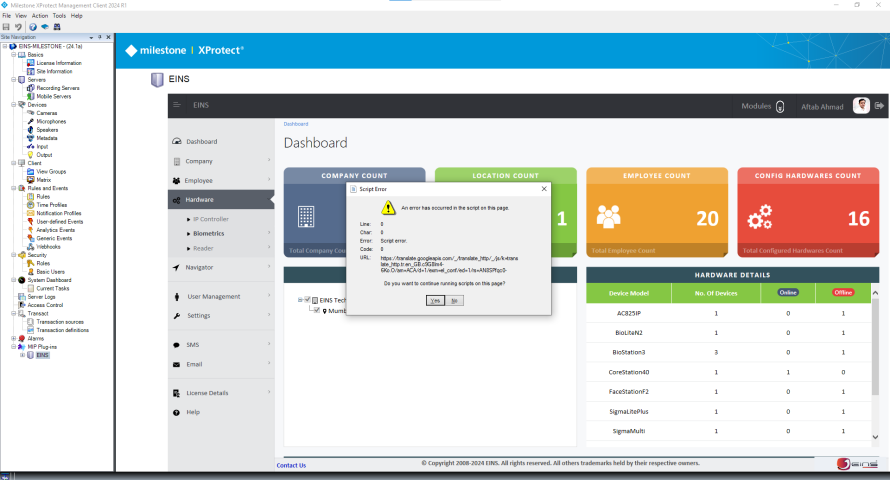
I have created a plugin of my own for a web application, but when I navigate through it, I get errors as it cannot load the javascripts. as it is getting opened at Internet Explorer.So is there some default path set to Internet Explorer and we can change to Chrome?
So can you let us know where to upload this web application dll?
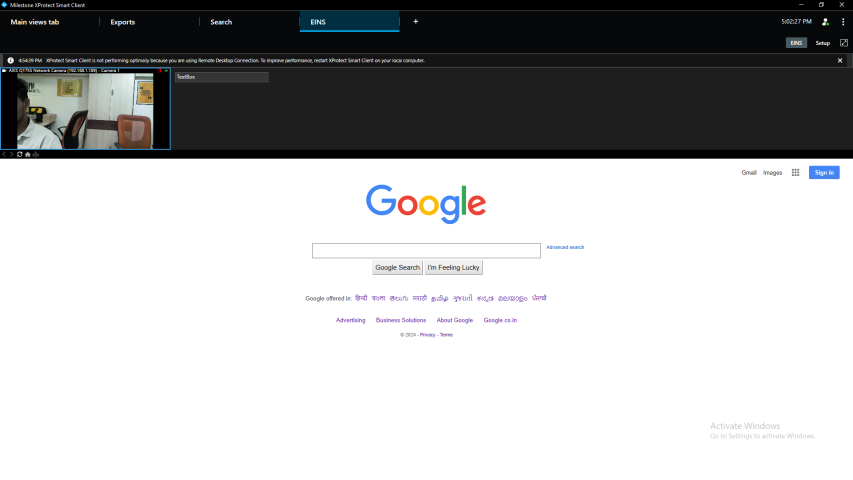
Also when we adding plugin in Smart Client it shows like this..
Is there something we are missing??
The built-in web browser in the Smart Client is Internet Explorer. What you can do is discussed in this older thread. If you have follow-up questions you can ask here again.
https://developer.milestonesys.com/s/question/0D53X0000DFICdSSQX/open-web-page-from-the-plugin
PS.
It seems from the image that you have implemented a workspace where you put more than the web view (HTMLBuiltinId). I do not recognize it from any sample. The Smart Client Insert Camera plugin sample inserts a web view (HTMLBuiltinId), but that sample also puts more than one item in the view..
https://doc.developer.milestonesys.com/html/index.html?base=samples/pluginsamples/scinsertcamera/readme.html&tree=tree_1.html
https://github.com/milestonesys
You have put “Access Plugin Integration” in the head line, but if I am not mistaken that is not relevant pertaining to the question, you just need a browser, please elaborate if I misunderstand this aspect of your integration.
I add a web application to it and make a plugin. However, by default, it launches Internet Explorer. Can we use the system browser by default to open it? or any other method that allows us to use plugins to open online applications. because, as the image below illustrates, Internet Explorer does not support the.js and.css files that I add to my program.
I linked
https://developer.milestonesys.com/s/question/0D53X0000DFICdSSQX/open-web-page-from-the-plugin
One of the options is to create a “browser” plugin. If you have your own view item plugin you can use it.
I am guessing that you built a view much like the SCInsertCamera plugin sample. If you instead of using InsertBuiltinViewItem use InsertViewItemPlugin you can use your own view item.
You must then develop that plugin mentioned in order to use it.
Ref. https://doc.developer.milestonesys.com/html/index.html?base=miphelp/class_video_o_s_1_1_platform_1_1_client_1_1_view_and_layout_item.html&tree=tree_search.html?search=insertviewitemplugin
https://doc.developer.milestonesys.com/html/index.html?base=samples/pluginsamples/scinsertcamera/readme.html&tree=tree_1.html
Uups. I started this answer not noticing that you have now switched to the Management Client. I believe the issue is similar, you need to use your own plugin with your own user control that implements a browser.