Can we we the Milestone REST API to connect to the XProtect Access Control Module? or we have to use the SDK for that purpose?
Access Control Module is a plugin integration for the Event Server, there is no support for it outside the MIP SDK -MIP library.
We have currently an existing integration (component Integration) of our Software (Protégé GX) with Milestone VMS that is achieving the following :
⦁ View live video footage from programmed cameras.
⦁ View historic and archived video footage.
⦁ Embed cameras into a status page.
⦁ Link a camera to a door, input, output or area.
⦁ View live or archived video footage directly from an event associated with a camera.
⦁ Automatically launch a camera view window when specific types of events occur.
⦁ Send PTZ preset commands to the VMS in response to a Protege GX event filter.
⦁ View the following HLI events directly within Protege GX. - Motion Detected - Camera Online/Offline - System Diagnostics
Now we would like to extend this integration bi-directional integration to do the Followings :
- Sync Doors from Protege GX to XProtect
- Control Door Status from both platforms XProtect and Protege GX
- Send Events and Alarms from One platform to the other and acknowledge alarms from XProtect client
- Sync Users from Protege GX to XProtect
can you please guide me to samples and how to achieve these requirements.
Currently we have a stand alone service/application that is linked to MIP SDK . can we still use this approach or we need to create a plugin to integrate our access control system to XProtect MIlestone system?
Thanks
For 1, 2, 4 the sample is the Demo Access Control Plug-in sample
For 3 the sample is the Alarm and Event Viewer sample
There is a lot of information on Access Control Module reachable in the left hand side under the heading “Access Control Overview” under Plugin Integration here
https://doc.developer.milestonesys.com/html/index.html?base=content_1.html&tree=tree_1.html
You find the source code for the samples here
Thank you for the reply.
For the Events and Alarms that is received from our Access Control System to send and display in Milestone , the sample for that is the Access Control Plug-in sample?
And how to Acknowledge Alarm in the Milestone and receive the acknowledgment and send it back to Our Access Control System is done?
Thanks
Number three is actually also the Demo Access Control Plug-in sample.
Your last question: I am in doubt as normally you would say that the acknowledgement is done by the Smart Client user on the Alarm Manager tab and the Alarm List. If you test the sample and does not feel it answers how to deal with this perhaps you can elaborate on the question and I can try to help further.
Can we delete the synched items (like Doors or Users ) from the Milestone XProtect? if so is it synched again from the Access Control System ?
Hi Hanan,
I’m sorry for the late response. As you can see, from the Mileston XProtect Access Control plugin for Management Client, you can only enable/disable doors, not remove/add.
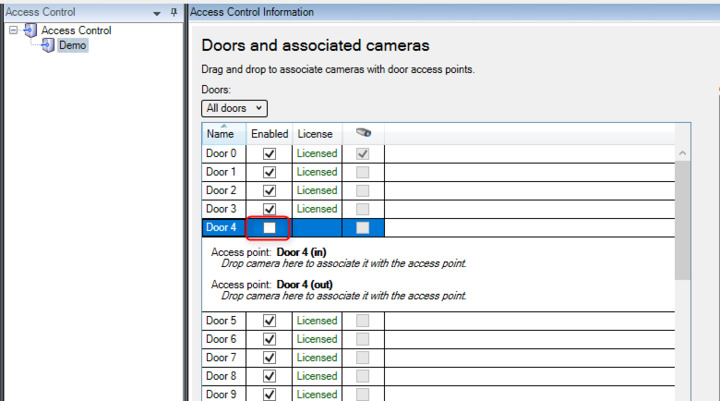
In order to remove or add new doors, you need to do it on the access control system, and then syncronize the data again.by clicking “Refresh configuration” on the first tab (introduce the password if promtped):
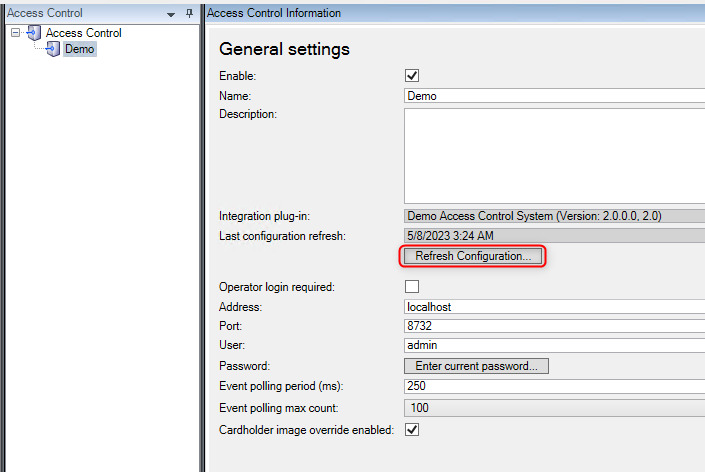
Thanks for you patience.
Fer
Hi Fernando,
Is there a way to trigger Refresh Configuration using a plugin every hour? I mean I would like to sync everything from a ACS every hour using a plugin. The effect should be the same as we click Refresh Configuration.
Thank you!