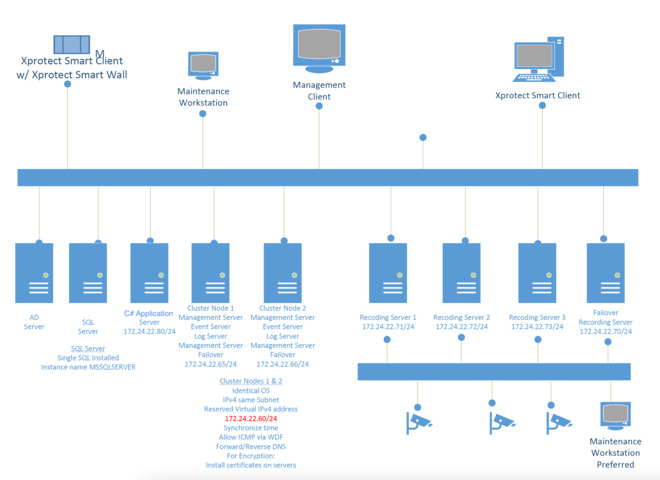
I’m running a C# based application that login into VMS and try to stream video from cameras. Application uses MIP SDK 2018 R3 and VMS is XProtect Corporate 2022.
I’m able to login successfully and retrieve cameras, but when try to stream, no frames received from the frame callback.
Using Milestone Client I see video properly.
The C# application works well with other customer sites that use same VMS, it is qualified and I know it’s able to receive frames from callback. The issue seems to be related a specific configuration (please see attached for architecture used).
The 2 Management servers are configured with Windows Cluster.
I tried to login with C# application to the virtual IP and also to the single management nodes. The result is the same. Application is able to connect, fetch cameras, but no frames.
The same test with Milestone client succeed.
Which port should I verify to be sure there are no network issues? Why Milestone client works? I expect client and SDK will use same ports to retrieve video stream, no?
Updating SDK to latest fixed the issue. Great. We did not upgrade initially, because the application was able to work with another 2022 R2 VMS, but it was a single node configuration.