Milestone Driver Framework & H.264

we’re having with the Milestone Driver Framework – we’ve written a driver that takes in an RTSP stream which is outputting H.264 video. I’m confident that we’re receiving the frames as we’re outputting the size and type (I-Frame / P-Frame) and I’m confident that we’re sending the latest frame we have onto Milestone.

Unfortunately once it is sent to Milestone, we’re not getting any video in the management client itself. Instead we are getting these errors, without any other context:

2020-12-21 10:05:23.039+00:00 [  36] ERROR   - 97023ef2-eed4-4d77-a829-c1e232644a45 Panoptech Hardware (localhost) - Panoptech Camera Unable to add one or more frames to the frame collector (Logged only once a minute). Error code = 5
 
2020-12-21 10:06:23.040+00:00 [  36] ERROR   - 97023ef2-eed4-4d77-a829-c1e232644a45 Panoptech Hardware (localhost) - Panoptech Camera Unable to add one or more frames to the frame collector (Logged only once a minute). Error code = 5
 
2020-12-21 10:07:23.040+00:00 [  36] ERROR   - 97023ef2-eed4-4d77-a829-c1e232644a45 Panoptech Hardware (localhost) - Panoptech Camera Unable to add one or more frames to the frame collector (Logged only once a minute). Error code = 5
 
2020-12-21 10:08:23.041+00:00 [  36] ERROR   - 97023ef2-eed4-4d77-a829-c1e232644a45 Panoptech Hardware (localhost) - Panoptech Camera Unable to add one or more frames to the frame collector (Logged only once a minute). Error code = 5

The example driver only uses JPEG so we’re a bit stumped at what to do next!

Any help would be appreciated.

Hi Patrick,

Would you mind sharing the code in your GetLiveFrame method of the relevant StreamSession implementation? Thanks.

Here is our VideoStreamSession code:

internal class MIPDriver2VideoStreamSession : BaseMIPDriver2StreamSession
    {
 
        public MIPDriver2VideoStreamSession(ISettingsManager settingsManager, MIPDriver2ConnectionManager connectionManager, Guid sessionId, string deviceId, Guid streamId) :
            base(settingsManager, connectionManager, sessionId, deviceId, streamId)
        {
            // TODO: Set Channel to correct channel number
            Channel = 1;
            start();
        }
 
        private byte[] lastFrame;
        private DateTime lastTimestamp;
        private bool isKeyframe = false;
 
        private async void start()
        {
            CancellationTokenSource source = new CancellationTokenSource();
            CancellationToken token = source.Token;
 
            var uri = new Uri("rtsp://---/rtsp/live");
            var connectionParameters = new ConnectionParameters(uri);
            connectionParameters.RtpTransport = RtpTransportProtocol.TCP;
            using (var rtspClient = new RtspClient(connectionParameters))
            {
                rtspClient.FrameReceived += (sender, frame) =>
                {
                    switch (frame)
                    {
                        case RawH264IFrame h264iFrame:
                            Toolbox.Log.Trace("-> " + h264iFrame.FrameSegment.Array.Length + "\t" + h264iFrame.Timestamp  + "\t" + true);
                            lastFrame = h264iFrame.FrameSegment.Array;
                            lastTimestamp = h264iFrame.Timestamp;
                            isKeyframe = true;
                            break;
 
                        case RawH264PFrame h264pFrame:
                            Toolbox.Log.Trace("-> " + h264pFrame.FrameSegment.Array.Length + "\t" + h264pFrame.Timestamp + "\t" + false);
                            lastFrame = h264pFrame.FrameSegment.Array;
                            lastTimestamp = h264pFrame.Timestamp;
                            isKeyframe = false;
                            break;
 
                        default:
                            break;
                    }
                };
 
                await rtspClient.ConnectAsync(token);
                await rtspClient.ReceiveAsync(token);
            }
        }
 
        protected override bool GetLiveFrameInternal(TimeSpan timeout, out BaseDataHeader header, out byte[] data)
        {
            header = null;
 
            data = lastFrame;
            DateTime dt = lastTimestamp;
 
            if (data == null || data.Length == 0) {
                return false;
            }
 
            Toolbox.Log.Trace("<- " + lastFrame.Length + "\t" + lastTimestamp + "\t" + isKeyframe);
 
            header = new VideoHeader()
            {
                CodecType = VideoCodecType.H264,
                Length = (ulong) data.Length,
                SequenceNumber = _sequence++,
                SyncFrame = isKeyframe,
                TimestampSync = dt,
                TimestampFrame = DateTime.Now
            };
            return true;
        }
    }

And here is the GetLiveFrame from the BaseStreamSession

public sealed override bool GetLiveFrame(TimeSpan timeout, out BaseDataHeader header, out byte[] data)
        {
            try
            {
                return GetLiveFrameInternal(timeout, out header, out data);
            }
            catch (Exception ex)
            {
                Toolbox.Log.LogError(GetType().Name,
                    "{0}, Channel {1}: {2}", nameof(GetLiveFrame), Channel, ex.Message + ex.StackTrace);
                throw new ConnectionLostException(ex.Message + ex.StackTrace);
            }
        }

Thank you for your quick response. The sync timestamp should be set to the timestamp of the last key frame, it appears you are setting it for every frame regardless of type; the frame timestamp should be the timestamp of the frame, not the time we request the frame. In addition, it looks like you’re creating a client which then goes out of scope as soon as you receive the first frame (given that you have a using statement around the creation of your rtsp client). Is this correct?

Thank you for your quick response as well Simon! :slight_smile:

Okay, so in the H264 P-Frame section I will comment out the assignment of lastTimestamp (lastTimestamp = h264pFrame.Timestamp). That’s done now.

The client continues to receive frames throughout due to the await client.ReceiveAsync() function and GetLiveFrameInternal continues to send. I’ve been able to confirm this with log files via Toolbox logging.

Any other advice, or should I recompile and give another try?

I would actually recommend saving two separate timestamps, one for the last frame received and one for the last i-frame received, passing the first one as the timeStampFrame and the other as timeStampSync. The recording server is very dependent on accurate time stamps.

Thanks Simon. I’ll give that a go and let you know how I get on.

Hi Simon,

Still no luck unfortunately - still getting “No video” + connection is broken when hovering over the device.

We’ve had to change servers and I seem to have lost the ability to log the driver output as well (I’ve set .def file debug=true).

I don’t suppose you have any examples of h264 working in a driver that I can look at? That would be a great starting point I think.

Thanks,

Patrick

Hi Patrick,

The only driver we have built with H.264 reads its data from a file, I’m not sure how helpful that would be, but if you want to take a look, here is what the GetLiveFrame method of that driver looks like:

public override bool GetLiveFrame(TimeSpan timeout, out BaseDataHeader header, out byte[] data)
        {
            _header.SequenceNumber++;
            header = _header;
            if (_useRawFiles)
            {
                data = _rawFiles[_nextRawFile].Item2;
                _header.SyncFrame = _rawFiles[_nextRawFile].Item1;
                header.Length = (ulong)data.Length;
                _nextRawFile++;
                if (_nextRawFile == _rawFiles.Count)
                {
                    _nextRawFile = 0;
                }
            }
            else
            {
                data = _testFrameBin;
            }
            DateTime idealCurrentFrameTime;
            if (_lastIdealFrameTime == DateTime.MinValue)
            {
                // first time initialization
                idealCurrentFrameTime = DateTime.UtcNow;
            }
            else
            {
                idealCurrentFrameTime = _lastIdealFrameTime + TimeSpan.FromMilliseconds(1000 / Constants.FPS);
            }
            TimeSpan delay = idealCurrentFrameTime - DateTime.UtcNow;
            if (delay > TimeSpan.Zero)
            {
                System.Threading.Thread.Sleep(delay);
            }
            // update _lastFrameTime to current ideal value
            _lastIdealFrameTime = idealCurrentFrameTime;
            _header.TimestampFrame = DateTime.UtcNow;
            // ideally idealCurrentFrameTime == _header.TimestampFrame here, but might not be
            if (_header.SyncFrame)
            {
                _header.TimestampSync = _header.TimestampFrame;
            }
            return true;
        }

Some new information now, maybe will help - seeing this error in the DeviceHandling.log

System.Runtime.InteropServices.SEHException (0x80004005): External component has thrown an exception.
   at NmMediaProcessing.CmByteDataSequenceSpecificAnalyzer.Analyze(CmByteDataSequenceSpecificAnalyzer* , CmGenericByteData* , CmByteDataSequenceAnalysisResult* )
   at NmMediaProcessing.CmStreamAnalyzer<NmMediaProcessing::SmByteDataSequenceAnalysisTraits>.Analyze(CmStreamAnalyzer<NmMediaProcessing::SmByteDataSequenceAnalysisTraits>* , CmGenericByteData* byteData, CmByteDataSequenceAnalysisResult* rResult)
   at NmMediaProcessing.CmVideoStreamCollector<SmGenericStreamCollectorTraits>.HandleFrame(CmVideoStreamCollector<SmGenericStreamCollectorTraits>* , CmGenericVideoStreamDataPacket* packet)
   at NmMediaProcessing.CmDummyVideoPacketGOPBuffer.Add(CmDummyVideoPacketGOPBuffer* , CmGenericVideoStreamDataPacket* )
   at NmMediaProcessing.CmBaseLegacyVideoBufferHandler<NmMediaProcessing::CmVideoBlockBufferHandler<NmMediaProcessing::CmDummyVideoPacketGOPBuffer>,NmMediaProcessing::CmDefaultTimeStampForLegacyData>.Add(CmBaseLegacyVideoBufferHandler<NmMediaProcessing::CmVideoBlockBufferHandler<NmMediaProcessing::CmDummyVideoPacketGOPBuffer>\,NmMediaProcessing::CmDefaultTimeStampForLegacyData>* , CmCountedPtr<NmMediaProcessing::CmGenericByteData\,NmCountedPtr::CmUnserializedReferenceCount>* pGenericByteData)
   at NmMediaProcessing.CmBaseLegacyVideoBufferHandler<NmMediaProcessing::CmVideoBlockBufferHandler<NmMediaProcessing::CmDummyVideoPacketGOPBuffer>,NmMediaProcessing::CmDefaultTimeStampForLegacyData>.Add(CmBaseLegacyVideoBufferHandler<NmMediaProcessing::CmVideoBlockBufferHandler<NmMediaProcessing::CmDummyVideoPacketGOPBuffer>\,NmMediaProcessing::CmDefaultTimeStampForLegacyData>* , CmGenericByteData* genericByteData)
   at CmGenericStreamCollector.AddFrame(CmGenericStreamCollector* , Byte* pData, UInt64 nBytes)
   at VideoOS.IO.Drivers.Interop.GenericStreamCollectorWrapper.AddStreamPacket(ReadOnlySharedBuffer packet)
   at VideoOS.Common.Media.FrameCollector.AddAnalyzedFrame(ReadOnlySharedBuffer frame, ICollection`1 decodableFrames, ICollection`1 completedFrameGroups)
   at VideoOS.Recorder.ObjectModel.Processors.Pipeline.ThreadFunctionPart1()

Ignore that last one, that was related to a bad timestamp sync value.

Now back to just:

Panoptech Camera Unable to add one or more frames to the frame collector (Logged only once a minute). Error code = 5

private byte[] _data;
        private DateTime _timestampSync;
        private DateTime _timestampFrame;
        private bool _keyframe = false;
 
        private async void start()
        {
            CancellationTokenSource source = new CancellationTokenSource();
            CancellationToken token = source.Token;
 
            var uri = new Uri("rtsp://192.168.84.3:1401/rtsp/live");
            var connectionParameters = new ConnectionParameters(uri);
            connectionParameters.RtpTransport = RtpTransportProtocol.TCP;
            using (var rtspClient = new RtspClient(connectionParameters))
            {
                rtspClient.FrameReceived += (sender, frame) =>
                {
                    switch (frame)
                    {
                        case RawH264IFrame iframe:
                            _sequence++;
                            _data = iframe.FrameSegment.Array;
                            _timestampSync = iframe.Timestamp;
                            _timestampFrame = iframe.Timestamp;
                            _keyframe = true;
                            break;
 
                        case RawH264PFrame pframe:
                            _sequence++;
                            _data = pframe.FrameSegment.Array;
                            _timestampFrame = pframe.Timestamp;
                            _keyframe = false;
                            break;
                    }
                };
 
                await rtspClient.ConnectAsync(token);
                await rtspClient.ReceiveAsync(token);
            }
        }
 
        protected override bool GetLiveFrameInternal(TimeSpan timeout, out BaseDataHeader header, out byte[] data)
        {
            header = null;
 
            data = _data;
 
            if (data == null || data.Length == 0) {
                return false;
            }
 
            header = new VideoHeader()
            {
                CodecType = VideoCodecType.H264,
                Length = (ulong) data.Length,
                SequenceNumber = _sequence,
                SyncFrame = _keyframe,
                TimestampSync = _timestampSync,
                TimestampFrame = _timestampFrame
            };
 
            return true;
        }

This is what the relevant code looks like right now. I think it follows what you said previously, last keyframe timestamp = sync timestamp, last frame timestamp = frame timestamp

We’re still stuck on this, some more clarity as to what this error means would be greatly appreciated: Panoptech Camera Unable to add one or more frames to the frame collector (Logged only once a minute). Error code = 5

I see two problems with your implementation.

One is that you have no lock around your data so the receiving code might update some of the variables while the sending code is reading them. (made even worse from the face that you don’t copy the data variable, but just assign a reference)

The other is that if data comes in slightly irregular it might mean that a frame is overwritten by the receiving code before the sending code get to pass it on. I would suggest introducing a queue for the transfer, so that the receiver adds header+data to the queue and the sender takes it from there.

Still getting Unable to add one or more frames to the frame collector (Logged only once a minute). Error code = 5 errors.

Code now looks like this:

internal class MIPDriver2VideoStreamSession : BaseMIPDriver2StreamSession
    {
 
        public MIPDriver2VideoStreamSession(ISettingsManager settingsManager, MIPDriver2ConnectionManager connectionManager, Guid sessionId, string deviceId, Guid streamId) :
            base(settingsManager, connectionManager, sessionId, deviceId, streamId)
        {
            // TODO: Set Channel to correct channel number
            Channel = 1;
            start();
        }
 
        private Queue<PanoptechFrame> _queue = new Queue<PanoptechFrame>(10000);
        private DateTime _lastSyncTimestamp;
        private int frames;
        private long lastSecond;
 
        private async void start()
        {
            CancellationTokenSource source = new CancellationTokenSource();
            CancellationToken token = source.Token;
 
            Toolbox.Log.LogDebug("Panoptech Driver", "Starting");
 
            var uri = new Uri("rtsp://---/rtsp/live");
            var connectionParameters = new ConnectionParameters(uri);
            connectionParameters.RtpTransport = RtpTransportProtocol.TCP;
            connectionParameters.ReceiveTimeout = TimeSpan.FromSeconds(120);
            using (var rtspClient = new RtspClient(connectionParameters))
            {
                PanoptechFrame panoptechFrame;
 
                rtspClient.FrameReceived += (sender, frame) =>
                {
                    switch (frame)
                    {
                        case RawH264IFrame iframe:
                            _sequence++;
                            frames++;
                            _lastSyncTimestamp = iframe.Timestamp;
 
                            // Toolbox.Log.LogDebug("Panoptech Driver", "New IFrame");
                            panoptechFrame = new PanoptechFrame(
                                _sequence, iframe.FrameSegment.Array, _lastSyncTimestamp, iframe.Timestamp, true
                            );
 
                            _queue.Enqueue(panoptechFrame);
                            break;
 
                        case RawH264PFrame pframe:
                            _sequence++;
                            frames++;
 
                            // Toolbox.Log.LogDebug("Panoptech Driver", "New PFrame");
                            panoptechFrame = new PanoptechFrame(
                                _sequence, pframe.FrameSegment.Array, _lastSyncTimestamp, pframe.Timestamp, true
                            );
 
                            _queue.Enqueue(panoptechFrame);
                            break;
                    }
                };
 
                await rtspClient.ConnectAsync(token);
                await rtspClient.ReceiveAsync(token);
            }
        }
 
        protected override bool GetLiveFrameInternal(TimeSpan timeout, out BaseDataHeader header, out byte[] data)
        {
            header = null;
            data = null;
 
 
            if (_queue.Count <= 0) {
                return false;
            }
 
            long now = DateTimeOffset.Now.ToUnixTimeMilliseconds();
 
            PanoptechFrame frame = _queue.Dequeue();
            data = frame.Data;
 
            if (data == null || data.Length == 0) {
                return false;
            }
 
            if (now - lastSecond > 1000) 
            {
                lastSecond = now;
                Toolbox.Log.LogDebug("Panoptech Driver", "{0} frames in queue ({1} fps)", _queue.Count, frames);
                frames = 0;
            }
            else
            {
                Toolbox.Log.LogDebug("Panoptech Driver", "{0} frames in queue", _queue.Count);
            }
 
            header = new VideoHeader()
            {
                CodecType = VideoCodecType.H264,
                Length = (ulong) data.Length,
                SequenceNumber = frame.Sequence,
                SyncFrame = frame.Keyframe,
                TimestampSync = frame.SyncTimestamp,
                TimestampFrame = frame.FrameTimestamp
            };
 
            return true;
        }

And the driver logs look like:

2021-03-31 10:37:20.820+01:00 INFO - Panoptech Driver: 1 frames in queue (27 fps) (8192 data length)

2021-03-31 10:37:20.820+01:00 INFO - Panoptech Driver: 0 frames in queue (8192 data length)

2021-03-31 10:37:20.913+01:00 INFO - Panoptech Driver: 2 frames in queue (8192 data length)

2021-03-31 10:37:20.913+01:00 INFO - Panoptech Driver: 1 frames in queue (8192 data length)

2021-03-31 10:37:20.913+01:00 INFO - Panoptech Driver: 0 frames in queue (8192 data length)

2021-03-31 10:37:21.054+01:00 INFO - Panoptech Driver: 1 frames in queue (8192 data length)

2021-03-31 10:37:21.054+01:00 INFO - Panoptech Driver: 1 frames in queue (8192 data length)

2021-03-31 10:37:21.054+01:00 INFO - Panoptech Driver: 0 frames in queue (8192 data length)

2021-03-31 10:37:21.132+01:00 INFO - Panoptech Driver: 0 frames in queue (8192 data length)

2021-03-31 10:37:21.163+01:00 INFO - Panoptech Driver: 0 frames in queue (8192 data length)

2021-03-31 10:37:21.179+01:00 INFO - Panoptech Driver: 0 frames in queue (16384 data length)

2021-03-31 10:37:21.273+01:00 INFO - Panoptech Driver: 0 frames in queue (8192 data length)

2021-03-31 10:37:21.273+01:00 INFO - Panoptech Driver: 0 frames in queue (8192 data length)

2021-03-31 10:37:21.351+01:00 INFO - Panoptech Driver: 1 frames in queue (8192 data length)

2021-03-31 10:37:21.351+01:00 INFO - Panoptech Driver: 0 frames in queue (8192 data length)

2021-03-31 10:37:21.429+01:00 INFO - Panoptech Driver: 1 frames in queue (8192 data length)

2021-03-31 10:37:21.429+01:00 INFO - Panoptech Driver: 0 frames in queue (8192 data length)

2021-03-31 10:37:21.507+01:00 INFO - Panoptech Driver: 2 frames in queue (8192 data length)

2021-03-31 10:37:21.507+01:00 INFO - Panoptech Driver: 1 frames in queue (8192 data length)

2021-03-31 10:37:21.507+01:00 INFO - Panoptech Driver: 0 frames in queue (8192 data length)

2021-03-31 10:37:21.585+01:00 INFO - Panoptech Driver: 0 frames in queue (8192 data length)

2021-03-31 10:37:21.648+01:00 INFO - Panoptech Driver: 0 frames in queue (8192 data length)

2021-03-31 10:37:21.726+01:00 INFO - Panoptech Driver: 2 frames in queue (8192 data length)

2021-03-31 10:37:21.726+01:00 INFO - Panoptech Driver: 1 frames in queue (8192 data length)

2021-03-31 10:37:21.726+01:00 INFO - Panoptech Driver: 0 frames in queue (8192 data length)

2021-03-31 10:37:21.804+01:00 INFO - Panoptech Driver: 1 frames in queue (8192 data length)

2021-03-31 10:37:21.804+01:00 INFO - Panoptech Driver: 0 frames in queue (8192 data length)

2021-03-31 10:37:21.866+01:00 INFO - Panoptech Driver: 1 frames in queue (27 fps) (8192 data length)

So we’re getting frames at a regular pace, of the right size and is being taken from the queue. Any help would be appreciated as we still don’t know what the error code (Unable to add one or more frames to the frame collector) means.

Thanks,

Patrick

I don’t have the code for the PanoptechFrame, so I cannot say for sure, but I can see that you pass in true as constructor argument for both I-frames and P-frames, and I suspect that this is what is later read as frame.Keyframe? In which case you should change it to false for the P-frames.

Furthermore, I would still suggest some handling of thread-safety (although this is probably not your problem right now), so either introducing some lock statements or use a ConcurrentQueue instead of just Queue.

You’re absolutely right Peter! I made 2 changes to the code since the last version I sent you.

  1. P-Frame now has the false flag for what defines whether its a keyframe or not.

  2. Now using a ConcurrentQueue rather than just a Queue.

We no longer have the “Unable to add one or more frames to the frame collector” error. We now have (from DeviceHandling.log):

2021-04-12 09:09:52.879+01:00 [ 22] INFO - ******************************* Starting logger *******************************

2021-04-12 09:09:55.316+01:00 [ 69] INFO - b020c6ed-8895-41ba-9eac-56c2495cc8c4 Panoptech Hardware (192.168.84.3) - Panoptech Camera Starting frame group media db consumer

2021-04-12 09:09:55.316+01:00 [ 69] INFO - b020c6ed-8895-41ba-9eac-56c2495cc8c4 Panoptech Hardware (192.168.84.3) - Panoptech Camera Creating performance counter for device frame group media db consumer

2021-04-12 09:09:56.597+01:00 [ 71] INFO - b020c6ed-8895-41ba-9eac-56c2495cc8c4 Panoptech Hardware (192.168.84.3) - Panoptech Camera Device communication established

2021-04-12 09:10:38.754+01:00 [ 71] WARNING - b020c6ed-8895-41ba-9eac-56c2495cc8c4 Panoptech Hardware (192.168.84.3) - Panoptech Camera Device communication error (ICPNoDataException). Error: No data received within the specified time frame

2021-04-12 09:10:39.894+01:00 [ 71] INFO - b020c6ed-8895-41ba-9eac-56c2495cc8c4 Panoptech Hardware (192.168.84.3) - Panoptech Camera Device communication established

2021-04-12 09:13:57.723+01:00 [ 71] WARNING - b020c6ed-8895-41ba-9eac-56c2495cc8c4 Panoptech Hardware (192.168.84.3) - Panoptech Camera Device communication error (ICPUnableToGetLiveDataException). Error: Unable to retrieve live data

2021-04-12 09:13:58.989+01:00 [ 71] INFO - b020c6ed-8895-41ba-9eac-56c2495cc8c4 Panoptech Hardware (192.168.84.3) - Panoptech Camera Device communication established

2021-04-12 09:14:57.786+01:00 [ 71] WARNING - b020c6ed-8895-41ba-9eac-56c2495cc8c4 Panoptech Hardware (192.168.84.3) - Panoptech Camera Device communication error (ICPNoDataException). Error: No data received within the specified time frame

2021-04-12 09:14:59.020+01:00 [ 71] INFO - b020c6ed-8895-41ba-9eac-56c2495cc8c4 Panoptech Hardware (192.168.84.3) - Panoptech Camera Device communication established

2021-04-12 09:15:09.192+01:00 [ 71] WARNING - b020c6ed-8895-41ba-9eac-56c2495cc8c4 Panoptech Hardware (192.168.84.3) - Panoptech Camera Device communication error (ICPNoDataException). Error: No data received within the specified time frame

2021-04-12 09:15:10.473+01:00 [ 71] INFO - b020c6ed-8895-41ba-9eac-56c2495cc8c4 Panoptech Hardware (192.168.84.3) - Panoptech Camera Device communication established

The driver specific log remains the same as before, reporting 24 - 26fps.

Could you please have a look at the logs in [c:\ProgramData\Milestone\XProtect](file:c:/ProgramData/Milestone/XProtect) Recording Server\Logs\[c:\ProgramData\Milestone\XProtect](file:c:/ProgramData/Milestone/XProtect) Recording Server\Logs\.

Also, looking at your previous log I find it a bit suspicious that all package sizes are exactly the same (8192 bytes)?

Hi - good news! We’re now getting video into Milestone which we’re excited about, thank you for all your help on that.

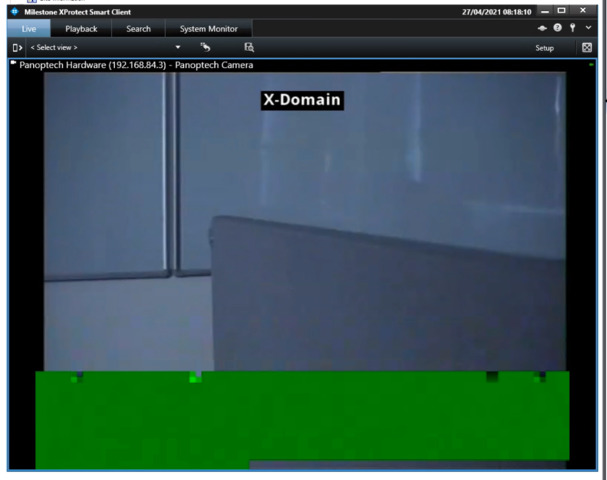
Some bad news however, we’re getting some frame pixelation, distortion? Not sure on the correct terminology. This distortion only happens within the Smart Client. It looks as though it has old pframes being loaded into the image that we’re currently looking at.

In the Management Client preview window under your devices, it appears correctly with none of the same issues and notably when exported from Smart Client to an AVI format - none of this distortion exists either.

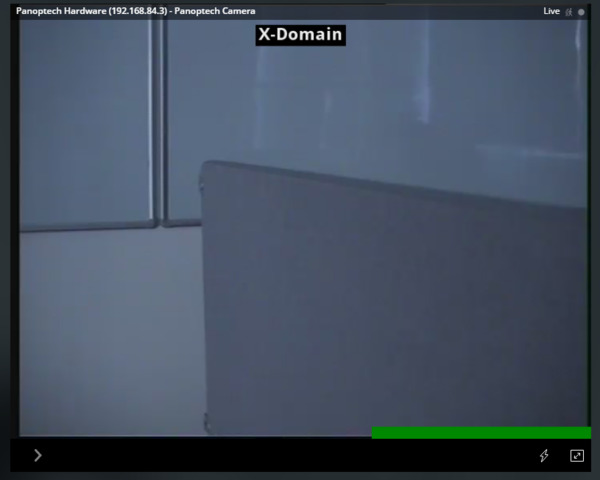
We’ve also noticed the first time you start the camera (or if you view the camera in the web client), there are a lot of green bars that appear in the same sort of place where this distortion occurs as well.

Is it possible that I’m not loading the pframes fast enough for live video, but its sufficient for saved/exported video?

Any advice would be appreciated. Screenshots with examples of what’s happening below.

Thanks,

Patrick

---------------------------------------

Example of the same video at the same time showing the issue in Smart Client and not in Management Client

example-milestone

Example of green bars in Smart Client (only appears at load)

Example of green bars in Web Client (continues to appear all the way through watching)

Hi Patrick

This sounds pretty strange. Could you please check whether this also happen in playback (browse) mode in the Smart Client?

And also try enabling the Video Diagnostics Overlay level 3 in Smart Client under Settings → Advanced and then watch whether frames are dropped or similar.