Hi guys,
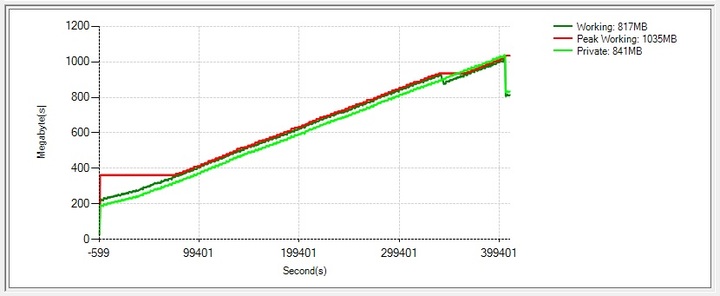
We seems to have a memory issue with our milestone 2019 SDK integration. When we use the playback mode, memory usage keep increasing over the time.
In one test run, it reached around 4GB over 4days. Application didn’t crash, but obviously it would run out of memory at one point.
I took a memory dump of my program when it reached 4GB and you can download it from here
It seems there are a large number of object instances being held through this ‘SDKImageViewerControl’ class.
Any idea what causing this issue?
Before we analyze could you please outline what your test does?
Do you have one (or multiple) ImageViewerControls open and simply playback?
Do you open and close ImageViewerControls continually during testing?
Do you do something else?
When we have an idea what your test does it will be easier to analyse the dump and we might also try to reproduce the issue in our test lab.
Hi Bo,
We have 6 camera tiles running through this application and 4 of them are playing back past videos.
So we have 2 ImageViewerControl instances loaded onto our main object for live play and 4 PlaybackUserControl and PlaybackController pairs for playback.
Execution procedure is, first all the tiles start playing live and then we set 4 of them into playback mode. At that point, we close the 4 instances of ImageViewerControl and load 4 PlaybackUserControl/PlaybackController pairs for playback.
When we close the ImageViewerControl,
if (_milestoneLiveViewerCtl != null)
{
        _milestoneLiveViewerCtl.MouseMoveEvent -= OnMouseMove;
        _milestoneLiveViewerCtl.Close();
        _milestoneLiveViewerCtl.Dispose();
        _milestoneLiveViewerCtl = null;
}

//_milestoneLiveViewerCtl is a ImageViewerControl ;
but after we start playing these 2 live/4 playback tiles, we don’t change objects.
on the playbackmode we get images through a BitmapSource object
_bitmapSource = new BitmapSource();
 _bitmapSource.PlaybackFQID = playbackControllerFQID;
_bitmapSource.NewBitmapEvent += BitmapSource_NewBitmapEvent;
_bitmapSource.Selected = true;
_bitmapSource.Item = _milestoneCam;
_bitmapSource.Init();
and in the BitmapSource_NewBitmapEvent method,
lock (_storedImgFrameLock)
{
		if (_storedImgFrame == null)
			return;

		var newImage = new Bitmap(bitmap);

		_storedImgFrame.Image = newImage;

		if (_currentOriginalBitmap != null)
				_currentOriginalBitmap.Dispose();

		_currentOriginalBitmap = newImage;
}
I am really curious: Why don’t you use the ImageViewerControl in both live and playback?
Unless you need the image data for something besides the presentation on screen i will strongly recommend to use the ImageViewerControl for playback as well as for live mode.
As to the potential leaking with BitmapSource I have a clarifying question: In you test are you performing a long playback or are you switching back and forth and continuesly creating new BitmapSource objects?
Thanks for the response Bo.
We used BitmapSource to receive images onto our side and take snapshots once in a while with that. This is how it was since our initial implementation and it was based on your sample code ‘MediaPlaybackViewer2015’.
Anyway, we had a conference call with one of your tech team members and he too recommended not to use BitmapSource in our scenario as it has chances of leaking memory and also it is possible to get the current image frame though ImageViewerControl:GetCurrentDisplayedImageAsBitmap.
This is looks like a feasible way to get around this issue for our usecase so we are in the process of making this changes/testing so ill get back to you if there is any issue on that.
Cheers.