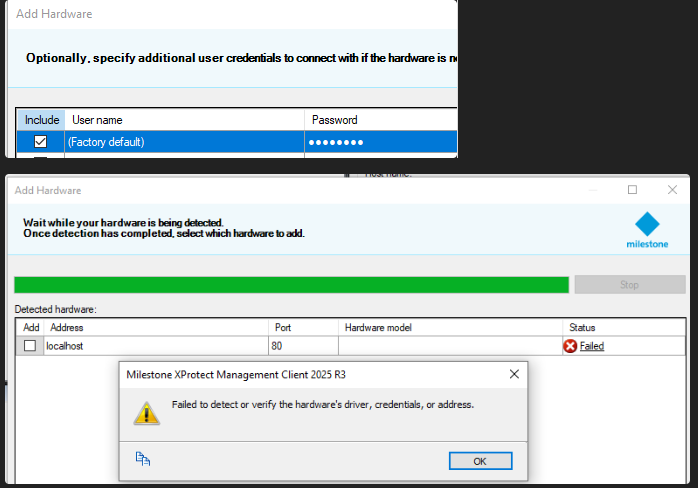
Background: I built an RTMP MIP driver that doesn’t load any external devices, so no username or password is required.
Issue/Question:
When I add a new device and leave “Use factory default credentials” checked, I get an unauthorized response (or the error shown in the screenshot). However, if I enter any other username/password combination, it works.
Have you tried adding some logging in your connect method and see what it is called with? I don’t remember exactly what is passed to the driver when the Factory defaults is selected by the user, but I suspect it might be something you don’t handle well (maybe null).
yes but short tests show that i dont come to this point, looks like this is for interal driver only, and internal something exists for factory credentials for an existing driver like AXIS, but this kinda of definition is not implemented in MIP driver framework. I dont check the creds at all. So when the are null i dont care because no code touches it.
I just tested with DemoDriver on XProtect 2025 R3 and it worked fine. There is no way of providing factory defaults from a MIP Driver so they will always be empty, but if I set up my DemoDriver device to accept empty user name and password it connected fine.
I just realized that you are probably not selecting the driver in the dialog where you provide IP and credentials (so “(Auto-detect)” is selected)? If I do the same I can reproduce.
I will report this with the team but as it is a bit of an edge cage I cannot say when it will be fixed.
You are correct, factory fails with auto detect but not when selected.
Fails: Factory Creds - Hardware Model (Auto-Detect)
OK: Factory Creds - Hardware Model (My Driver)
Thank you thats very good input, it should be more like: when only one driver is selected, auto detect option should be at all no visible, and just my driver is selected, because this confused me and also other folks =)