Hello,
we developed a MIP PlugIn for XProtect, which draws some metadata onto the video image in the client. it also has a Portion concerning the management Client (to grant some rights for a user)
It is working for XProtect 2018R2. (Man Server)
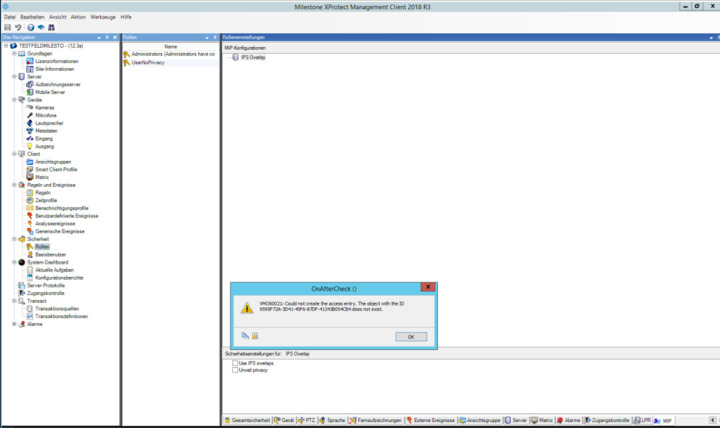
Using Pro+ 2018R3 the same PlugIn does not work any more and creates the following output.
The PlugIn itself seems to be visible, but after trying to check some checkboxes an error message appears.
(as a variant, we also already compiled against the newest 2018R3 dll)
This issue is kind of urgent, since we are about to release this version for 2018R3.
Please advise what we could do now to resolve the issue.
See below and Thanks a lot.
Christof
VMO60021: Could not create the access entry. The object with the ID 9595F72A-3D41-40F6-87DF-41343B054CB4 does not exist. (VideoOS.Platform)
------------------------------
Programmordner:
bei VideoOS.Platform.Util.Security.SecurityClientXPCO.AddAccessControlEntries(Guid kind, String objectId, AccessControlEntry[] entries)
bei VideoOS.Platform.Util.Security.SecurityClientXPCOWrapper.AddAccessControlEntries(Guid namespaceId, String objectId, AccessControlEntry[] entries)
bei VideoOS.Platform.Util.SecurityAccess.SetPermittedAction(String identity, PluginDefinition pluginDefinition, String actionId, Boolean permit)
bei VideoOS.Administration.AddIn.PlatformAddIn.UserControlPlatformSecuritySetup.OnAfterCheck(Object sender, TreeViewEventArgs e)
===================================
VMO60021: Could not create the access entry. The object with the ID 9595F72A-3D41-40F6-87DF-41343B054CB4 does not exist. (mscorlib)
------------------------------
Programmordner:
Server stack trace:
bei System.ServiceModel.Channels.ServiceChannel.HandleReply(ProxyOperationRuntime operation, ProxyRpc& rpc)
bei System.ServiceModel.Channels.ServiceChannel.Call(String action, Boolean oneway, ProxyOperationRuntime operation, Object[] ins, Object[] outs, TimeSpan timeout)
bei System.ServiceModel.Channels.ServiceChannelProxy.InvokeService(IMethodCallMessage methodCall, ProxyOperationRuntime operation)
bei System.ServiceModel.Channels.ServiceChannelProxy.Invoke(IMessage message)
Exception rethrown at [0]:
bei System.Runtime.Remoting.Proxies.RealProxy.HandleReturnMessage(IMessage reqMsg, IMessage retMsg)
bei System.Runtime.Remoting.Proxies.RealProxy.PrivateInvoke(MessageData& msgData, Int32 type)
bei VideoOS.Platform.Util.Security.ISecurityService.AddPermissions(String namespaceId, String objectId, AccessControlEntry[] entries)
bei VideoOS.Platform.Util.Security.SecurityClientXPCO.<>c__DisplayClass22_0.b__0(SecurityServiceClient client)
bei VideoOS.Platform.Util.Svc.ClientPool`1.CallWithRetry(Action`1 method, Int32 retryCount)
bei VideoOS.Platform.Util.Security.SecurityClientXPCO.AddAccessControlEntries(Guid kind, String objectId, AccessControlEntry[] entries)