MIPSDK_2020R3 ImageViewerControl showing Black Screen while getting H265 stream from Camera in ActiveX loaded in Internet Explorer 11 running in 64 Bit platform.

We are using MIPSDK_2020R3 and developed the ActiveX component using C# dotnet application. We are loading ActiveX in Internet explorer 11 in 64 bit platform.

We have 2 cameras, one Camera set into H265 streaming and another in Jpeg.

The H265 camera steam is not displaying and showing black screen.

When we checked logs, ImageDisplayedEvent as below:

ImageViewerControl_ImageDisplayedEvent(0) - 00:00:00, Org=0x0, Display=0x0

ImageViewerControl_ImageDisplayedEvent(0) - 00:00:00, Org=0x0, Display=0x0

ImageViewerControl_ImageDisplayedEvent(0) - 00:00:00, Org=0x0, Display=512x259

and LiveStreamInformationEvent as below:

ImageViewerControl_LiveStreamInformationEvent(0) - 1661250908474

But same code if we load as standalone Win form Application we are able to see the H265 stream with below event Info :

ImageViewerControl_ImageDisplayedEvent(0) - 00:00:00, Org=0x0, Display=0x0

ImageViewerControl_ImageDisplayedEvent(0) - 10:25:08, Org=1920x1080, Display=150x150

If we change the same camera to Jpeg stream it display stream in ActiveX and win Application.

Camera 2 using Jpeg Stream able to display the stream in both ActiveX and Win application.

So Issue is why we receiving Blank or Black Screen in ImageViewerControl while getting H265 stream from Camera in ActiveX loaded in Internet Explorer 11 running in 64 Bit platform?

The activeX components were discontinued from the MIP SDK after 2018 R3 version. The activeX components are no longer supported.

The activeX components never supported H265. You will have to use newer component or methods from the MIP SDK in order to support H265. We strongly recommend that you use the newest MIP SDK when doing development work.

Ref. https://doc.developer.milestonesys.com/html/index.html?base=gettingstarted/mip2018r3_intro.html&tree=tree_home.html

Hi,

We are not using any milestone SDK ActiveX control to load H265.

We are using ImageViewerControl as said in link provided in response, wit in UserContorl as we do in windows application. then we are loading this UserControl in our own ActivxControl to load in Internet Explorer.

The EnvironmentManager.Instance.EnvironmentOptions[VideoOS.Platform.EnvironmentOptions.UseActiveX] = “No” ( flag also set to “No” as default and explicit tried to set)

Same application able to display Live H264 stream in our application running as ActiveX inside Internet Explorer from same Camera if Camera is set to H264 mode. But black screen in case of H265.

As shown in below image; our application running under IE but as separate application both are in 64 bit mode.

image

So I think it is not of Milestone ActiveX component issue, unless Milestone SDK internally loads or activates any ActiveX component.

As above scenario SDK still not support H265?

Thanks,

Let me clarify one thing, have you already tried the newest MIP SDK?

Hi,

We now implemented same code with Milestone SDK 2022R1,

Same issue we are facing with newer SDK as defined above post, It is displaying black screen in imageviewer.

We did further investigate the issue as we enabled below lines in code to check info.

imageViewerControl.EnableVisibleHeader = true;

      _EnvironmentManager.Instance.EnvironmentOptions\["PlayerDiagnosticLevel"\] = "3";_

      _EnvironmentManager.Instance.FireEnvironmentOptionsChangedEvent();_

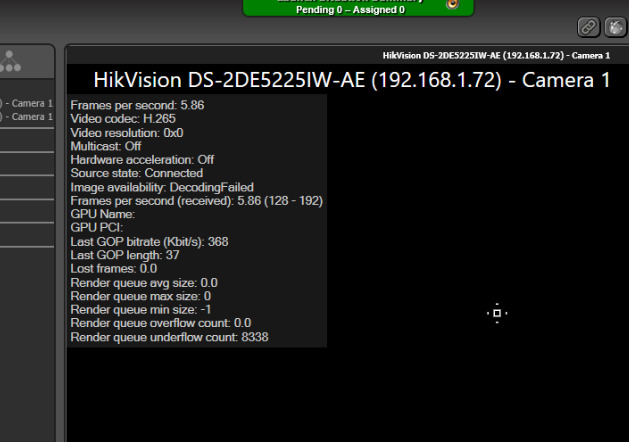
We are getting error “Image Availability: Decoding Failed” as below attached image.

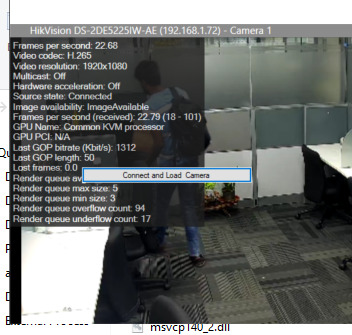
But same code if we run directly from calling inside Win Form application it is playing H265 stream.

In WinForms application case it displays below information.

So why we are getting this Image Availability: Decoding Failed error?

What we need to do to fix this issue.

Thanks

H265 is not supported in the ImageViewer in 32 bit (neither Smart client nor MIP SDK). You say that you deploy in Internet Explorer 11 running in 64 Bit platform but the key question is if you are building 64 bit using the 64 bit binaries. We suspect this might be 32 bit. Please check and comment on this.

Hi,

I have used 64 bit MIP SDK installed and referred the dlls,

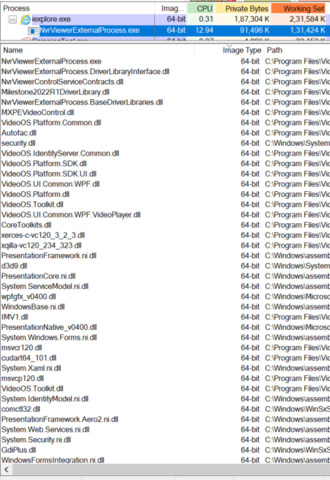
Also, we checked the all dlls and it is running in 64-bit platform as shown in below image.

"MXPEVideoControl.dll" (6th dll in the list in above attached Image) as a user control which contains milestone ImageViewer and related component and all other methods to load the video is built in 64 bit and loaded as 64 bit.

Same “MXPEVideoControl.dll” loaded as user control in WinForms application it is working as mentioned in previous posts.

But it is showing “Decoding Failed” in Internet Explorer 64 bit loading our application ActiveX and this ActiveX is WinForms application which internally loads “MXPEVideoControl.dll”

All are compiled in 64 bit and running in 64 Bit platform as shown in attached image.

So where it may cause this error?

Thanks,

Th

Milestone Support does not have any expertise in making an ActiveX to work under Internet Explorer, we could speculate that it could be a load error or permissions issue. As you say it works in a normal application and then it is down to Internet Explorer, Internet Explorer is beyond what we in Milestone Support can offer support on.