Hi.
I’m using Xprotect Pro 2017 R2 Mobile Server to server the video frames for my mobile app.
Any ideas why I might be getting zero-byte image frames back? It seems to happen at the start of a request stream - i.e. the first x frame requests for a stream. Often it’s 10+ requests before I get an actual image returned - though sometimes it can be 30+ requests, which does not make for a good responsive mobile app.
Note that I get valid responses back from the server, but they ONLY contain header info - and are of size 36 or 44 bytes.
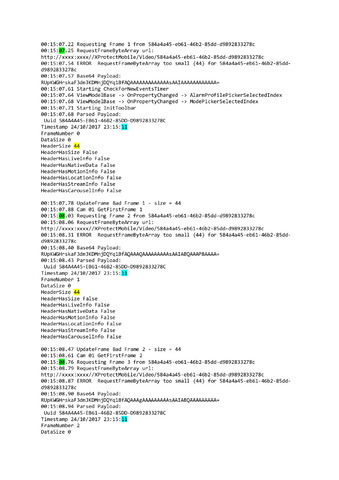
Please see attached word doc detailing the full flow of data - i.e. command / response objects from fiddler and parsed frame (header) responses from my debug logs.
Has anyone else experienced this? Any ideas anyone?
Thanks
Gary
Hi Gary,
First frame could delay in some circumstances mostly depending on input stream.
What is seen in the attached log is that all the video request are made in one and the same time (within one and the same second) - 21:58:50.
So the delay on the start that you are experiencing is no more that 1 second.
Which doesn’t seem to be a big problem that “not make for a good responsive mobile app”.
Usually on the client side is shown spinner or progress bar or something similar that indicates to the user that the stream is still in configuration phase.
What could be checked:
What is the camera FPS (configured in the Management client) ?
What is the camera encoding (H.264 or MJPEG)?
If it is H.264, what is the GOP size ?
What is the achieved FPS in the mobile client after initial delay (first frame receive delay) ?
(If camera is set to H.264 with greater GOP size - more than 1 second - could be shown greater delay in the initial stream start-up. Same could be valid if the Camera provides more than 2-3 B frames between the P frames.)
Hi and thanks for the speedy response.
The plot actually thickens here, because the decoded frame timestamp does not match the request time. It wouldn’t be an exaggeration to say that it can take 10-20 seconds to return the first good frame (after which it generally continues as it should). I’m attaching another log - this time just the frame requests/responses - where I’ve added timestamps to the logger. Ignoring the time difference (+1hr timezone and a few seconds) between the client and server clocks, you can clearly see that the 10 frames are requested over a period of approx 5 seconds and yet the decoded timestamps are all the same - and still it doesn’t return a good frame. And before you ask, yes, I do clear my response object before sending the request (and can see the behaviour mirrored in fiddler). Notice also that the header size changes between frames 4 & 5.
Thanks again for your help
Gary
Hi Gary,
Strange log indeed.
What is strange in it:
Time between request is about 700 ms (seems too big to me).
Does the behavior changes if you try to ask for frames more frequently ?
Another thing - many responses are received with HeaderSize of 44. Having in mind that Main header size usually is 36 bytes (rarely 40), this means there are 8 additional bytes. Which passes with size of the LiveInfo header extension. But on the other hand HeaderHasLiveInfo is set to False. This doesn’t make sense.
How behave Milestone Mobile/Web clients for the same camera live stream ?
Do they wait also 10-20 seconds to present something ?
Btw what kind of request are made to the server GET or POST ?
We noticed that sometimes if the client makes GET requests, some cached response is returned. We usually recommend POST to be used and to be send 1 byte of data (value could be changed between the requests, but usually is not needed - POST request should be never cached).
Garry, can you share somewhere WireShark or Fiddler log ?
Hi Petar.
In response to your q’s/comments:
Time between request is about 700 ms (seems too big to me).
Yes it’s deliberately long at first. The code I’ve demonstrated (via the log) is actually just to get an initial thumbnail, though it uses the same mechanism as my live stream and adequately demonstrates my issue. When the stream is in full swing the delay would be around 50ms
Does the behavior changes if you try to ask for frames more frequently ?
It doesn’t seem make any difference, no - unless I fire too many in at once and then it seems the server can’t cope and kills the stream
How behave Milestone Mobile/Web clients for the same camera live stream ?
It does seem to take longer than the other cameras, yes - averaging 5+ seconds
Btw what kind of request are made to the server GET or POST ?
It’s Post, yes
Garry, can you share somewhere WireShark or Fiddler log ?
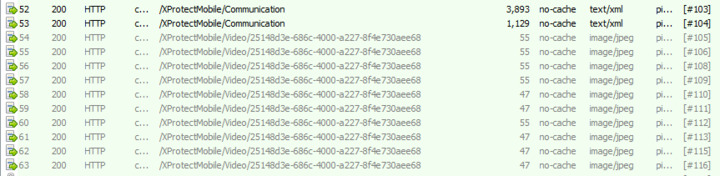
I can’t upload a fiddler log as it may contain sensitive information. I’m assuming you work for Milestone, but it’s not clear from your profile. I could probably encrypt it and send to a milestone email account. In the meantime, I have attached a sanitised screen grab showing an example data flow (though not the one from my debug logs). In the screen shot you can clearly see the different packet sizes
Many thanks for your help.
You could mail the log to pvv@milestone.dk.
What worries me however is :
“It does seem to take longer than the other cameras, yes - averaging 5+ seconds”.
For me there is something misconfigured with that particular camera.
(Or unknown bug/issue, of course)
Especially if behavior is reproduced with Milestone official clients.
Could you please provide screenshot of camera configuration in the VMS.
In particular of “Settings” and “Streams” tabs.