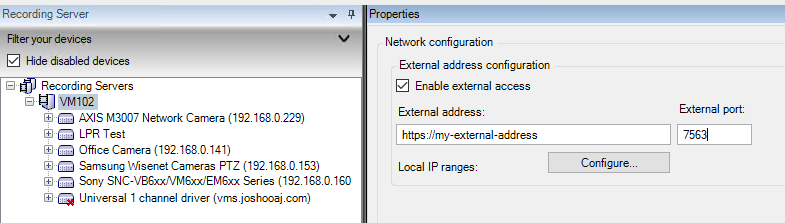
We have a new customer that has Axis cameras with SD cards. We are wondering if there is way to pull information about the SD cards using the protocol integration? We are able to pull information about the recording servers but this would be separate.
No. The way I understand your question the answer is no.
You can make a setup so that when doing playback in the clients, it will ask the camera device directly, nothing needs to be recorded.
You can make a setup so you can order retrieval, transfer video from the camera to be recorded in other scenario than live, using the Smart Client or order it by using code (RetrievalTask).
You can make a setup so that of the recording server looses connection to the camera, then when the connection is reestablished the recording server will retrieve the video automatically.
There is no functionality in the MIP SDK or XProtect beyond that.
Now this is speculation on my part. If the camera has a interface where you can ask the camera and it will answer with status information you might be able to use “Control.DriverCommand” and “Control.DriverResponse”. Ref. https://doc.developer.milestonesys.com/html/index.html?base=miphelp/class_video_o_s_1_1_platform_1_1_messaging_1_1_message_id_1_1_control.html&tree=tree_search.html?search=messageid
Thank you. Yes, there is a way to get status information using the camera interface.
Is there an example you can share for a plugin integration to make use of the Control.DriverCommand or Control.DriverResponse?
Unfortunately there is no sample using this.
I have an idea it will help if you read..
Having no sample (and haven’t tried this myself) I think you should use RegisterReceiver to be ready for the feedback and then PostMessage use to send the DriverCommand
Thank you, Bo. We’ve continued looking into this and tried to use the PSTools. I don’t see another place to ask questions about it so I am posting it here but please let me know if there is any other place to ask this question if it is not the right place.
I am trying to send a VideoOS.Platform.Messaging.DriverCommandData command to an individual camera using PSTool’s Send-MipMessage function as well as receive the response using the VideoOS.Platform.Messaging.DriverResponseData command.
In the Send-MipMessage function I have the MessageId parameter simply as Control.DriverCommand. For the Data parameter I have created a DriverCommandData object with the SyncObject being the Camera’s platform item FQID.
I run into trouble with the DestinationEndpoint, DestinationObject, RelatedFqid parameters for the accessing the camera and I am not sure what I am doing incorrectly. For the DestinationEndpoint I am passing the server’s FQID. For the DestinationObject and RelatedFqid I am passing the camera’s FQID. I am not sure if the issue is 1. I am passing the incorrect FQIDs for those parameters or 2. If something has to be done with the server/camera before hand to register it for a DriverCommandData request as the docs may indicate here https://doc.developer.milestonesys.com/html/miphelp/class_video_o_s_1_1_platform_1_1_messaging_1_1_message_communication.html.
Additionally I am having difficulty with the VideoOS.Platform.Messaging.DriverResponseData command and ResponseMessageId parameter for getting back the response from the camera.
the trouble is a few things. Mainly I dont get a response back. I tried to copy the docs as best as i could. It could be 1. I am not passing the right FQIDs for those parameters or 2. I’m not using the right combination of parameters or 3. something has to be done with the server/camera before hand to make it eligible for a request or 4. something else that I am missing.
Any suggestions would be helpful.
Thank you
VideoOS.Platform.Messaging.DriverResponse is not a command. You should listen by using something like.
EnvironmentManager.Instance.RegisterReceiver(DriverResponseHandler, new MessageIdFilter(MessageId.Control.DriverResponse));
When you use EnvironmentManager.Instance.SendMessage() (or PostMessage()) the Destination should be the camera (FQID).
Thank you for mentioning that.
We don’t see in the PSTools docs a parallel function for RegisterReceiver(). We see there is Add-RegisterService(https://www.milestonepstools.com/commands/en-US/Add-RegisteredService), but that seems to be for other things(Event Server, Log Server, etc.). Do you have a way of registering the DriverResponse in PSTools?
Additionally, we aren’t in a C#/.NET environment. Using the protocol integration, many of the functions are still available to us, but do you know if DriverCommand/EnvironmentManager functions are inside of the protocol integration’s scope?
The equivalent is the RecorderCommandService.SendDriverCommand, in a way this is easier as it is a synchronous call and you get the response right away.
I’m back from vacation now and was able to try this out in PowerShell with success! Not specifically the SD card commands but those should work fine too.
I wrote a sample function and you can find the GitHub Gist at https://gist.github.com/joshooaj/af734c840547f19267adeba26dfe57e6
The Send-MipMessage command accepts an optional “ResponseMessageId” and when you provide “Control.DriverResponse”, the command will register a receiver for that message before sending your “Control.DriverCommand” message, and then return the response to you when it arrives (or return a timeout error after 10 seconds by default).
Feel free to use the sample function along with MilestonePSTools or take what you need from it to write your own solution.
Edit: I just posted a video showing this capability in PowerShell at https://youtu.be/pi6Gv2KAVV8
Thank you very much Josh for the response(and the youtube shoutout). It was very helpful and exactly what we needed. We were able to get the SD card response. We do have a question regarding the PSTool’s Send-MipMessage function. When we call Send-MipMessage inside of Send-VmsDriverCommand from a remote machine. The public endpoint gets forwarded to the local hostname for the recording server on the milestone machine, which causes an error - "DriverCommand returned an error: ERROR: -2146233087: There was no endpoint listening at
http://win-1234:7563/recordercommandservice/recordercommandservice.asmx that could accept the message." We can temporarily solve this by rerouting the win-1234 domain to the public address, but this is not ideal. Looking at the docs for Send-MipMessage there is no way to specify an address for the recordercommandservice endpoint. Is there a way around this?
Hmm, I would expect that the connection would be made to whatever address is reported as the local web server address for the recording server in Management Client. That address is the hostname or FQDN of the recording server by default, but can be modified in the RecorderConfig.xml file on the recording server under “[C:\ProgramData\Milestone\XProtect](file:C:/ProgramData/Milestone/XProtect) Recording Server\” by editing the “host” node under “webserver” like the screenshot below.
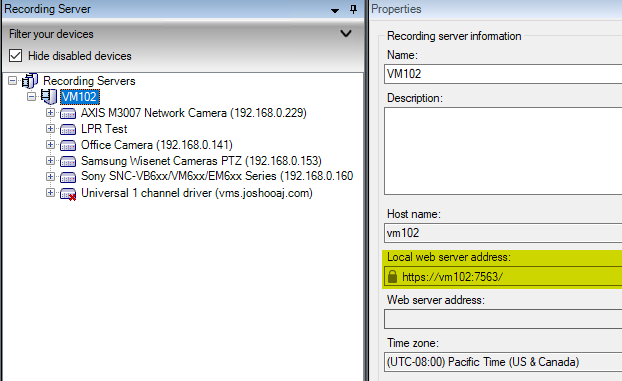
If you have external access enabled on the recording server, then that address should be used if the system running PowerShell is connecting from an IP address the management server doesn’t recognize as “local” which includes all subnets for enabled NICs on the management server and any manually entered ranges in the Tools > Options dialog in Management Client.