To Bo Andersen: (Bo, Please let us know that you’ve seen this, and if there is something else we could provide… Thanks.)
Information gathered so far:
Question: If you restart the event server service, does the status then assume correct state?
Answer: I saw this problem once today and did try restarting the event server service. It seems to have cleared the problem. This is the only time I have tried this, however.
Question: Are all the XProtect where you have seen the issue e-code (XProtect Professional or
Express, but never Corporate, Expert or Plus product versions)?
Answer: I have seen the issue on these versions of Milestone:
- Milestone XProtect Professional 2018 R3 (4 times)
- Milestone XProtect Management Client 2018 R3 (1 time)
Question: Are the cameras of a certain make or model or is the issue seen across multiple makes?
Answer: Often times it is cameras of a certain make/model but to a certain extent, this is because a given installation often has a lot of one camera type. I have seen this happen on more than one make or model but I don’t have good records to back up that statement.
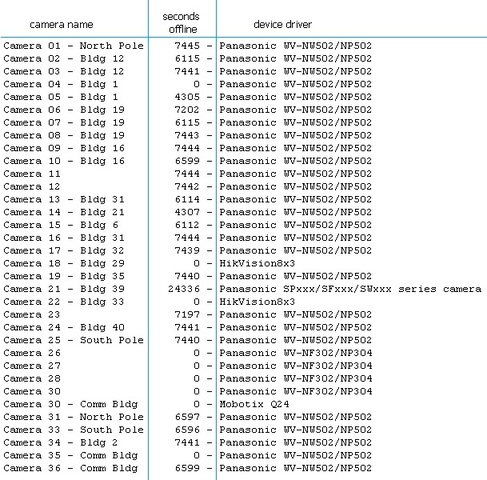
Here is an example from today (where I restarted the event server service):
>>> (see attachment)
Note that all of the cameras not responding are Panasonic. However, the camera using Panasonic SPxxx/SFxxx/SWxxx has been not responding significantly longer than the cameras using WV-NW502/NP502.
Note also that the Panasonic WV-NF302/NP304 cameras are responding.
In this case, I restarted the event server and they all showed as responding again.
Kevin Glick
App-Techs Corporation
505 Willow Lane
Lancaster, PA 17601