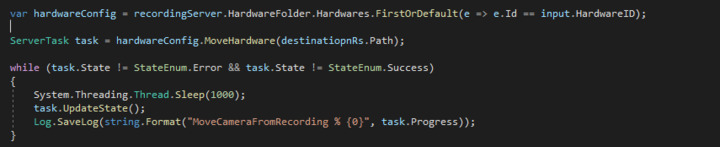
Hello I’m using Milestone 2018 and 2020 SDK to move hardware between RecordingServers. When I Invoke de method hardware.MoveHardware(RsPath) the server task respond Success but when I search de hardware inside de Management Client, the hardware hasn’t been moved
This is de implementation, the path is from the Destination RercordingServer

Does it make a difference if you refresh or restart the Management Client (MC)? I.e. is the move being done but not reflected in the MC before a refresh/restart?
If you do the same move manually from the MC does it succeed?
When I Move it manually using the wizard works perfectly. I made the test of refreshing and restarting de MC but the change wasn’t reflected. The rest is working fine, For example adding or removing a camera through the SDK is working fine!
Please let me know the exact product and version of the XProtect VMS you are using. If multiple please list.
If you have been testing multiple cameras, does it fail for every camera you attempt to move or does it fail for some and succeed for others?
If you have tested on more than one setup/site, does it fail for all or only for some?
The version of the VMS is 2020 R2 (Server). and the version of the SDK I made test were version 2018 and 22.2 the lastone was installed throw Nuget
on the other hand I only made the test with only one camera.
I wonder if you tried. If you do this from the Config API Client sample, can you make it work then?
Can you provide me the sample? I couldn’t find it in this github repo
https://github.com/milestonesys/mipsdk-samples-component
ConfigApiClient
If you do not find it I would like to troubleshoot. What do you see at this URL?
yes i could find it, but in the there is no sable of moving hardware from recording server. I made a search in the hole repository through visual studio. Can you tell me wher ir that part of code?
Yes I saw it, is using the wizard when i click the button, but my method execute in background and Im using the method available in the hardware. First i find de hardware by Id, then y try to Move it passing the path of the restination RS
What I am asking and hoping you can test. If you use the Config API Client to do the hardware move does it fail in the same way as it does when you use your code? (Does it work or fail from the sample?)
From the sample is working fine but is using the configurationService. But from the SDK not. I also made an SDK upgrade to version 2023 and the method MoveHardware response is success but the hardware does not move when I refresh the management, what im doing wrong in my code?
I had to set up an appropriate testing platform, and it caused a delay in getting back.
Where your code ends the servertask is in “InvokeInfo” which is a mechanism where additional information is requested.
Please try our this piece of code that works for me. (The code is sort of a hack, how I find the objects to manipulate or use, but I hope as an example you will not mind that.)
private void MoveHardware()
{
    ManagementServer mgt = new ManagementServer(EnvironmentManager.Instance.MasterSite.ServerId);
    var rsMoveFrom = mgt.RecordingServerFolder.RecordingServers.First(x => x.Name.StartsWith("RS1"));
    var rsMoveTo = mgt.RecordingServerFolder.RecordingServers.First(x => x.Name.StartsWith("RS2"));
    var storageMoveTo = rsMoveTo.StorageFolder.Storages.First(x => x.Name.StartsWith("Local default"));
    var hardwareToMove = rsMoveFrom.HardwareFolder.Hardwares.First(x => x.Name.StartsWith("Hallway"));
    ServerTask servertask = hardwareToMove.MoveHardware(rsMoveTo.Path);
    if (servertask.ItemType == "InvokeInfo")
    {
        ICollection<string> keys = servertask.GetPropertyKeys();
        foreach (var key in keys)
        {
            string property = servertask.GetProperty(key);
            label1.Text += key + " " + property + Environment.NewLine;
            if (key == "DestinationStorage")
            {
                servertask.SetProperty(key, storageMoveTo.Path);
                label1.Text += key + " " + storageMoveTo.Path + Environment.NewLine;
            }
        }
        ServerTask serverTask2 = servertask.ExecuteDefault();
        if (serverTask2.ItemType == "InvokeResult" && servertask.State == StateEnum.Success)
        {
            label1.Text += "Move complete " + hardwareToMove.Name + " to " +rsMoveTo.Name + Environment.NewLine;
        }
    }
}
on InvokeInfo, there is a bit of text here. https://doc.developer.milestonesys.com/html/index.html?base=gettingstarted/intro_configurationapi.html&tree=tree_search.html?search=invokeinfo
PS. When you tested this in the Config API Client you were presented with a extra dialog, this represents the InvokeInfo extra step.
Now is woking with SDK 2023 and this example, i did not know that i must set DestinationStorage Property before executing task. I made the test with SDK 2020 but the task doesn’t have the method executeDefault. Can you give me an example with SDK 2020? , because i had multiple proyects with different SDK versions
The general advise is to use the newest MIP SDK always when developing, there are very few and seldom exceptions to this advise.
Normally we will ask you to use the newest MIP SDK before we investigate or debug an issue because Milestone Development generally never make a bug fix for an old MIP SDK.
In this case where you do know that the newest MIP SDK works this general advise is even more important; use the newest MIP SDK.
https://developer.milestonesys.com/s/article/about-MIP-SDK-compatibility-with-XProtect-product-versions
Ok, thanks for your advice!! we will use the newest SDK