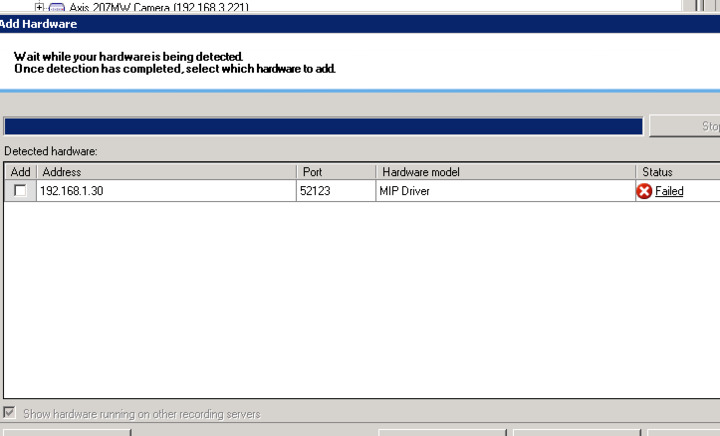
Hi,
We Tried to configure Multi channel metadata provider in XProtect 2016 R2 Which was developed in XProtect 2017 R2 MIP SDK.
While configuring the detected hardware status is “Failed”.
Here we have attached the screen shot also.
How can we configure this without fail.
Thanks
4W Team.
If not solved by the above..
If you click on “Failed” you will get further information on the failure, what does it say?
We are not using multiple MIP Driver in single system.
We are using single MIP Driver with multi channel.
This is finely working in XProtect 2017 R2. But having problem in 2016 R2.
If you click on “Failed” you will get further information on the failure, what does it say?
The error showing like “Failed to detect or Verify the hardware’s driver, credentials or address”
Are you running the Metadata app in the server itself? Is it 192.168.1.30?
Double-check if you have “root” “password”, if the sample is changed this might be changed.
Make sure the Metadata app is running and is accepting sessions.
Actually what I am saying is please double-check using the sample documentation and especially the list
How to use this sample:
- Start the sample
- Click the “Accept Sessions” button
- Start the Management Client / Application
- Start the add hardware wizard
- Add username and password to the search list: “root”, “password”
- Select to use the “MIP Driver”
- Enter IP address of the machine this sample is running on, and port 52123
- Press the “Start all metadata” button on the sample application.
- Press “Stop all metadata” to stop the stream or Close to exit the sample application.
- You can view the incoming metadata by using the Metadata Live Viewer sample
We followed these steps.
Now the hardware is detected but it is failed to add.
Here we ave attached the screenshot of error message.![error1]()
When this is an older recording server I would like you to try to upgrade the device pack.
https://www.milestonesys.com/support/resources/download-software/?type=17
After the device pack upgrade re-try to add..