2023R1 adds the ability to replace HW through the SDK. Now the Hardware object as a ReplaceHardware() method. Two of the parameters are strings: driver and customDriverData. Is there documentation on these parameters?
You found the documentation here: https://doc.developer.milestonesys.com/html/index.html?base=miphelp/class_video_o_s_1_1_platform_1_1_configuration_items_1_1_replace_hardware_server_task.html&tree=tree_search.html?search=replacehardwareservertask.driver
Note on CustomDriverData: This is almost like a feature for future use as almost all drivers don’t have support to use this presently. We think you can safely ignore this parameter.
We have discussions on improving the tooltip for the ReplaceHardware method directly, for now we hope the link above gives you the information you need.
Thank you. I thought the driver string may be the driverpath, which would be consistent with the AddHardware method on the RecordingServer class, but I guess they went a different way with ReplaceHardware.
I had been looking at this documentation:
Besides the tooltip, you may want to link the documentation so you can click on the parameter.
Anyway, the documentation you sent me on the ReplaceHardwareServerTask indicates there is a DriverValues dictionary you can use, which would be handy, but I cannot figure out how to access that. It is not a static member, so I need to instantiate a task to use the dictionary. That seems odd, and I can’t do it anyways. There is no default constructor on that task and no tooltip or documentation on what parameters you’d need to supply. The ReplaceHardware method does return a ServerTask which I might be able to cast to a ReplaceHardwareServerTask, but I would need to use the dictionary before calling this method.
Can you point me in the right direction again?
Milestone support is investigating..
The id is a number. While trying this I used the following snippet of code to find the right driver for ONVIF:
var ms = new VideoOS.Platform.ConfigurationItems.ManagementServer(Configuration.Instance.ServerFQID.ServerId);
var hardwareDriverForReplace = hardwaredrivers.FirstOrDefault(h => h.Name.Equals("ONVIF Conformant Device"));
int numberForReplace = hardwareDriverForReplace.Number;
Then this snippet of code worked for the actual replace:
SecureString theSecureString = new NetworkCredential("", "MyPa55w0rd").SecurePassword;
var serverTask = hardware.ReplaceHardware("10.100.100.99", 80, false, 443, "admin", theSecureString, numberForReplace.ToString(), "", true);
while (serverTask.State != VideoOS.Platform.ConfigurationItems.StateEnum.Error && serverTask.State != VideoOS.Platform.ConfigurationItems.StateEnum.Success)
{
	System.Threading.Thread.Sleep(100);
	serverTask.UpdateState();
}
There has been an update made to the documentation (2023R2 and forward) so that this should be easier in the future.
Thanks Bo. Just in case someone else stumbles upon this post, I think you were missing a line of code when you pasted the first part:
var ms = new VideoOS.Platform.ConfigurationItems.ManagementServer(Configuration.Instance.ServerFQID.ServerId);

var hardwaredrivers = ms.RecordingServers.FirstOrDefault().HardwareDriverFolder.HardwareDrivers

var hardwareDriverForReplace = hardwaredrivers.FirstOrDefault(h => h.Name.Equals("ONVIF Conformant Device"));
int numberForReplace = hardwareDriverForReplace.Number;
Obviously that just takes the first recording server, which may or may not be correct, but it will compile/work.
What would be SUPER helpful is if there was actually a driver database you could query by brand & model. Right now it is pretty painful mapping specific devices to a driver name.
Thank you for the correction, you are right both in the code and the comment about the possibility of multiple Recording Servers.
There is a database like the one you ask for!
I did not think to include it before because it is outside the domain of the SDK.
You find it here: https://www.milestonesys.com/support/tools-and-references/supported-devices/
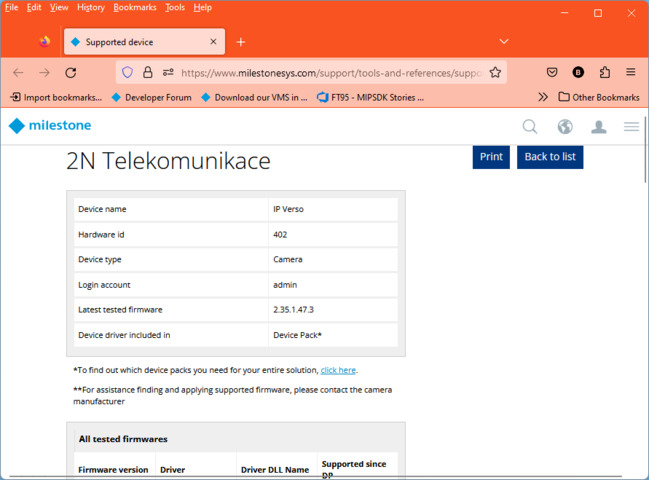
Once you have found your camera using make and model just click on the device in the list and open details. In the details you see as field #2 the “Hardware id”.
Here is an example (semi-random, one of the first cameras in the list):
Oh yes, I’m well aware of that website. It would be great if the Export CSV button on the main search results page included the hardware ID but it does not. Or better yet include this information in the device pack and SDK so we can programmatically query for a specific device and get the driver required.
See another posting that I responded to here:
Hi all,
if I call the ReplaceHardware method, the following exception is generated: "Invalid MethodId ReplaceHardware on ItemType: Hardware
Parameter name: methodId"
I used NuGEt 23.3.2 libraries and the server has version 2022R3
This feature is available starting in version 2023R1, but does this have to be the server version? or the SDK version?
Thanks in advance
This is unfortunately a server side change and the server version is the key to whether this functionality is present or not.