New sample: Add cameras (Configuration API)

I have made a new sample with two goals in mind.

  1. Show how to add a camera to a recording server in c-code (does not have the csv import option that the e-code servers have).

  2. Show how the new strongly typed configuration API classes can help you in development.

--

Configuration API -Adding Cameras

This sample shows how to add multiple cameras on an XProtect system. It reads a file in comma-separated format containing necessary information and then adds the cameras based on this.

In order to keep it simple this sample is a console application.

When connected to the server it add cameras add based on information form a file. The sample can be provided command-line parameters for login and location of input file. If not provided as command-line the console application will ask for the parameters. The sample can be started like this:

  • ConfigAddCameras.exe (Program now ask for address to connect to, user authentication method, user name, password and the name of the file (with full path))
  • ConfigAddCameras.exe http://localhost d test.txt (In this example login on localhost using Default Windows authentication and read camera information from the file test.txt placed in the folder of the executable.

The file must have the following format:

[Camera URL. IP or hostname and port],[Camera user name],[Camera password],[Driver number],[Name the hardware],[Name for the camera],[Name of the recording server],[Name of camera group]

Example:

http://10.10.48.75:52123,root,password,616,myHardware,myCamera,REC007,myGroup

In this example we add a camera using the MIP Driver (i.e. UIVideoProvider sample), MIP driver is Hardware ID number 616 . (See - Driver page (https://www.milestonesys.com/community/business-partner-tools/supported-devices/xprotect-corporate-and-xprotect-expert/?usingAdvancedMode=False&manufacturerId=0&deviceTypeId=0&freeTextSearch=MIP+Driver&pageSize=100&deviceId=28582))

The camera is on the address http://10.10.48.75:52123, has the admin user “root” with the password “password”. The camera should be added to the recording server with the name “REC007”. When added the hardware name will be “myHardware”, the camera name “myCamera” and the camera will be put in a camera group named “myGroup”. The camera group will automatically be created if it does not already exist.

The file can have multiple lines each line having the information for one camera.

The Configuration API which is used in this sample is supported in XProtect Corporate, Expert, Professional+ , Express+ and Essential+ (All PLUS products); all the C-code XProtect servers.

The Sample Demonstrates:

  • Login with credentials provided by operator
  • Usage of strongly typed Configuration API classes to add a camera to the VMS and specify the name and group for it.

Using:

  • VideoOS.Platform.ConfigurationItems
  • VideoOS.Platform.ConfigurationItems.ManagementServer
  • VideoOS.Platform.ConfigurationItems.ServerTask

Environment:

  • • .Net Library MIP Environment

Download:

http://download.milestonesys.com/MIPSDK/Samples/ConfigAddCameras.zip

* If you test this please give me feedback. Your feedback will be appreciated!
Did anybody try this?

Hi,

i’m also searching a tool to add camera via csv file (import).

I try to use the code you publish here but it seems the SDK i’m suing do do not have following component:

  • VideoOS.Platform.ConfigurationItems.ManagementServer
  • VideoOS.Platform.ConfigurationItems.ServerTask

I’m using MIPSDK 2017R2 for Xprotect corporate version.

Can you share with the exec file (ConfigAddCameras.exe) so I can test it ?

Thanks

Shay

This was intended as a programming sample, not a tool, so it would be preferable if use it to program a tool of your design.

After I announced it here the sample has been released with the MIP SDK as a part of the collection of samples within the MIP SDK.

The MIP SDK you have is too old, strongly typed configuration API classes was introduced in MIP SDK 2017R3.

Please download ad use the latest MIP SDK.

See the newer documentation: http://doc.developer.milestonesys.com/html/index.html?base=samples/configaddcameras.html&tree=tree_2.html

To download MIP SDK: https://developer.milestonesys.com/s/article/About-Milestone-software-development-Kit-SDK-download-link-For-MSP

Thanks! This code helps me guide to successfully add cameras using powershell. My question is maybe unrelated but I want to know whats the SDK command that creates a camera group folder within a group folder? Like A sub folder. Thanks!

A group contains two collections:

  • CameraFolder containing a collection of cameras
  • CameraGroupFolder containg a collecton of child groups

You will need to navigate throw the CameraGroupFolder/CameraGroup recursive until you find the correct group, and the take the CameraFolder for the specific camera.

Bo,

this is a very good app and we are reviewing it. However, is there a way to get a list of all the device driver hardware ids? we can’t expect our customer to have to go to the webpage to get this data. could we get it as a csv or some kid of file that we could parse and use when adding cameras?

thanks,

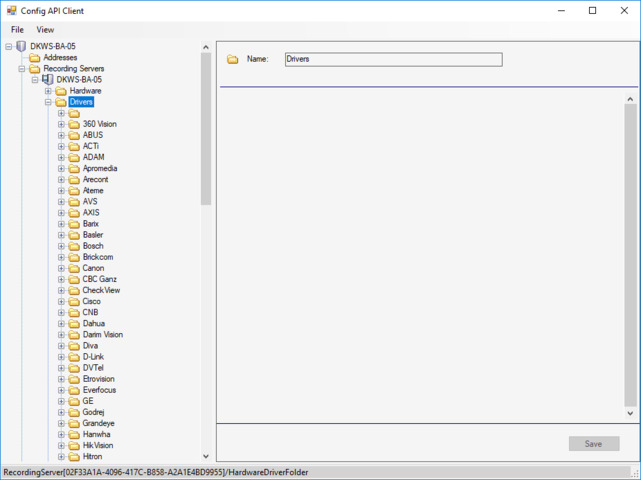
The list of drivers are also part of the Configuration API.

If you see the Config API Client you find it as illustrated:

Note: The ConfigAddCameras sample is today a sample included in the MIP SDK. - http://doc.developer.milestonesys.com/html/index.html?base=samples/configaddcameras.html&tree=tree_2.html

I’m investigating the SDK and was able to add cameras without any problems using this sample. How do I update the settings for the camera once it’s added. For example, on the Settings tab for the camera, I want to update FPS, Resolution, and Streaming Mode once it’s been added. I’m guessing I might have to use SetVideoResolutionAndFPS, but I’m not finding anything for changing the streaming mode to RTP/UDP. TIA

Try to use the Config API Client, and see how you can access and change the settings. the Config API Client sample can be very useful as a hint to finding the way when working with the strongly typed classes.

A word of caution: Some of these setting are different from one camera driver to the next. You might find the methods that work for a camera from vendor A will not work for a camera from vendor B.

Thanks Bo! I’ll give that a try.

Hi, Bo, thanks for the sample, I was able to add an AnalyticEvent definition using similar method. I wonder if there is any notify function or event that listen to the changes in Events so that the newly added event got shown in the Rules and Events tab automatically without pressing Refresh button ?

Hi Tram, Please start a new thread by asking a new question when you have something new only remotely connected to an existing thread, I worry that users will otherwise find it too difficult to find information in this forum.

If you from your integration wanted to know that something had changed you could subscribe using “Server.ConfigurationChangedIndication”

http://doc.developer.milestonesys.com/html/index.html?base=miphelp/class_video_o_s_1_1_platform_1_1_messaging_1_1_message_id_1_1_server.html&tree=tree_search.html?search=configurationchange

Unfortunately the Management Client does not auto-refresh using this event. So in the Management Client you will have to use the refresh button. This is general behavior which you will also notice if you have two Management Clients open; you will not see what you have modified in the other Management Client before you use the refresh button.

Dear Bo,

Could please guide us to solve our problem?

we have a camera that generate metadata for LPR through ONVIF device manager and now we want to take or retrieve this metadata to milestone client through event server .

so is there any possibility to take this auto generated data from the onvif device manager?

thanks in advanced.

Sorry for overlooking this last question. In general please open a new question on the developer forum instead of appending to another question, this will reduce the risk of me overlooking posts and will increase the usability of the Developer Forum..

To retrieve metadata from XProtect please explore Metadata Live Viewer and Metadata Playback viewer samples..

http://doc.developer.milestonesys.com/html/index.html?base=samples/metadataliveviewer.html&tree=tree_2.html

Dear Bo,

I am urgently looking for the executable of Config API Client to run it against 2018R3 system.

Where can I find it?

best regards

Kostas

Please start a new thread by asking a new question when you have something new only remotely connected to an existing thread, I worry that users will otherwise find it too difficult to find information in this forum.

The Config API Client is a sample project. Download the MIP SDK and build the project. It is strongly recommended always to use the newest MIP SDK even if your current server / test server is older.

https://developer.milestonesys.com/s/article/About-Milestone-software-development-Kit-SDK-download-link-For-MSP