Dear Support,
I have an Access 2016 Plugin. I have no Problems on my Development Environment, but if I copy the dlls to the Test Environments, the Plugin is not found. I’ve Placed the Dlls in “[C:\Program](file:C:/Program) Files\Milestone\MIPPlugins” and also “[C:\Program](file:C:/Program) Files\Milestone\XProtect Event Server\MIPPlugins”. I’ve Restarted all the milestone services, and rebooted.
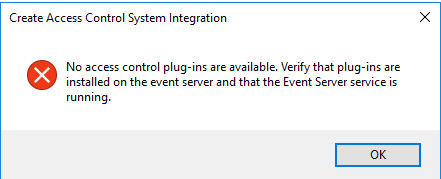
For Example, Right Clicking the Access Control Node, and selecting Create New, results in the Message: “No access control plug-ins available . . . . .”
I know the Event server is Loading the Plugin, becase I cannot delete the Plugin folder if the Event Server Service is running.
I have also tried 2 different Test Licenses (Corporate 2016).
I have looked in the Event Server Logs, no errors there…
Please explain to me what the reasons could be for this issue?
Thanks,
Werner
Werner,
it really looks as if the Access Control plugin is loaded (you can also see this in the Event Server’s MIP log). You may even see activity of the plugin (loading config etc.)
We have seen this effect before. It may be so that the Event Server has never finished its start-up procedure.
To verify if the Event Server has fully started, pls checck this URL:
http://localhost:22331/central/statusservice
What is the result?
Dear Support, I have not been able to figure this one out yet. Everything seems fine? Can you please give advice? Here is the Result of the URL you Suggested to Check:
Hi Torsten, Another Update: Works perfectly with Express… Seems an Enterprise and Lower vs Expert and Higher issue. Any Ideas? Kind Regards, Werner
Werner, I cannot see the result of the URL, would you mind posting it again?
Next, the versions: Do I get this right that it works in all Professional Products (Express, Professional, Enterprise), but does not work in Advanced Products (Expert, Corporate)?
Dear Torsten, Re-Installing Milestone Corporate, fixed the Problem. Thank you, Werner
Exactly the same issue on 2017 R1
Plugins are definitely loaded:
09/05/2018 09:03:03 Debug: PluginLoader ():Milestone XProtect Access, loaded from:C:\Program Files (x86)\Milestone\Milestone Surveillance\MIPPlugins\VideoOS.AccessControl.Plugin\VideoOS.AccessControl.Plugin.dll
09/05/2018 09:03:03 Debug: PluginLoader ():Milestone XProtect Access, loaded from:C:\Program Files (x86)\Milestone\Milestone Surveillance\MIPPlugins\VideoOS.AccessControl.Plugin\VideoOS.AccessControl.Plugin.dll
09/05/2018 09:03:03 Debug: PluginLoader ():Analytics Events, loaded from:C:\Program Files (x86)\Milestone\Milestone Surveillance\MIPPlugins\VideoOS.Analytics.Events\VideoOS.Analytics.Events.dll
09/05/2018 09:03:03 Debug: PluginLoader ():Alarms, loaded from:C:\Program Files (x86)\Milestone\Milestone Surveillance\MIPPlugins\VideoOS.Event.PlatformPlugin\VideoOS.EventServer.AlarmPlugin.Admin.dll
09/05/2018 09:03:03 Debug: PluginLoader ():Milestone XProtect Transact, loaded from:C:\Program Files (x86)\Milestone\Milestone Surveillance\MIPPlugins\VideoOS.Transact.AdminPlugin\VideoOS.Transact.AdminPlugin.dll
Version is 2017 R1, what is the XProtect product?
XProtect Professional 2017 R1 (that controls Husky)
I cannot get your observations to fit. In XProtect Professional 2017R1 the event server is a 64 bit service. It would not load anything from “[C:\Program](file:C:/Program) Files (x86)..”
The event server must load the plugin. Please double-check that you have the Access plugin in “[C:\Program](file:C:/Program) Files\Milestone\MIPPlugins” and once it is there have restarted the Milestone Event Server service.
Such path does not even exist!
“[C:\Program](file:C:/Program) Files\Milestone\MIPPlugins”
Only think that exists is:
“[C:\Program](file:C:/Program) Files (x86)\Milestone\Milestone Surveillance\MIPPlugins\VideoOS.AccessControl.Plugin\VideoOS.AccessControl.Plugin.dll”
Unless that is the wrong plugin (which could be the case…)
Seb
Did you develop or install an Access solution?
-
“[C:\Program](file:C:/Program) Files (x86)\Milestone\Milestone Surveillance\MIPPlugins\VideoOS.AccessControl.Plugin\VideoOS.AccessControl.Plugin.dll” is the build in functionality for the Management Apllication but that does not mean you have an Access system installed.
“No access control plug-ins available . . . . .” normally means that no Access system is installed.
I am beginning to wonder if you did not reuse a forum thread but your situation is nothing like the first situation, where an Access system was installed. Allow me a big step backwards: Do you have an Access system?
Good point! Obviously do not have it (as I only inherited system with zero documentation!)
I suggest you start a new thread explaining the situation. I hope that I or other users of the forum will be able to help better then.. I wish you the best of luck getting your system up.
Please note that if you are not a developer yourself using the MIP SDK you will probably find better help asking the integration developer, or alternatively try the Support Community at https://supportcommunity.milestonesys.com