No audio when I export video in Smart Client Player: any solution?

Hi there!

I have a XProtect Smart Client database, it’s about old videos recorded in the 2014. Now when I open this database in the Smart Client Player, I can see the video and listen to the audio, selecting the audio in the “Audio —> Microphones” menu, but when I’m trying to export audio AND video, audio does not export with the video and I don’t understand why. I’ve tried any video codec, but the result is the same: video exported without audio.

Again, if I select only the audio in the Smart Client Player, I can listen to it, but if I try to export just the audio and not the video, the exporting process make me an empty folder.

I’ve tried both with 7.0b and 10.0a version of the player.

Many thanks to whom will help me.

I apologize for my bad english.
Your English is very good in fact, but I do not think this is possible, as the Smart Client is designed to depend on a video track when exporting. If you need a file with audio only, I would recommend exporting video+audio to an AVI- or MKV file, and use a 3rd. party tool to extract the audio to a separate file.

Many thanks, you’re very kind. My issue is exactly that I can’t export video + audio, because the smart client player export me only the video without the audio, and I dont’ understand why. I try to export video and audio, I’ve tried any codec, but audio does not export with the video.

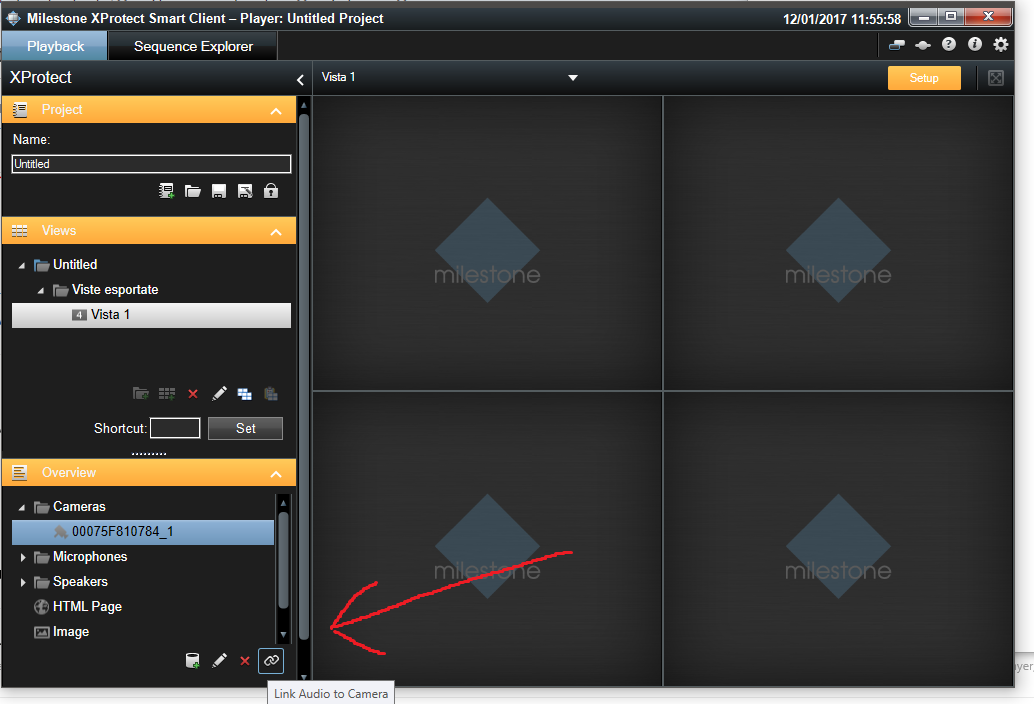
Great!!! I’ve done, by a happy chance!!! It was necessary to link the microphones to the video and then the exporting is okay, both video and audio together!