No results when calling GetRecordingSearchResults

Hi

I don’t get any search results when calling the above endpoint. I’m starting the search with

env:Body

<FindRecordings xmlns=“http://www.onvif.org/ver10/search/wsdl” >

<Scope>

 <IncludedSources xmlns="[http://www.onvif.org/ver10/schema](http://www.onvif.org/ver10/schema "http://www.onvif.org/ver10/schema")">

  <Token>1cee5558-f385-4a22-b691-149812fcfe4b</Token>

 </IncludedSources>

 <RecordingInformationFilter xmlns="[http://www.onvif.org/ver10/schema](http://www.onvif.org/ver10/schema "http://www.onvif.org/ver10/schema")">

 </RecordingInformationFilter>

</Scope>

 <MaxMatches>1000</MaxMatches>

 <KeepAliveTime>PT0H0M0.05S</KeepAliveTime>

</env:Body>

</env:Envelope>

Note, I have removed the search filter to hopefully widen the search.

Them, if I use the search token in GetRecordingSearchResults, like this…

env:Header

</env:Header>

env:Body

<GetRecordingSearchResults xmlns="[http://www.onvif.org/ver10/search/wsdl](http://www.onvif.org/ver10/search/wsdl "http://www.onvif.org/ver10/search/wsdl")">

  <SearchToken>f13501bd-a00f-4d5e-acce-6c7dddac4f6a</SearchToken>

  <MinResults>1</MinResults>

  <WaitTime>PT5S</WaitTime>

</GetRecordingSearchResults>

</env:Body>

</env:Envelope>

I get…

SOAP-ENV:Body

<tse:GetRecordingSearchResultsResponse>

  <tse:ResultList>

    <tt:SearchState>Completed</tt:SearchState>

  </tse:ResultList>

</tse:GetRecordingSearchResultsResponse>

</SOAP-ENV:Body>

</SOAP-ENV:Envelope>

However, I know there are 11 recordings available because from the GetRecordingSummary, I get this response

<tse:GetRecordingSummaryResponse>

  <tse:Summary>

    <tt:DataFrom>2025-05-03T15:13:38Z</tt:DataFrom>

    <tt:DataUntil>2025-06-02T16:03:49Z</tt:DataUntil>

    <tt:NumberRecordings>11</tt:NumberRecordings>

  </tse:Summary>

</tse:GetRecordingSummaryResponse>

I originally posted a comment to this thread, however I then deleted it because I reaslised I wasn’t reading the latest comments, including from @Nikolay Dimitrov​.

I did try your entire request object (only changing the camera token) where the search filter was all on one line, but it didn’t seem to help in my case.

I wondered if it might be because we do not have a schedule set up. All 11 cameras record continuously. I did try adjusting the search filter to go back far enough in time (3 months) to cross a boundary, but no success yet.

So, I know there are some recordings available, but I’m not sure how to get them at this stage. I am using version 24.1.1 of the Open Network Bridge. I’m not sure if this corresponds with the ONVIF Bridge too.

I appreciate any help you can give me.

PS I have attached a Wireshark capture of the exchange. I’ve reduced some of the XML too

-Richard
Hi @Richard Gundersen

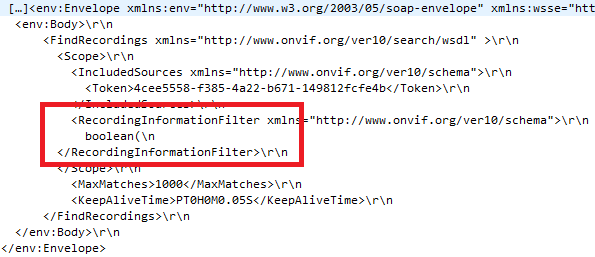
From what I can see in WireShark, your FindRecordings request is a bit weird:

As stated in the other forum thread, there must not be any new lines in/around the filter. Also - the filter is incomplete. Did you trim that manually in the wireshark trace? If so - please provide the original trace with all your requests and responses.

One more thing - can you please make sure that the token you provided to FindRecordings’s request is a valid camera GUID in your system?

And yet another idea - please try the following filter without changes:

<RecordingInformationFilter xmlns=“http://www.onvif.org/ver10/schema”>boolean(//Track[TrackType = "Video"]),2025-06-02T15:24:48Z,99999999,20,99999999,20

Hi Nikolay

Thanks for the quick response, sorry I wasn’t working yesterday so only just had chance to look at this. Thanks for pointing out the search filter being truncated. It turns out that postman was mangling the value - I think it was treating the ‘//’ as part of a URL and trying to do some additional encoding, and breaking it in the process. I now get a sensible response containing a search token, and I can use that in the next call to GetRecordingSearchResults, and I get some results back.

It’s a bit strange, because in order to get it to work I had to change the body type from Raw/XML to Raw/Text, and also add a Content-Type header of “application/soap+xml; charset=utf-8”. But then I changed everything back to how I originally had it and the request still works. So maybe Postman just needed some sort of settings ‘nudge’. I can see the full request in Wireshark and the filter looks fine however I post the request now.

For completeness, here is my XML in case it helps anyone else

FindRecordings request (replace the camera GUID)

<env:Envelope xmlns:env="http://www.w3.org/2003/05/soap-envelope" xmlns:wsse="http://docs.oasis-open.org/wss/2004/01/oasis-200401-wss-wssecurity-secext-1.0.xsd" xmlns:wsu="http://docs.oasis-open.org/wss/2004/01/oasis-200401-wss-wssecurity-utility-1.0.xsd">
 
  <env:Body>
 
      <FindRecordings xmlns="http://www.onvif.org/ver10/search/wsdl" >
 
        <Scope>
 
          <IncludedSources xmlns="http://www.onvif.org/ver10/schema">
 
            <Token>[YOUR CAMERA GUID]</Token>
 
          </IncludedSources>
 
<RecordingInformationFilter xmlns="http://www.onvif.org/ver10/schema">boolean(//Track[TrackType = 'Video']),2025-06-02T15:24:48Z,99999999,20,99999999,20</RecordingInformationFilter>
 
        </Scope>
 
          <MaxMatches>1000</MaxMatches>
 
          <KeepAliveTime>PT0H0M0.05S</KeepAliveTime>
 
      </FindRecordings>
 
  </env:Body>
 
</env:Envelope>

Response

<?xml version="1.0" encoding="UTF-8"?>
 
<SOAP-ENV:Envelope xmlns:SOAP-ENV="http://www.w3.org/2003/05/soap-envelope" xmlns:SOAP-ENC="http://www.w3.org/2003/05/soap-encoding" xmlns:xsi="http://www.w3.org/2001/XMLSchema-instance" xmlns:xsd="http://www.w3.org/2001/XMLSchema" xmlns:wsa="http://schemas.xmlsoap.org/ws/2004/08/addressing" xmlns:wsdd="http://schemas.xmlsoap.org/ws/2005/04/discovery" xmlns:chan="http://schemas.microsoft.com/ws/2005/02/duplex" xmlns:wsa5="http://www.w3.org/2005/08/addressing" xmlns:c14n="http://www.w3.org/2001/10/xml-exc-c14n#" xmlns:ds="http://www.w3.org/2000/09/xmldsig#" xmlns:saml1="urn:oasis:names:tc:SAML:1.0:assertion" xmlns:saml2="urn:oasis:names:tc:SAML:2.0:assertion" xmlns:wsu="http://docs.oasis-open.org/wss/2004/01/oasis-200401-wss-wssecurity-utility-1.0.xsd" xmlns:xenc="http://www.w3.org/2001/04/xmlenc#" xmlns:wsc="http://docs.oasis-open.org/ws-sx/ws-secureconversation/200512" xmlns:wsse="http://docs.oasis-open.org/wss/2004/01/oasis-200401-wss-wssecurity-secext-1.0.xsd" xmlns:xmime="http://tempuri.org/xmime.xsd" xmlns:xop="http://www.w3.org/2004/08/xop/include" xmlns:tt="http://www.onvif.org/ver10/schema" xmlns:wsnt="http://docs.oasis-open.org/wsn/b-2" xmlns:tdn="http://www.onvif.org/ver10/network/wsdl" xmlns:tds="http://www.onvif.org/ver10/device/wsdl" xmlns:tmd="http://www.onvif.org/ver10/deviceIO/wsdl" xmlns:tptz="http://www.onvif.org/ver20/ptz/wsdl" xmlns:tr2="http://www.onvif.org/ver20/media/wsdl" xmlns:trp="http://www.onvif.org/ver10/replay/wsdl" xmlns:trt="http://www.onvif.org/ver10/media/wsdl" xmlns:tse="http://www.onvif.org/ver10/search/wsdl">
 
    <SOAP-ENV:Body>
 
        <tse:FindRecordingsResponse>
 
            <tse:SearchToken>3c0fa150-6279-454a-92b4-73b4ea794c36</tse:SearchToken>
 
        </tse:FindRecordingsResponse>
 
    </SOAP-ENV:Body>
 
</SOAP-ENV:Envelope>

Then pass the search token to…

GetRecordingSearchResults request

<?xml version="1.0" encoding="utf-8"?>
 
<env:Envelope xmlns:env="http://www.w3.org/2003/05/soap-envelope" xmlns:wsse="http://docs.oasis-open.org/wss/2004/01/oasis-200401-wss-wssecurity-secext-1.0.xsd" xmlns:wsu="http://docs.oasis-open.org/wss/2004/01/oasis-200401-wss-wssecurity-utility-1.0.xsd">
 
    <env:Header>
 
    </env:Header>    
 
    <env:Body>
 
        <GetRecordingSearchResults xmlns="http://www.onvif.org/ver10/search/wsdl">
 
            <SearchToken>3c0fa150-6279-454a-92b4-73b4ea794c36</SearchToken>
 
            <MinResults>1</MinResults>
 
            <WaitTime>PT5S</WaitTime>
 
        </GetRecordingSearchResults>
 
    </env:Body>
 
</env:Envelope>

Which returns

Response

<?xml version="1.0" encoding="UTF-8"?>
 
<SOAP-ENV:Envelope xmlns:SOAP-ENV="http://www.w3.org/2003/05/soap-envelope" xmlns:SOAP-ENC="http://www.w3.org/2003/05/soap-encoding" xmlns:xsi="http://www.w3.org/2001/XMLSchema-instance" xmlns:xsd="http://www.w3.org/2001/XMLSchema" xmlns:wsa="http://schemas.xmlsoap.org/ws/2004/08/addressing" xmlns:wsdd="http://schemas.xmlsoap.org/ws/2005/04/discovery" xmlns:chan="http://schemas.microsoft.com/ws/2005/02/duplex" xmlns:wsa5="http://www.w3.org/2005/08/addressing" xmlns:c14n="http://www.w3.org/2001/10/xml-exc-c14n#" xmlns:ds="http://www.w3.org/2000/09/xmldsig#" xmlns:saml1="urn:oasis:names:tc:SAML:1.0:assertion" xmlns:saml2="urn:oasis:names:tc:SAML:2.0:assertion" xmlns:wsu="http://docs.oasis-open.org/wss/2004/01/oasis-200401-wss-wssecurity-utility-1.0.xsd" xmlns:xenc="http://www.w3.org/2001/04/xmlenc#" xmlns:wsc="http://docs.oasis-open.org/ws-sx/ws-secureconversation/200512" xmlns:wsse="http://docs.oasis-open.org/wss/2004/01/oasis-200401-wss-wssecurity-secext-1.0.xsd" xmlns:xmime="http://tempuri.org/xmime.xsd" xmlns:xop="http://www.w3.org/2004/08/xop/include" xmlns:tt="http://www.onvif.org/ver10/schema" xmlns:wsnt="http://docs.oasis-open.org/wsn/b-2" xmlns:tdn="http://www.onvif.org/ver10/network/wsdl" xmlns:tds="http://www.onvif.org/ver10/device/wsdl" xmlns:tmd="http://www.onvif.org/ver10/deviceIO/wsdl" xmlns:tptz="http://www.onvif.org/ver20/ptz/wsdl" xmlns:tr2="http://www.onvif.org/ver20/media/wsdl" xmlns:trp="http://www.onvif.org/ver10/replay/wsdl" xmlns:trt="http://www.onvif.org/ver10/media/wsdl" xmlns:tse="http://www.onvif.org/ver10/search/wsdl">
 
    <SOAP-ENV:Header></SOAP-ENV:Header>
 
    <SOAP-ENV:Body>
 
        <tse:GetRecordingSearchResultsResponse>
 
            <tse:ResultList>
 
                <tt:SearchState>Completed</tt:SearchState>
 
                <tt:RecordingInformation>
 
                    <tt:RecordingToken>4cee5558-f385-4a22-b671-149812fcfe4b</tt:RecordingToken>
 
                    <tt:Source>
 
                        <tt:SourceId>http://www.w3.org/2005/08/addressing/anonymous</tt:SourceId>
 
                        <tt:Name>recording</tt:Name>
 
                        <tt:Location>Location Description</tt:Location>
 
                        <tt:Description>Source Description</tt:Description>
 
                        <tt:Address>http://www.w3.org/2005/08/addressing/anonymous</tt:Address>
 
                    </tt:Source>
 
                    <tt:EarliestRecording>2025-05-26T22:50:26Z</tt:EarliestRecording>
 
                    <tt:LatestRecording>2025-06-04T10:32:25Z</tt:LatestRecording>
 
                    <tt:Content>Content Description</tt:Content>
 
                    <tt:Track>
 
                        <tt:TrackToken>v1</tt:TrackToken>
 
                        <tt:TrackType>Video</tt:TrackType>
 
                        <tt:Description>Description</tt:Description>
 
                        <tt:DataFrom>2025-05-26T22:50:26Z</tt:DataFrom>
 
                        <tt:DataTo>2025-06-04T10:32:25Z</tt:DataTo>
 
                    </tt:Track>
 
                    <tt:RecordingStatus>Recording</tt:RecordingStatus>
 
                </tt:RecordingInformation>
 
            </tse:ResultList>
 
        </tse:GetRecordingSearchResultsResponse>
 
    </SOAP-ENV:Body>
 
</SOAP-ENV:Envelope>

Not sure what to do with these results yet. I want to ultimately get a video from the specified time playing in VLC. If you have any tips I would be grateful, but I’m happy I’ve got past this problem now. Thanks for your help!

Good news it works for you now.

As for your next question, please take a look at those threads:

https://developer.milestonesys.com/s/question/0D50O00003ZPfphSAD/onvif-bridge-video-playback-sequence-issues

https://developer.milestonesys.com/s/question/0D50O00003X1EZnSAN/onvif-bridgertsp-server-reverse-playback-and-gototime-support

Hi Nikolay

Thanks again for the response. We’re using libvlc and I have been unable to get the range header to work (it always seems to be ignored). For example, it sounds like something like this should work

:rtsp-range=clock=20250607T142005.123Z-

This should start playback at approx 14:20 on 7th June, but it just seem to be ignored (playback always starts at the very beginning of the recording)

However, I have had success with

:start-time=2361133

This starts playback at about the right time. I just need to calculate how many seconds are required for the offset.

However, in order to calculate the offset, I need to know when the recording starts.

GetRecordingSearchResults doesn’t seem to include the starting date/time. It does include tt:EarliestRecording2025-05-12T11:21:45Z</tt:EarliestRecording>, but this isn’t accurate. My recording actually starts a day earlier.

I can get this value from the output of the DESCRIBE step when setting up an RTSP session, which I can do myself in code, but I don’t think libvlc makes the output easy to capture.

This is what it looks like: a=range:clock=20250511T095109Z-20250512T111937Z;clock=20250512T112145Z-20250610T104111Z. The first range is accurate.

Do you know how best to get the starting date/time of a recording? Is the output of the DESCRIBE command the correct way to get it?

UPDATE: I see there’s a GetRecordingInformation ONVIV call that can be made. The request looks like this

<soapenv:Envelope xmlns:soapenv="http://www.w3.org/2003/05/soap-envelope"
                  xmlns:ser="http://www.onvif.org/ver10/search/wsdl">
   <soapenv:Header/>
   <soapenv:Body>
      <ser:GetRecordingInformation>
         <ser:RecordingToken>{{recordingToken}}</ser:RecordingToken>
      </ser:GetRecordingInformation>
   </soapenv:Body>
</soapenv:Envelope>

and the response looks like

    <SOAP-ENV:Body>
        <tse:GetRecordingInformationResponse>
            <tse:RecordingInformation>
                <tt:RecordingToken>29730e14-0892-4f61-b1e1-4dbc47b2801c</tt:RecordingToken>
                <tt:Source>
                    <tt:SourceId>http://www.w3.org/2005/08/addressing/anonymous</tt:SourceId>
                    <tt:Name>recording</tt:Name>
                    <tt:Location>Location Description</tt:Location>
                    <tt:Description>Source Description</tt:Description>
                    <tt:Address>http://www.w3.org/2005/08/addressing/anonymous</tt:Address>
                </tt:Source>
                <tt:EarliestRecording>2025-05-11T12:51:21Z</tt:EarliestRecording>
                <tt:LatestRecording>2025-06-10T13:10:26Z</tt:LatestRecording>
                <tt:Content>Content Description</tt:Content>
                <tt:Track>
                    <tt:TrackToken>v1</tt:TrackToken>
                    <tt:TrackType>Video</tt:TrackType>
                    <tt:Description>Description</tt:Description>
                    <tt:DataFrom>2025-05-11T12:51:21Z</tt:DataFrom>
                    <tt:DataTo>2025-06-10T13:10:26Z</tt:DataTo>
                </tt:Track>
                <tt:RecordingStatus>Recording</tt:RecordingStatus>
            </tse:RecordingInformation>
        </tse:GetRecordingInformationResponse>
    </SOAP-ENV:Body>
</SOAP-ENV:Envelope>

In these results, tt:EarliestRecording does appear to have the correct start date/time of my recording, so I will use this. It’s actually 1 hour difference but I put this down to UTC issues.

Hopefully this is the recommended approach

Hi @Richard Gundersen

GetRecordingInformation’s EarliestRecording is the proper way to go. Well done finding it!

All timestamps are indeed in UTC.

Br,

Nikolay

Thanks for confirming Nikolay, it’s good to know we’re using the correct approach!

-Richard