Not able to Retrieve recording from edge storage to smart client

Hello,

We are integrating our Network Video Recorder (NVR) with Milestone using ONVIF Protocol. Our NVR supports Edge Storage. We want to retrieve the recording from NVR for selected time from XProtect smart client’s retrieve feature but not getting success on that.

We have followed “Edge Storage retrieval workflow” and implemented require APIs such as GetServices, GetCapabilities, GetVideoSources, GetProfiles, GetRecordingSummary, GetMediaAttributes and GetReplayUri (As mentioned in Edge storage Workflow, if GetMediaAttributes response is OK then no need to implement other APIs as the flow will directly jump to the GetReplayUri).

We have enabled the remote recording for cameras as shown in attached figure.

When we try to retrieve the recording from Smart client, we have noticed following things :

  1. We are getting start time to retrieve the recording in ONVIF request but not getting stop time.
  2. Our NVR server is successfully sending proper response for all the APIs with RTSP URI through GetReplayUri. e.g., Our RTSP server has generated RTSP URI “rtsp://172.25.4.12:8556/IPCamera_2” And we can also play that RTSP URI of requested time using VLC player.
  3. In smart client we can see the Job has completed. but still in playback section, requested timeline is showing as No recording as shown in attached figures.

Can you please guide us if we are doing anything wrong or missing anything ?
Can you provide a Wireshark trace made on the machine where the Recording Server is installed:

  1. During adding of the NVR in XProtect.
  2. During request to retrieve Edge Storage recording from NVR.

Hello,

Please find an attached Wireshark traces files for both the cases you have requested. NVR IP is : 172.25.4.12

I see several issues with the RTSP Playback stream.

For more information see the ONVIF Streaming Specification - Section 6 (Playback).

https://www.onvif.org/specs/stream/ONVIF-Streaming-Spec.pdf

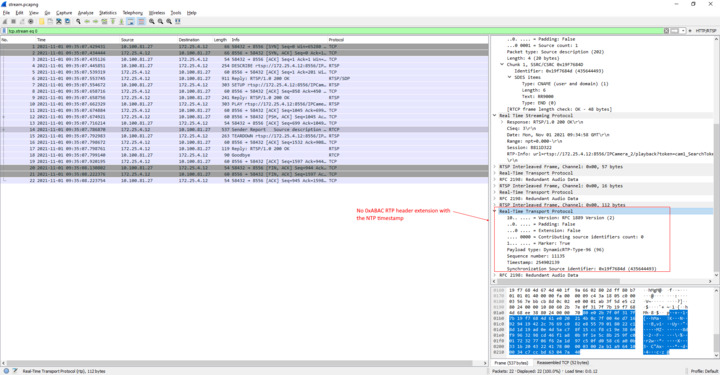
  1. The RTSP Describe SDP does not contain the x-onvif-track attribute for the tracks (section 6.2).
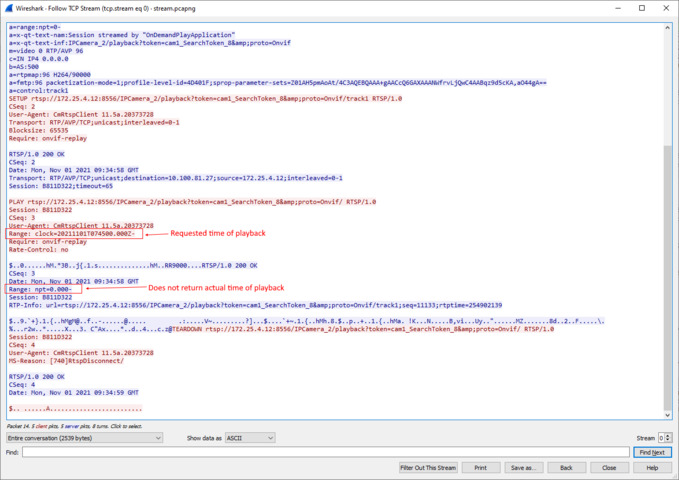
  2. The RTSP PLAY response has an invalid Range field. It should be the time of first frame of the playback stream.
  3. The stream does not start with a keyframe (IDR). It is preferable for the playback stream to start with a keyframe i.e. the device should start playback further forward or further back in the recording. This should affect the Range field in the RTSP PLAY response. Not starting from a keyframe is a waste of bandwidth and processing for the client as the decoding process cannot start until a keyframe is received.
  4. The ONVIF RTP header extension is missing from the RTP packets (Section 6.3). This is the most important part for XProtect as it is used to accurately position on the timeline every received frame from the recording.