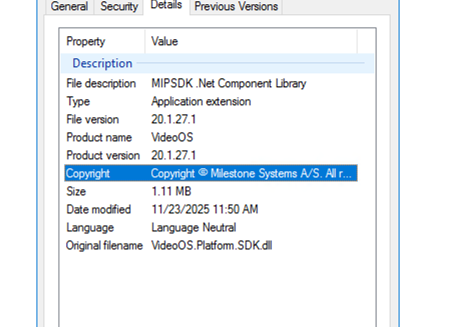
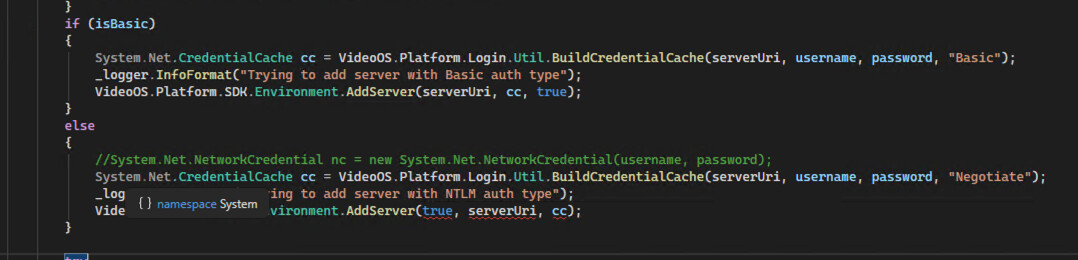
We have been using an older version of the SDK (approximately 5–6 years old) in our integration, and after upgrading to MIP SDK 2025 R2 (25.2a), we are experiencing issues with NTLM-based logins. the basic still works ok.
We have verified that the server is accessible and running.
   if (isBasic)

  {

    System.Net.CredentialCache cc = VideoOS.Platform.Login.Util.BuildCredentialCache(serverUri, username, password, "Basic");

    \_logger.InfoFormat("Trying to add server with Basic auth type");

    VideoOS.Platform.SDK.Environment.AddServer(serverUri, cc, true);

  }

  else

  {

    System.Net.NetworkCredential nc = new System.Net.NetworkCredential(username, password);

    \_logger.InfoFormat("Trying to add server with NTLM auth type");

    VideoOS.Platform.SDK.Environment.AddServer(serverUri, nc, true);

  }

  try

  {

    \_logger.InfoFormat("Trying to login server: {0} with user: {1}", serverUri.ToString(), username);

    VideoOS.Platform.SDK.Environment.Login(serverUri, true);

  }
we get those logs after the login method execute:
2025-11-25 13:48:34,759 INFO STMilestonePlugin.Services.MilestoneDeviceService - Trying to remove all servers
2025-11-25 13:48:34,762 INFO STMilestonePlugin.Services.MilestoneDeviceService - Removed all servers successfully
2025-11-25 13:48:34,762 INFO STMilestonePlugin.Services.MilestoneDeviceService - Trying to add server with NTLM auth type
2025-11-25 13:48:34,797 INFO STMilestonePlugin.Services.MilestoneDeviceService - Trying to login server: http://localhost/ with user: stadmin
ConnectionCheck for:http://localhost/, Took:1141ms
ConnectionCheck for:http://localhost/, Took:1142ms
ConnectionCheck for:http://localhost/, Took:1186ms
ConnectionCheck for:https://localhost/, Took:16147ms
ConstructLoginServer:Unable to identify server type:localhost
MIP: Error: SDKConfiguration.Login(Uri) ():Unable to login on server URI=http://localhost/
2025-11-25 13:48:51,092 ERROR STMilestonePlugin.Services.MilestoneDeviceService - Server http://localhost/ not found, reason:
2025-11-25 13:48:51,125 ERROR STMilestonePlugin.Services.MilestoneDeviceService - Falied to check if loggedIn
2025-11-25 13:48:51,149 INFO STMilestonePlugin.Services.MilestoneDeviceService - Not loggedin to the environment
2025-11-25 13:48:51,149 INFO STMilestonePlugin.Services.MilestoneDeviceService - Trying to logout
2025-11-25 13:48:51,150 INFO STMilestonePlugin.Services.MilestoneDeviceService - Logout successfully
2025-11-25 13:48:51,150 INFO STMilestonePlugin.Services.MilestoneDeviceService - Trying to remove all servers
2025-11-25 13:48:51,150 INFO STMilestonePlugin.Services.MilestoneDeviceService - Removed all servers successfully
2025-11-25 13:48:51,150 INFO STMilestonePlugin.Services.MilestoneDeviceService - Trying to add server with NTLM auth type
2025-11-25 13:48:51,152 INFO STMilestonePlugin.Services.MilestoneDeviceService - Trying to login server: http://localhost/ with user: stadmin
MIP: Error: SDKConfiguration.Login(Uri) ():Unable to login on server URI=http://localhost/
2025-11-25 13:48:51,182 ERROR STMilestonePlugin.Services.MilestoneDeviceService - Server http://localhost/ not found, reason:
2025-11-25 13:48:51,211 ERROR STMilestonePlugin.Services.MilestoneDeviceService - Falied to check if loggedIn
2025-11-25 13:48:51,234 INFO STMilestonePlugin.Services.MilestoneDeviceService - Not loggedin to the environment
2025-11-25 13:48:51,234 INFO STMilestonePlugin.Services.MilestoneDeviceService - Trying to logout
2025-11-25 13:48:51,234 INFO STMilestonePlugin.Services.MilestoneDeviceService - Logout successfully
2025-11-25 13:48:51,235 INFO STMilestonePlugin.Services.MilestoneDeviceService - Trying to remove all servers
2025-11-25 13:48:51,235 INFO STMilestonePlugin.Services.MilestoneDeviceService - Removed all servers successfully
2025-11-25 13:48:51,235 INFO STMilestonePlugin.Services.MilestoneDeviceService - Trying to add server with NTLM auth type
2025-11-25 13:48:51,237 INFO STMilestonePlugin.Services.MilestoneDeviceService - Trying to login server: http://localhost/ with user: stadmin
MIP: Error: SDKConfiguration.Login(Uri) ():Unable to login on server URI=http://localhost/
2025-11-25 13:48:51,266 ERROR STMilestonePlugin.Services.MilestoneDeviceService - Server http://localhost/ not found, reason:
2025-11-25 13:48:51,298 ERROR STMilestonePlugin.Services.MilestoneDeviceService - Falied to check if loggedIn