IP SPEAKER of AXIS is connected on network and showing under devices in Xprotect management console. Same is visible in smart client also and When Talk button is pressed , able to hear sound on speaker.
I am sorry but I failed to understand your question. Can you please describe what you want to achieve?
Let me explain in steps.
- We have IP Speaker connected on same network as Milestone installed machine is connected.
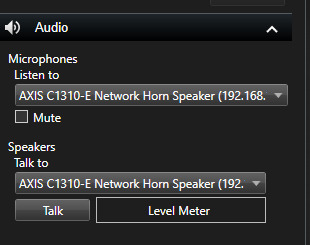
- IP Speaker is configured and tested with Xpert Smart Client. When TALK button is pressed and message is given on mic same is passed on to SPEAKER.
- Similar to that we like to implement the TALK button on WEB Application. So that User near by SPEAKER at Remote location can listen to the message sent from computer MIC.
- IP SPEAKER is of AXIX make.
- AUDIO example provided is to get the audio stream from MOBILE SERVER.
- Also Added below Smart Client screen shot which works as explained above. similar functions we like to implement in WEB application.
- Hope now requirement is explained clearly.
Hello Divyakumar,
you are right. The Audio sample is to take audio stream from the server. But did you try the PushToTalk one (https://github.com/milestonesys/mipsdkmobile-web/tree/main/Samples/PushToTalk). I think this is what you needed.
You can also use the WebClient for a sample to see if that functionality works from the Web point of view.
I hope that helps
Teodor
Push to talk is also tried and i have gone through it. It is for Speaker which are inbuilt with Camera. First it takes camera id and then as a child item it takes speaker id from it,
What I am looking for is direct Speaker item and send the mic input to the speaker.
Web Client you mentioned in your response Can you send me link for web client sample.
thanks for your response.
Thanks for clarification. I see that you have went a long way before coming here in the forum.
Let’s go more technical.
Are you using the XPMobileSKD to develop for web? I guess yes. If not please share more details how what is your platform that you use to develop for web.
To connect via Web you need a Milestone Mobile Server installed in the VMS. This server is used to expose the VMS to the internet and it also host a WebClient (usually on port 8081 for http and 8082 for https : https://localhost:8082). There you can see the WebClient I mentioned above.
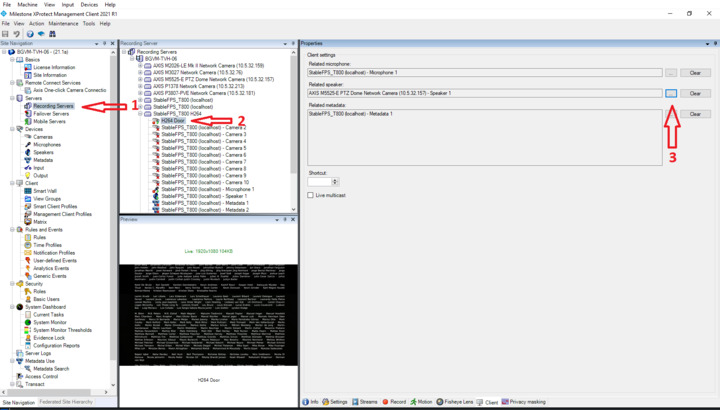
In the Push to talks samples you can see all the mics and speakers that are related to cameras. If a camera have a mic. or speaker they will be automatically related to that camera. In your case it is a IP speaker which is not related to any camera. That is the reason why you are not seeing it in the list of devices for the Web. The only way to have this IP speaker work in web is to relate it to a camera. Check the image below. After doing so this speaker should be available from the web.
I hope that helps.
Teodor
Thanks for your response. I could configure now. We are using Mobile server and also checked on WEB Client. Now message is https is must for PushToTalk. In testing setup https is not available. we will arrange the same and test it.
Any suggestions on testing without SSL on http pages.
once again thank you very much for your support.
For security reasons we have make the PushToTalk to be available only on HTTPS. There are no workarounds that I am aware of. It is working just fine with self signed certificates so you don’t need to spend money for real ones.