Hello Milestone Community,
I am working on integrating an AI Bridge (version
v2.0.0
) with our Milestone XProtect VMS, specifically to display ONVIF analytics overlays on live video streams in the Smart Client. I’ve successfully set up the data flow, but the overlays are not appearing, and I’m hoping to get some insights into what might be going wrong.
My Setup:
- Milestone XProtect VMS Version: (Please insert your specific XProtect version here, e.g., 2024 R1, 2023 R2, etc. If unsure, state “a recent version”).
- **AI Bridge Version:**v2.0.0
- (as per GraphQL query).
- Video Source: GStreamer simulation, sending an RTSP stream to
- rtsp://127.0.0.1:554/video1
gst-launch-1.0 videotestsrc is-live=true do-timestamp=true ! tsoffset offset=-60000000000 ! nvvideoconvert ! nvv4l2h264enc ! rtspclientsink protocols=tcp location=rtsp://127.0.0.1:554/video1
Metadata Sender: A Python script (provided below) sends ONVIF analytics XML data via REST POST requests to the AI Bridge.
AI Bridge Metadata Topic: The AI Bridge exposes an
ONVIF_ANALYTICS
topic for objects.
graphQL response
{
  "data": {
    "about": {
      "version": "v2.0.0"
    },
    "metadataTopics": [
      {
        "topicName": "objects",
        "metadataFormat": "ONVIF_ANALYTICS",
        "topicAvailability": {
          "rest": "http://aivs-serv-2:8382/metadata/05f3aa90-2316-4286-a0a9-97f70b0d77db/objects/onvif_analytics",
          "kafka": "metadata.05f3aa90-2316-4286-a0a9-97f70b0d77db.objects.onvif_analytics",
          "grpc": "grpc://AIVS-Serv-2:8383"
        }
      }
    ]
  }
}
python sender to bridge
import requests
import time
from datetime import datetime, timezone, timedelta

# --- Configuration ---
METADATA_URL = "http://10.5.1.230:8382/metadata/05f3aa90-2316-4286-a0a9-97f70b0d77db/objects/onvif_analytics"
SEND_INTERVAL_SECONDS = 0.1
SOURCE_STREAM_ID = "6f9f6042-7ece-4e99-8e9b-b65f603d2418/28dc44c3-079e-4c94-8ec9-60363451eb40"

def generate_onvif_metadata_xml():
    current_utc_now = datetime.now(timezone.utc)
    # The UtcTime is set to current UTC time for the purpose of this post,
    # though I've also tested with a 1-minute offset to match the GStreamer pipeline.
    utc_time_str = current_utc_now.isoformat(timespec='milliseconds') + '+00:00'

    xml_content = f"""<?xml version="1.0" encoding="UTF-8"?>
<tt:MetadataStream xmlns:tt="http://www.onvif.org/ver10/schema">
    <tt:VideoAnalytics>
        <tt:Frame UtcTime="{utc_time_str}" SourceStreamID="{SOURCE_STREAM_ID}">
            <tt:Object ObjectId="1">
                <tt:Appearance>
                    <tt:Class>
                        <tt:ClassCandidate>
                            <tt:Type>Vehicle</tt:Type>
                            <tt:Likelihood>0.86</tt:Likelihood>
                        </tt:ClassCandidate>
                    </tt:Class>
                    <tt:VehicleInfo>
                        <tt:Type>Car</tt:Type>
                        <tt:Brand>Ford</tt:Brand>
                        <tt:Model>Mustang</tt:Model>
                    </tt:VehicleInfo>
                    <tt:Shape>
                        <tt:BoundingBox bottom="0.46875" right="0.321875" top="0.515625" left="0.275"/>
                        <tt:CenterOfGravity y="0.298" x="0.492"/>
                    </tt:Shape>
                </tt:Appearance>
            </tt:Object>
        </tt:Frame>
    </tt:VideoAnalytics>
</tt:MetadataStream>"""
    return xml_content.encode('utf-8')

def send_metadata_loop():
    print(f"Starting ONVIF metadata sender to {METADATA_URL}")
    print(f"Sending every {SEND_INTERVAL_SECONDS * 1000} ms...")

    while True:
        try:
            xml_data = generate_onvif_metadata_xml()
            headers = {'Content-Type': 'application/xml'}
            response = requests.post(METADATA_URL, data=xml_data, headers=headers, timeout=5)
            print(f"[{datetime.now().isoformat(timespec='milliseconds')}] Status Code: {response.status_code}, Response: {response.text.strip()}")
            response.raise_for_status()
        except requests.exceptions.RequestException as e:
            print(f"[{datetime.now().isoformat(timespec='milliseconds')}] Error: {e}")
        time.sleep(SEND_INTERVAL_SECONDS)

if __name__ == "__main__":
    send_metadata_loop()
Observations:
The Python script consistently receives HTTP 200 OK responses from the AI Bridge, indicating successful delivery of the XML metadata.
The AI Bridge logs show that the metadata is being received and forwarded to the VPS (Video Processing Service). An example log line:
2025-08-06T14:42:55Z Forwarding metadata in onvif_analytics format from source 6f9f6042-7ece-4e99-8e9b-b65f603d2418/28dc44c3-079e-4c94-8ec9-60363451eb40 to VPS connection stopped after 46130 frames (did not get data for 13.727018311s)
(The “connection stopped” message is expected as a timeout if no new data is sent for a period, which happens between bursts of metadata).
I have verified that the “Overlays” option is enabled in the Milestone Smart Client view item.
The SourceStreamID used in the metadata XML matches the camera’s ID in Milestone.
I have ensured that the UtcTime in the XML is correctly formatted and aligns with the video stream’s timestamp (both by trying current UTC time and a 1-minute offset).
The XML includes tt:BoundingBox with left, top, right, bottom coordinates, which should allow for drawing.
The Problem:
Despite all these confirmations, no overlays (like bounding boxes for the “Vehicle” object) are visible on the video feed in the Milestone Smart Client.
Questions for the Community:
What are the common reasons for ONVIF analytics overlays not appearing in the Smart Client, even when the AI Bridge confirms successful forwarding to the VPS and returns 200 OK?
Are there any specific, less obvious settings in the Milestone Management Client or Smart Client that need to be configured for ONVIF analytics overlays to render?
Could there be a subtle issue with the UtcTime synchronization or format that is accepted by the AI Bridge but causes rendering issues in the Smart Client?
Are there any known compatibility issues with AI Bridge v2.0.0 and specific Milestone XProtect versions regarding ONVIF analytics rendering?
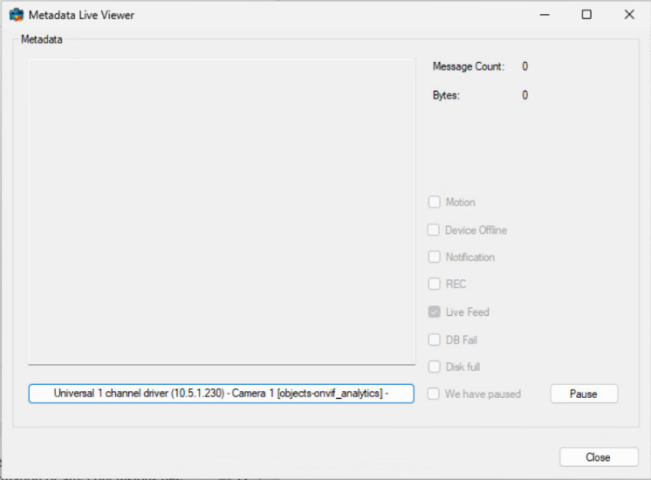
What debugging steps can I take within Milestone (e.g., specific logs, diagnostics tools) to understand why the overlays aren’t being drawn?
Any guidance or suggestions would be greatly appreciated. Thank you in advance for your help!