ONVIF Bridge FindRecording method

we have issues with the FindRecording method in serach.wsdl when using the ONVIF bridge.

this method is marked as implemented in the document, and it is primary source of getting list of camera recordings.

There is no example in the ONVIF Bridge user guide, so we looked to the official Onvif spec, we’ve used this example http://pdn.pelco.com/blog/retrieving-recorded-video-onvif-device#sthash.jLs1wM7i.MAmaUTxu.dpbs

When we try to call the method like this:

var searchToken = searchClient.FindRecordings(new SearchService.SearchScope(), 10, “PT0H0M0.05S”);

this corresponds to call of methd 5. FindRecordings https://www.onvif.org/ver10/search.wsdl

it returns invalid TCP packet (apparently invalid argument).

So our questions are:

  1. Can we please confirm that the FindRecording and search.wsdl methods are working? Can you provide some code sample or some way we can see that we can get a list of avalable camera recordings?

  2. what is the response we should expect and can you provide some examples?
I found this explanation from the Developers -

Send FindRecordings request with the following parameters, which are mandatory:

SearchScope->IncludedSources->Token – you must provide the camera GUID token

SearchScope->RecordingInformationFilter – string with the following parameters: “XPath expression,timestamp,maxTimeBefore,maxCountBefore,maxTimeAfter,maxCountAfter”

Timestamp of the request time in UTC format,

maxTimeBefore is time before the requested time stamp in milliseconds,

maxCountBefore is the maximum number of tracks before requested time stamp,

maxTimeAfter is time after the requested time stamp in milliseconds,

maxCountAfter is the maximum number of tracks after requested time stamp.

Example = “boolean(//Track[TrackType = “Video”]),2016-12-06T08:07:43Z,99999999,20,99999999,20”

You will get a response with a SearchToken which is unique for the search criteria.

Then you pass the SearchToken to GetRecordingSearchResults and you will get a list with all the tracks corresponding to the search criteria.

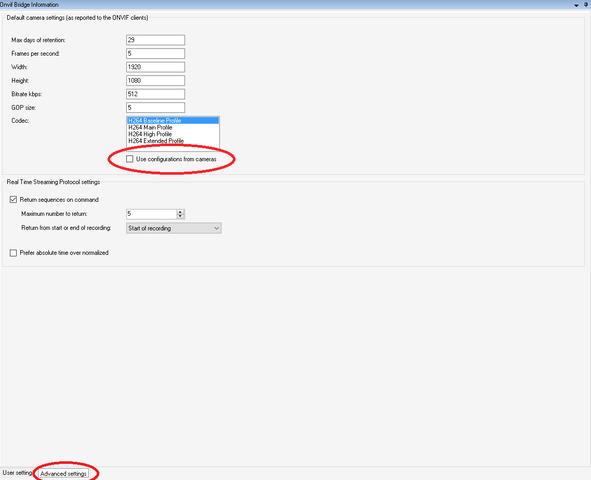
You can also use GetMediaAttributes and/or GetRecordingSummary to get the timestamp of the first and the last recording. But you have to enable Use configurations from cameras setting from the Advanced setting page of Onvif Bridge plugin in the XProtect Management Client.

Also, if Return sequences on command is enabled, the recording sequences will be included in the RTSP Describe response.

Hello Bo,

Sorry to wake this topic, but I still can’t have the FindRecordings working with Milestone’s ONVIF Bridge.

Here is my request :

<?xml version="1.0" encoding="UTF-8"?>
<SOAP-ENV:Envelope xmlns:SOAP-ENV="http://www.w3.org/2003/05/soap-envelope" xmlns:wsse="http://docs.oasis-open.org/wss/2004/01/oasis-200401-wss-wssecurity-secext-1.0.xsd" xmlns:wsu="http://docs.oasis-open.org/wss/2004/01/oasis-200401-wss-wssecurity-utility-1.0.xsd" xmlns:tse="http://www.onvif.org/ver10/search/wsdl">
    <SOAP-ENV:Header>
        <wsse:Security>
            <wsse:UsernameToken>
                <wsse:Username>admin</wsse:Username>
                <wsse:Password Type="http://docs.oasis-open.org/wss/2004/01/oasis-200401-wss-username-token-profile-1.0#PasswordDigest">1zstxq/P8f+DZC7aTjDHs2XXClc=</wsse:Password>
                <wsse:Nonce EncodingType="http://docs.oasis-open.org/wss/2004/01/oasis-200401-wss-soap-message-security-1.0#Base64Binary">ezg1Zjc5ZmZiLTExZDItNDk3ZC04MjAxLTQxYWI3ZWQ5YzRiY30=</wsse:Nonce>
                <wsu:Created>2020-04-09T18:19:56.066Z</wsu:Created>
            </wsse:UsernameToken>
        </wsse:Security>
    </SOAP-ENV:Header>
    <SOAP-ENV:Body>
        <tse:FindRecordings>
            <tse:Scope>
                <tse:IncludedSources>
                    <tse:Token>B18002F7-AACE-4F7E-8003-66C339177CFE</tse:Token>
                </tse:IncludedSources>
                <tse:RecordingInformationFilter>boolean(//Track[TrackType = "Video"]),2020-04-09T16:00:00Z,99999999,20,99999999,20</tse:RecordingInformationFilter>
            </tse:Scope>
            <tse:KeepAliveTime>PT60S</tse:KeepAliveTime>
        </tse:FindRecordings>
    </SOAP-ENV:Body>
</SOAP-ENV:Envelope>

Where B18002F7-AACE-4F7E-8003-66C339177CFE is the ID of my camera in Milestone XProtect (c-code).

No matter what I test, I always receive the same (I removed the namespaces for better readability):

<?xml version='1.0' encoding='UTF-8'?>
<SOAP-ENV:Envelope>
    <SOAP-ENV:Header/>
    <SOAP-ENV:Body>
        <SOAP-ENV:Fault>
            <SOAP-ENV:Code>
                <SOAP-ENV:Value>SOAP-ENV:Sender</SOAP-ENV:Value>
                <SOAP-ENV:Subcode>
                    <SOAP-ENV:Value>ter:InvalidArgs</SOAP-ENV:Value>
                </SOAP-ENV:Subcode>
            </SOAP-ENV:Code>
            <SOAP-ENV:Reason>
                <SOAP-ENV:Text>FindRecordings</SOAP-ENV:Text>
            </SOAP-ENV:Reason>
            <SOAP-ENV:Detail>FindRecordings Invalid Arguments</SOAP-ENV:Detail>
        </SOAP-ENV:Fault>
    </SOAP-ENV:Body>
</SOAP-ENV:Envelope>

I need to have the FindRecordings working. Can you help?

Hi Sullivan,

please check the answer to this question:

https://developer.milestonesys.com/s/question/0D53X00006W3NPFSA3/onvif-bridge-findrecordings-method-invalid-arguements

Regards

Hi Bo,

Thanks ut I had already checked this answer. And as you can see in my previous post, I had correctly defined the namespace for ONVIF search in the root element, using the “tse” prefix.

For the sake of rigor (as I’m pretty desperate), I revamped my request to be as close as possible to the one in the reply (the guy said “it works!”, so I was hopeful). Here it is:

<env:Envelope xmlns:env="http://www.w3.org/2003/05/soap-envelope" xmlns:wsse="http://docs.oasis-open.org/wss/2004/01/oasis-200401-wss-wssecurity-secext-1.0.xsd" xmlns:wsu="http://docs.oasis-open.org/wss/2004/01/oasis-200401-wss-wssecurity-utility-1.0.xsd">
    <env:Header>
        <wsse:Security>
            <wsse:UsernameToken>
                <wsse:Username>admin</wsse:Username>
                <wsse:Password Type="http://docs.oasis-open.org/wss/2004/01/oasis-200401-wss-username-token-profile-1.0#PasswordDigest">UHAaXuf45M+LPhWsfbiq37WwjdQ=</wsse:Password>
                <wsse:Nonce EncodingType="http://docs.oasis-open.org/wss/2004/01/oasis-200401-wss-soap-message-security-1.0#Base64Binary">e2M2NmUzYmViLTBjNWItNGQyZS04ZmFmLTU5MWM2ZjhkZTg5NH0=</wsse:Nonce>
                <wsu:Created>2020-04-10T06:16:51.858Z</wsu:Created>
            </wsse:UsernameToken>
        </wsse:Security>
    </env:Header>
    <env:Body>
        <FindRecordings xmlns="http://www.onvif.org/ver10/search/wsdl">
            <Scope>
                <IncludedSources>
                    <Token>b18002f7-aace-4f7e-8003-66c339177cfe</Token>
                </IncludedSources>
                <RecordingInformationFilter>boolean(//Track[TrackType = “Video”]),2020-04-09T16:00:00Z,99999999,20,99999999,20</RecordingInformationFilter>
            </Scope>
            <KeepAliveTime>PT0H0M0.05S</KeepAliveTime>
        </FindRecordings>
    </env:Body>
</env:Envelope>

Unfortunately, I still get the same SOAP error: FindRecordings invalid arguments.

Hi Sullivan,

I guess placebo didn’t work in this case. I will have a closer look. Meanwhile, please share what version of Onvif and XProtect you are using. Please also try to add the xmlns="http://www.onvif.org/ver10/search/wsdl namespace to IncludedSources and RecordingInformationFilter as it is shown in the answer from the other post.

Regards,

Tsvetomira

Hi Tsvetomira,

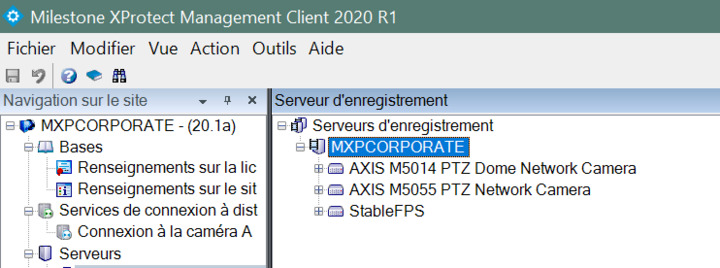
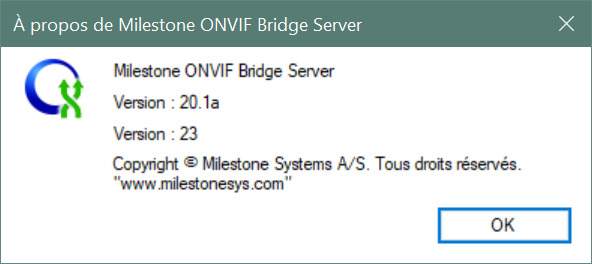
Here are some screenshots for the versions of my system.

Version3

I also did your trick with adding the namespace to IncludedSources and RecordingInformationFilter and that didn’t work better.

Hi Sullivan,

I have spent some time debugging your request using postman. If I sent it like this it works:

<?xml version="1.0" encoding="utf-8"?>

<env:Envelope

xmlns:env=“http://www.w3.org/2003/05/soap-envelope

xmlns:wsse=“http://docs.oasis-open.org/wss/2004/01/oasis-200401-wss-wssecurity-secext-1.0.xsd

xmlns:wsu=“http://docs.oasis-open.org/wss/2004/01/oasis-200401-wss-wssecurity-utility-1.0.xsd”>

env:Header

<wsse:Security>

  <wsse:UsernameToken>

    <wsse:Username>basic</wsse:Username>

    <wsse:Password Type="[http://docs.oasis-open.org/wss/2004/01/oasis-200401-wss-username-token-profile-1.0#PasswordDigest](http://docs.oasis-open.org/wss/2004/01/oasis-200401-wss-username-token-profile-1.0#PasswordDigest)">VGVzdDEyMzQ=</wsse:Password>

   <wsse:Nonce EncodingType="[http://docs.oasis-open.org/wss/2004/01/oasis-200401-wss-soap-message-security-1.0#Base64Binary](http://docs.oasis-open.org/wss/2004/01/oasis-200401-wss-soap-message-security-1.0#Base64Binary)">e2M2NmUzYmViLTBjNWItNGQyZS04ZmFmLTU5MWM2ZjhkZTg5NH0=</wsse:Nonce>

    <wsu:Created>2020-04-10T06:16:51.858Z</wsu:Created>

  </wsse:UsernameToken>

</wsse:Security>

</env:Header>

env:Body

<FindRecordings

    **xmlns="[http://www.onvif.org/ver10/search/wsdl](http://www.onvif.org/ver10/search/wsdl)"**\>

  <Scope>

    <IncludedSources

        **xmlns="[http://www.onvif.org/ver10/schema](http://www.onvif.org/ver10/schema)"**\>

      <Token>b18002f7-aace-4f7e-8003-66c339177cfe</Token>

    </IncludedSources>

    <RecordingInformationFilter

        **xmlns="[http://www.onvif.org/ver10/schema](http://www.onvif.org/ver10/schema)"**\>

     boolean(//Track\[TrackType = “Video”\]),2020-04-09T16:00:00Z,99999999,20,99999999,20

    </RecordingInformationFilter>

  </Scope>

  <KeepAliveTime>PT0H0M0.05S</KeepAliveTime>

</FindRecordings>

</env:Body>

</env:Envelope>

I guess gSoap is quite sensitive. This should work.

Regards,

Tsvetomira

Thank you Tsvetomira.

Your debug was very helpful and at least my request does not return any error now.

However, I need to get the recordings and even if I’m sure there is recordings available, the list returned is always empty:

<?xml version='1.0' encoding='UTF-8'?>
<SOAP-ENV:Envelope>
    <SOAP-ENV:Header/>
    <SOAP-ENV:Body>
        <tse:GetRecordingSearchResultsResponse>
            <tse:ResultList>
                <tt:SearchState>Completed</tt:SearchState>
            </tse:ResultList>
        </tse:GetRecordingSearchResultsResponse>
    </SOAP-ENV:Body>
</SOAP-ENV:Envelope>

Can you help me again? I need to retrieve the recordings for each camera (my Milestone XProtect server records video continuously, keeping 7 days of video). Is there any request that could give me ALL the recordings in one time? I tried to put the following value in RecordingInformationFilter: boolean(//Track[TrackType = “Video”]),2020-04-13T12:00:00Z,99999999,99999999,99999999,99999999

But still the ResultList was empty.

I need more documentation on that parameter.

Thanks in advance (my client wants a camera replay stream from a Milestone ONVIF bridge and delivery is on wednesday).

Hi Sullivan,

please send us the xml of the GetRecordingSearchResults request, so that we can debug.

Hi Tsvetomira,

I had a bug yesterday, my SearchToken was empty in the GetRecordingSearchResults request.

You asked me to dump it, and so I noticed.

I have my results. I don’t know if it will be enough but this topic is over I think. Thanks again for all your help.

Cordially yours,

I am glad it works :slight_smile: Have a nice day!

Hi Tsvetomira,

I have the same issues here, even though i put searchToken, still could not find the recording list. Is it because the config issue or? Please kindly check the link and help.

https://developer.milestonesys.com/s/feed/0D53X00007Qf5h2SAB

Bo,

When enabling configurations from cameras, it causes the onvif bridge service to fail/stop on 2 different systems. We have seen this behavior before. If we enable this option and save changes, after 5-10 minutes the onvif service will fail.

if we disable that option, the onvif server stays stable. We have confirmed this on multiple systems as i have said.

Please advise.

The developers suspect a bug.

What is the ONVIF bridge version?

What is the XProtect product and version?

Let us see the ONVIF Bridge logs..

Maybe with the exchange of logs and all this is better suited for a support case, I will invite you on a support case, please answer on that..

Hi There,

As I had the time to look a bit closer, I realized that Use configurations from cameras setting is not used for Find Recording, but only for GetMediaAttributes and GetRecordingSummary.

If you use Return sequences on command and get the sequences from the response of RTSP describe method, you should get pretty much stable behavior.