We are developing a device which implements the ONVIF protocol and we have observed an issue with dynamic events.
When the device uses an HTTP port different from 80, Milestone calls CreatePullPointSubscription and PullMessages periodically as expected. However, none of the the dynamic events we send in those PullMessages responses are being recognized by Milestone (e.g. they do not appear in the Smart Client).
We also get the following warnings logged in %ProgramData%\Milestone\XProtect Recording Server\Logs\Drivers\ONVIF:
0000240 2024-01-29T12:47:35.157459+00:00 WARNING 0x000017e0@0x000012e4 NmONVIFDevice::CmOnvifEventPolling::MatchDynamicEvent()@ONVIFEvent.cpp:1247	Unrecognized dynamic event received and will not be processed: [<NotificationMessage><Topic>tevt:Monitoring/EnvironmentalConditions/Temperature</Topic><Message PropertyOperation="Changed" UtcTime="2024-01-29T12:47:35.388754Z">
	<Data>
		<SimpleItem Name="Status" Value="19.300000"/>
	</Data>
</Message></NotificationMessage>]
The events are defined in the GetEventProperties response, and are correctly appearing as dynamic events in the camera settings:
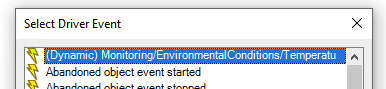
The issue occurs for all dynamic events we define. Both the GetEventProperties and the PullMessage responses look correct, and the device passes all corresponding tests in the ONVIF Test Tool as well. Non-dynamic events work as expected.
If the device uses HTTP port 80, the dynamic events work as expected and we get these log entries instead:
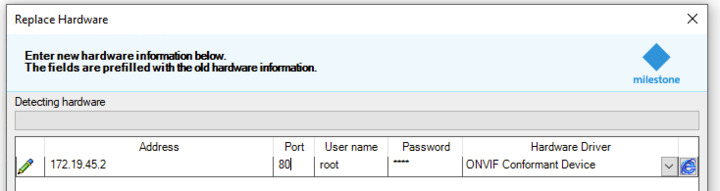
0225180 2024-01-29T11:02:01.437655+00:00 INFO 0x00003228@0x000017fc NmONVIFDevice::CmOnvifEventPolling::MatchDynamicEvent()@ONVIFEvent.cpp:1239	Event detected = DYNAMIC EVENT DETECTION [Monitoring/EnvironmentalConditions/Temperature] (ch=0, win=0, state=0) iEventIndex=53348, matchIndex=53348
0225181 2024-01-29T11:02:01.440669+00:00 INFO 0x00003228@0x000017fc NmGenericEvent::CmGenericEventPolling::SendAlertMessage()@GenericEventPolling.cpp:233	SendAlertMessage [172.19.45.2] event:732420189|3,

Could we get confirmation that this is indeed an issue? Is there any workaround?
Kind regards,
Fernando