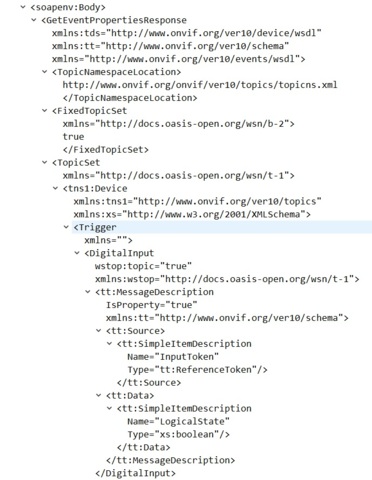
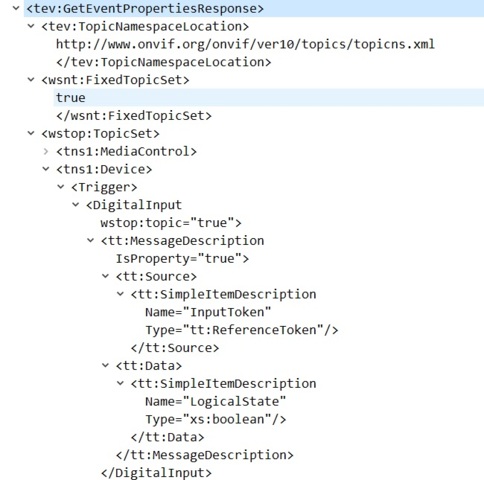
We are developing a BWC which supports ONVIF, and Milestone doesn’t detect the dynamic events.
Does XProtect expose dynamic events based on the GetEventProperties only?
I have a fixed camera where XProtect detects the dynamic events exposed by the camera and for testing, I send the same exact XML response, and in my case, XProtect doesn’t detect any dynamin events.
I attached our response for the GetEventProperties call.
Any help will be really appreciated.
Sylvain
Hello Sylvain,
I don’t know if you had a chance to see the Milestone Onvif document before, but I believe that this document will help you.
Please have a look at section Events and section Dynamic Events:
https://doc.milestonesys.com/latest/en-US/portal/htm/chapter-page-onvifdriver.htm?tocpath=Third-party%20integrations%7CONVIF%C2%AE%20drivers%7C_____0
If you have further questions please let us know.
Kind regards,
Magdalena
Hi Magdalena,
Yes, I follow all suggested implementation.
Is there a way to activate advanced logs in order to find the cause of the problem?
The documentation talk about GetEventProperties, I attached the response sent by our camera in this thread.
Do you see something wrong?
Is there another call that needs to be implemented with specific information to have access to the dynamic events?
Is there a way to debug this issue by activating advanced logs?
As I said before, I took the ONVIF response from another camera which works perfectly with XProtect for the dynamic events and send the same XML response from our camera and I still won’t be able to see the dynamic events.
Thanks for your help,
Sylvain
Hi Sylvain,
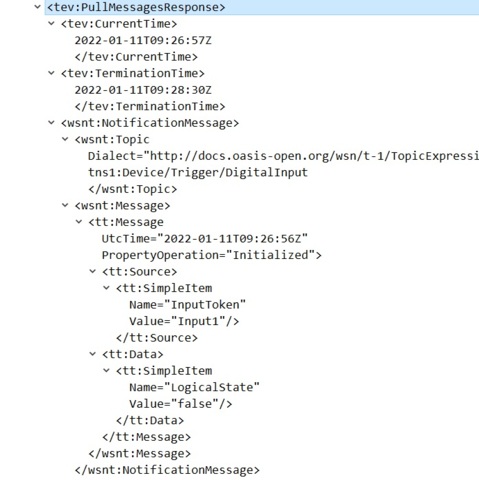
At first glance I don’t see anything wrong with GetEventProperties response that you sent. But we use the response only to get the list of events the device supports. As explained in documentation we check which of the events from the list is already supported and add as dynamic events only the rest of the events. There are also some limitation described. Then, when we receive the real event trough PullMessagesRespose we are trying to match with the description from GetEventProperties. There could be same differences that are preventing us from matching the event. To be able to help you we will need Wireshark trace. Start Wireshark capture, add the device in XProtect, configure event, activate the event on device then stop Wireshark capture save it and send it to us for investigation.
Kind regards,
Kalin Stoychev
Hi Kalin,
I attached a Wireshark capture by adding my camera to XProtect.
Thanks,
Sylvain
Hi Sylvain,
From Wireshark trace I see you are using firmware version that is not supported 10.7.1.2. I advise you to use the supported firmware version 10.4.0.9. Unfortunately dynamic events may not work even with the supported version because I noticed some items required by ONVIF standard are missing in camera responses which makes it very difficult do discover and match these events. We will notify the manufacturer of the device to fix these problems.
Hi Kalin,
I’m one of the developer of IONODES trying to solve this issue. The firmware version that you see is an engineering build trying to fix the issue.
So, don’t focus on 10.4.0.9. As far as I can see, this version doesn’t report correctly the event properties.
I fixed this issue in the engineering build.
Could you send me what is missing in our ONVIF response?
Thanks,
Sylvain
Hi Sylvian,
The main reason for the events not working is the missing of most of the namespaces required by standard. Not only in response of requests related to events but in all responses. Hera are example for events:
EventWithMissingNamespaces
EventWithAllNamespaces
PullEventWithMissingNamespaces
PullEventWithAllNamespaces
There are also other problems regarding the support of ONVIF. But it’s hard to see them before you fix these first. To find them and fix then you can refer to the core ONVIF specification.
https://www.onvif.org/specs/core/ONVIF-Core-Specification.pdf
Regards,
Kalin
Hi Kalin,
For the PullMessagesResponse, I think the namespaces are ok. The default namespace for the PullMessagesResponse is http://www.onvif.org/ver10/events/wsd.
PullMessagesResponse, CurrentTime and TerminationTime are under this namespace. After the default namespace for the NotificationMessage, Topic and Message is http://docs.oasis-open.org/wsn/b-2.
In my understanding, In XML, if you specify a default namespace, you don’t need to specify a prefix and all nodes with no prefix under this node will use the same namespace.
For the GetEventProperties, I fixed the namespaces and I still don’t have access to the dynamic events.
Is Milestone required to have the prefix for each node?
Thanks,
Sylvain
Hi Kalin,
By fixing all namespaces for the GetEventProperties, I was able to see the dynamic events. I fixed also the message namespaces as you specify.
I created a rule in Milestone to start recording on the tns1:RecordingHistory/Recording/State - IsRecording raising and stop recording if IsRecording is falling.
The rule is never triggered even though I receive the event (see the wireshark capture).
Your help is appreciate,
Thanks
Sylvain
Hi Sylvain,
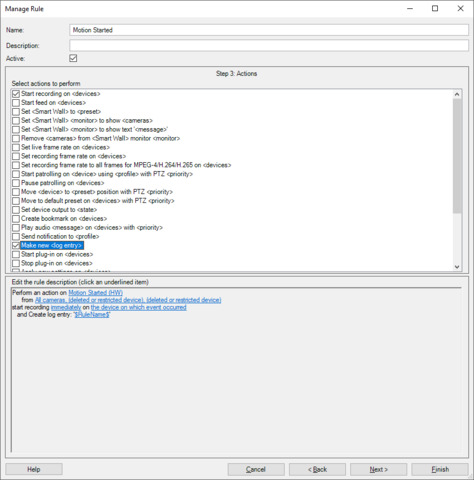
You will never see the event in server log if you don’t select “Make ne” in the rule as shown on the screen shot . If you do it as shown in logs you will see the name of the rule(Motion Started in this case) not the name of the event. You can configure to see the name of the event if you want.
If recording is not starting check recording tab on the camera settings. Event looks ok in Wireshark and should work.
Regards,
Kalin