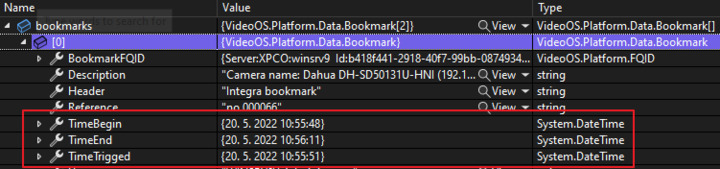
I have a bookmark and I want to play it. The bookmark has Start time, End time and Triggered time. I want to play video from this bookmark. I did not find any method like “GetBookmarkStream”. Is there any?
I wanted to implement workaround for not existing “GetBookmarkStream” via this code:
var videoParams = new VideoParams
{
	CameraId = cameraId,
	DestWidth = destinationWidth,
	DestHeight = destinationHeight,
	CompressionLvl = 83,
	FPS = 15,
	RequestSize = true,
	MethodType = StreamParamsHelper.MethodType.Push,
	SignalType = StreamParamsHelper.SignalType.Playback,
	KeyFramesOnly = false
};

var pbParams = new PlaybackParams()
{
	SeekType = PlaybackParamsHelper.SeekType.Time,
	TimeRangeBegin = new DateTime(637884517276151006, DateTimeKind.Utc),
	TimeRangeEnd = new DateTime(637884517576160995, DateTimeKind.Utc).Subtract(TimeSpan.FromSeconds(10)),
	Speed = 1
};

response = await connectionWrapper.Connection.Video.RequestStreamAsync(
	videoParams,
	pbParams,
	this.connectionTimeout).ConfigureAwait(false);
Here I use TimeRangeBegin and TimeRangeEnd where I put time from the bookmark. Method RequestStreamAsync ignores those range times. I’ve tried all of seek types and all of them ignores the range values.
When I use Time (without TimeRangeBegin and TimeRangeEnd) then I get the video from the specified time but end time is not applied.
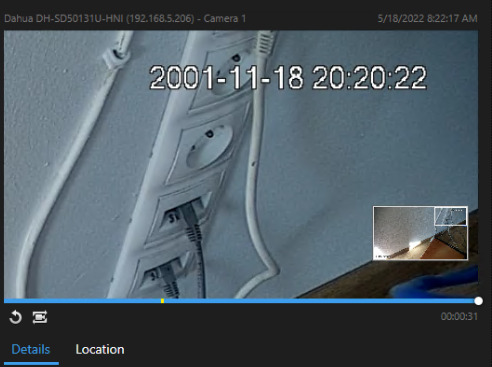
I need the same player like in Smart Client when you search for bookmarks (start time, end time, triggered time marked on the timeline):
My questions are:
- how can I get video playback of bookmark?
- how can I get video playback of specific time range?
For both I need StreamId to play it via Websocket in Angular client as I do it for live stream via the same code above with StreamParamsHelper.SignalType.Live .