A couple of years ago I developed a plugin that opens a camera playback in a Floating Window at a specific date/time using PlaybackCommandData.
It worked fine with several revisions but with the 2023R1, whatever the date and whatever the time, it always opens playback at the end of the recordings.
Do you have an idea what it could be?
Thank you,
Frediano
We would like to see if we can reproduce at Milestone. Can you please share the plugin source code? Maybe we need just a snippet to tell us how to reproduce. You can open a support case with us at Milestone Support if you do not want to share source code in the public forum, then you can perhaps more of the plugin project so that we get it reproduced easily..
Hi Bo,
here is the code used:
                    Item view = tempGroupItem.GetChildren().Find(Field => Field.Name.Equals(viewName));
                    if (view == null) return;

                    // Predisposizione Dati Finestra
                    data.Window = windows[0].FQID;
                    data.View = view.FQID;
                    view.Name = viewName;
                    data.X = X + _posX;
                    data.Y = Y + _posY;
                    data.Width = floatingWindowWidth;
                    data.Height = floatingWindowsHeight;
                    data.MultiWindowCommand = MultiWindowCommand.OpenFloatingWindow;
                    data.PlaybackSupportedInFloatingWindow = command.Equals(MessageData.CommandType.OpenPlaybackWindow);

                    // Richiedi Apertura della Floating Windows
                    // ------------------------------------------------------------------------
                    // Qui bisogna usare il Delegato che opera sul Thread della GUI per evitare
                    // conflitti di accesso dal Thread di background
                    // ------------------------------------------------------------------------
                    Collection<object> resultCollection = null;
                    ClientControl.Instance.CallOnUiThread(() =>
                    {
                        // resultCollection[0] dovrebbe essere il FQID della Floating Windows
                        resultCollection = EnvironmentManager.Instance.SendMessage(new Message(MessageId.SmartClient.MultiWindowCommand, data), null, null);
                    });

                    if (command == MessageData.CommandType.OpenPlaybackWindow)
                    {
                        // Il Messaggio richiede il Playback delle Registrazioni
                        if (resultCollection != null && resultCollection.Count > 0 && resultCollection[0].GetType().Equals(typeof(FQID)))
                        {
                            // Assegna al Cursore Temporale della Finestra la Data/Ora dell'Allarme
                            PlaybackCommandData playbackCommandData = new PlaybackCommandData()
                            {
                                Command  = PlaybackData.Goto,
                                DateTime = timestamp,
                                Speed    = 0
                            };
                            EnvironmentManager.Instance.PostMessage(new Message(MessageId.SmartClient.PlaybackCommand, playbackCommandData), (FQID)resultCollection[0], null);

                            // Attiva il Workspace di Registrazione
                            EnvironmentManager.Instance.PostMessage(new Message(MessageId.SmartClient.ChangeModeCommand, Mode.ClientPlayback), (FQID)resultCollection[0], null);
                        }
                    }
Many Thanks,
Frediano
Milestone Development have developed a fix!
The fix is part of the Smart Client patch installer for Smart Client 2023R1 - https://supportcommunity.milestonesys.com/KBRedir?art=000051001&lang=en_US
I have tested the hot-fix, now it is working fine
Frediano
The solution worked with both the 2023R1 and R2, but with the 2023R3 there is the same problem: GoTo does NOT work and the time cursor is positioned at the end of the recordings.
I have reported this to Milestone Development. Thank you for reporting this.
This issue has been hanging in our system at Milestone Support due to a mistake on my part.
The status is that we cannot reproduce the issue, the repro code I had made the first time is lost, and new attempts to reproduce has been unsuccessful. We have no other option than to now ask you for code that will allow us to reproduce the issue. Can you please give us a plugin with code that allows us to reproduce?
Bo, following code id from a plugin called AlarmWindows, You can see from attachment from how many year it was working fine.
Many Thanks,
Frediano
                                Collection<object> resultCollection = null;
                                ClientControl.Instance.CallOnUiThread(() =>
                                {
                                    resultCollection = EnvironmentManager.Instance.SendMessage(new Message(MessageId.SmartClient.MultiWindowCommand, data), null, null);

                                    // result[0] dovrebbe essere il FQID della Floating Windows
                                    if (resultCollection != null && resultCollection.Count > 0 && resultCollection[0].GetType().Equals(typeof(FQID)))
                                    {
                                        // Assegna al Cursore Temporale della Finestra la Data/Ora dell'Allarme
                                        PlaybackCommandData playbackCommandData = new PlaybackCommandData()
                                        {
                                            Command = PlaybackData.Goto,
                                            DateTime = newAlarm.StartTime  //.AddSeconds(-3)
                                        };
                                        EnvironmentManager.Instance.PostMessage(new Message(MessageId.SmartClient.PlaybackCommand, playbackCommandData), (FQID)resultCollection[0], null);

                                        // Attiva il Workspace di Registrazione
                                        EnvironmentManager.Instance.PostMessage(new Message(MessageId.SmartClient.ChangeModeCommand, Mode.ClientPlayback), (FQID)resultCollection[0], null);
                                    }
                                });
sorry, missing attachment
I think you have sent the same information again, which was what we used when we failed in reproducing the issue. Can you make a plugin and give us the source code so that we can directly debug on your plugin? Best if you extract only the minimum implementation, but we might also be able to debug in your production plugin. I can make a support case so that you can upload source code without sharing it in this public forum. Please give me an indication how you prefer to do this.
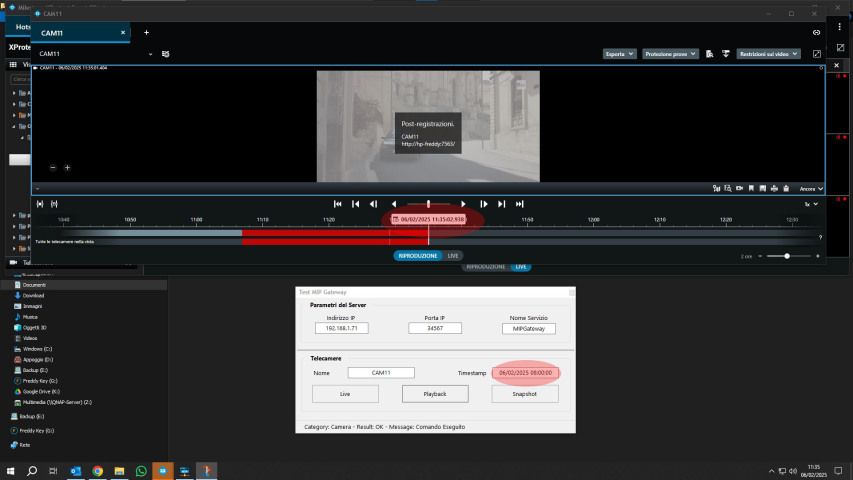
Bo, attached you will find the source code of a ‘particular’ plugin, it is a simple listener able to receive and execute 3 commands: Live, Playback and Snapshot. There is also a small test program for sending these commands.
Many Thanks,
Frediano
I successfully downloaded and unpacked the file. I will now try to run and observe.
I don’t have it working. I load the plugin in my Smart Client and confirm that it is loaded in the Help About dialog. I run the Test.exe, update the local IP (run everything in the same PC), put in the name of a test camera. When I use any of the three buttons I get “Exception: An error occurred while sending the request.” I must be doing something wrong, I have a feeling it might be something simple. Please describe how to use the plugin and test.
(Log: No connection could be made because the target machine actively refused it [IP]:34567)
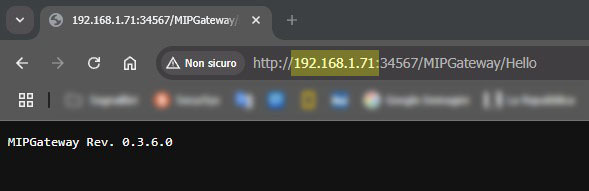
To make sure the listener is active type the image string, the plugin must respond to you.
Of course you must have restarted ES and loaded SC.
Many Thanks,
Frediano
In my browser I get ERR_CONNECTION_REFUSED
Any idea why I cannot use your plugin and test app?
Before to use Test app you need to start SC, with plugin, in order to perform commands.
This is what I am doing. Yet I still get ERR_CONNECTION_REFUSED.