In Tile.xaml I have a grid
       <Grid Name="Tile\_Grid" Background="DodgerBlue">

       </Grid>
In Tile.cs I add the ImageViewerWpfControl
imageViewerControl = new ImageViewerWpfControl();
Tile\_Grid.Children.Add(imageViewerControl);
also call
private void SetupControls()
   {

       imageViewerControl.Disconnect();

       imageViewerControl.EnableVisibleHeader = true;

       imageViewerControl.EnableVisibleCameraName = true;

       imageViewerControl.EnableVisibleLiveIndicator = true;

       if (\_playbackFQID == null)

       {

           \_playbackFQID = ClientControl.Instance.GeneratePlaybackController();

       }

   }
Now I call this Tile from MainWindow
for (int i = 0; i < tile.Length; i++)
       {

           tile\[i\] = new Tile();

           Display.Children.Add(tile\[i\]);

       }
public void PlayMTile(Guid camGuid, int type)
{
case 1: //Live
                   imageViewerControl.StartLive();

                   EnvironmentManager.Instance.SendMessage(new VideoOS.Platform.Messaging.Message(

                                          VideoOS.Platform.Messaging.MessageId.System.ModeChangeCommand,

                                          VideoOS.Platform.Mode.ClientLive));
case 2: //Playback
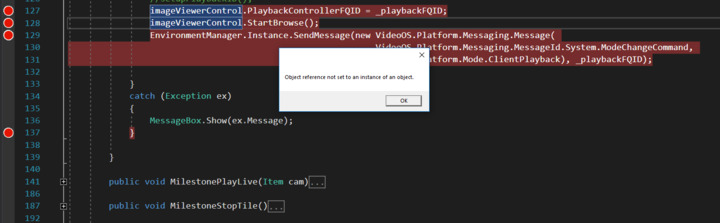
                       imageViewerControl.StartBrowse();

                       EnvironmentManager.Instance.SendMessage(new VideoOS.Platform.Messaging.Message(

                                                                   VideoOS.Platform.Messaging.MessageId.System.ModeChangeCommand,

                                                                   VideoOS.Platform.Mode.ClientPlayback), \_playbackFQID);
}
I do Milestone Login stuff in MainWindow Once Logged In I call Play function of user control
tile.PlayMTile(myCamGuid, 1); The LiveMode works just fine.
tile.PlayMTile(myCamGuid, 2); But facing fallowing bug for PlaybackControllerFQID in Playback Mode