Hello.
I want to display some workspaces on multi display at logon time.
I want to achieve something like that in Figure 1.
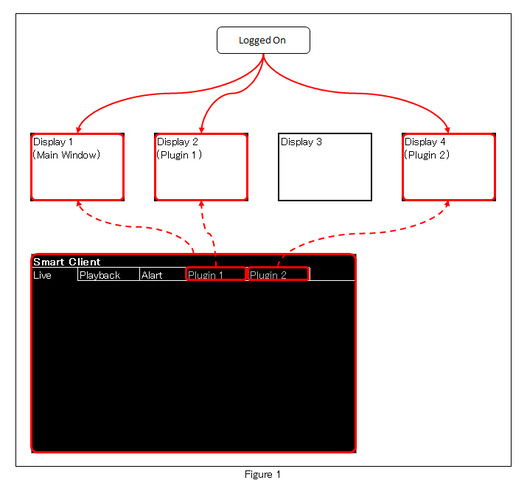
I found that we need to receive ApplicationLoggedOnIndication to embed processing at logon.
I also found out that using Multi Window Command can display floating windows.
I did not understand the following.
· How to display floating window on arbitrary display
· How to display the floating window in full screen
The contents of MultiWindowCommandData specified for full screen display are as follows.
· MultiWindowCommand: Set “MultiWindowCommand.OpenFullScreenWindow”
· View: Set the FQID of the item acquired based on “ClientControl.Instance#GetViewGroupItems()”
· Window: Set the FQID of the first item obtained from “Configuration.Instance#GetItemsByKind(Kind.Window)”
· Screen: Set the FQID of an arbitrary item obtained from “Configuration.Instance#GetItemsByKind(Kind.Screen)”
· X, Y, Width, Height: Not set
· Send MultiWindowCommand using “EnvironmentManager.Instance#SendMessage()”
Thank you.